
Fireflies.ai Review for 2025: Why This AI Teammate Is Changing How Teams Run Meetings


1-Minute Summary — What Is Fireflies.ai and Who Is It For?
What Is Fireflies.ai?
Have you ever left a series of back-to-back meetings feeling like you understood the action items—only to realize the next day that you’re no longer sure who agreed to do what?
Fireflies.ai is not just a meeting assistant.
It is an AI teammate that joins your meetings as part of the team. Fireflies automatically attends scheduled calls, listens with context, records conversations, converts speech into searchable text, and organizes key points, decisions, and action items. There’s no need to take notes or rewatch long recordings—your meetings instantly become usable knowledge.
In 2025, Fireflies took a major step forward. Through a partnership with the AI search engine Perplexity, it can now bring the latest web knowledge directly into meetings and deliver real-time, context-aware answers. At the same time, Fireflies expanded its capabilities with 200+ agent-style AI apps, evolving from a tool that summarizes meetings into an AI teammate that helps turn conversations into action.
Driven by this evolution, Fireflies has grown into a $1B+ unicorn company. Today, it is used by over 500,000 organizations, including 75% of the Fortune 500, and supports approximately 20 million users worldwide.
Quick Verdict — Who Fireflies.ai Is Best For in 2025
In 2025, makes the biggest difference for people who actually spend a lot of time in meetings. Real-world use cases where it really shines include:
Global teams with lots of English discussions, especially if you’re juggling time zones, clients, and follow-ups.
Sales and customer success teams — those who need quick takeaways and action items the second the call ends.
Remote or hybrid workplaces where keeping everyone aligned is hard without a single source of truth.
Busy managers and founders who’d rather focus on decisions than on notetaking during meetings.
If you’re in a world where audio matters more than text, or you wish you could remember that one detail from last week’s call, Fireflies proves its worth fast.
How Fireflies.ai Works — From AI Notetaker Bot to Meeting Intelligence
What makes Fireflies.ai stand out in a crowded field of AI meeting tools isn’t just that it records meetings — it’s how boldly the product keeps evolving. While many tools remain focused on transcription and post-meeting summaries, Fireflies is steadily pushing toward something more ambitious: an AI teammate that actively participates in meetings and helps teams move faster from discussion to execution.
This section breaks down how Fireflies works under the hood — and where it goes beyond the traditional “AI notetaker” model with real-time intelligence, voice interaction, and agent-style AI apps.
From “AI Notetaker” Bot to Full Meeting Intelligence Platform
Fireflies.ai starts with something deceptively simple: a bot that can join a meeting like a human participant and capture what everyone says. But that’s only the foundation.
Here’s how the core workflow unfolds:
The Fireflies bot joins meetings automatically based on calendar rules, or by being invited as a participant
Conversations are recorded across supported platforms such as Zoom, Google Meet, Microsoft Teams, Webex, and more
Real-time transcription converts spoken language into searchable text as the meeting happensAfter the meeting, AI transforms the transcript into structured summaries with highlights, decisions, action items, and key themes
All meeting data becomes searchable across your entire history, forming a team-wide knowledge base
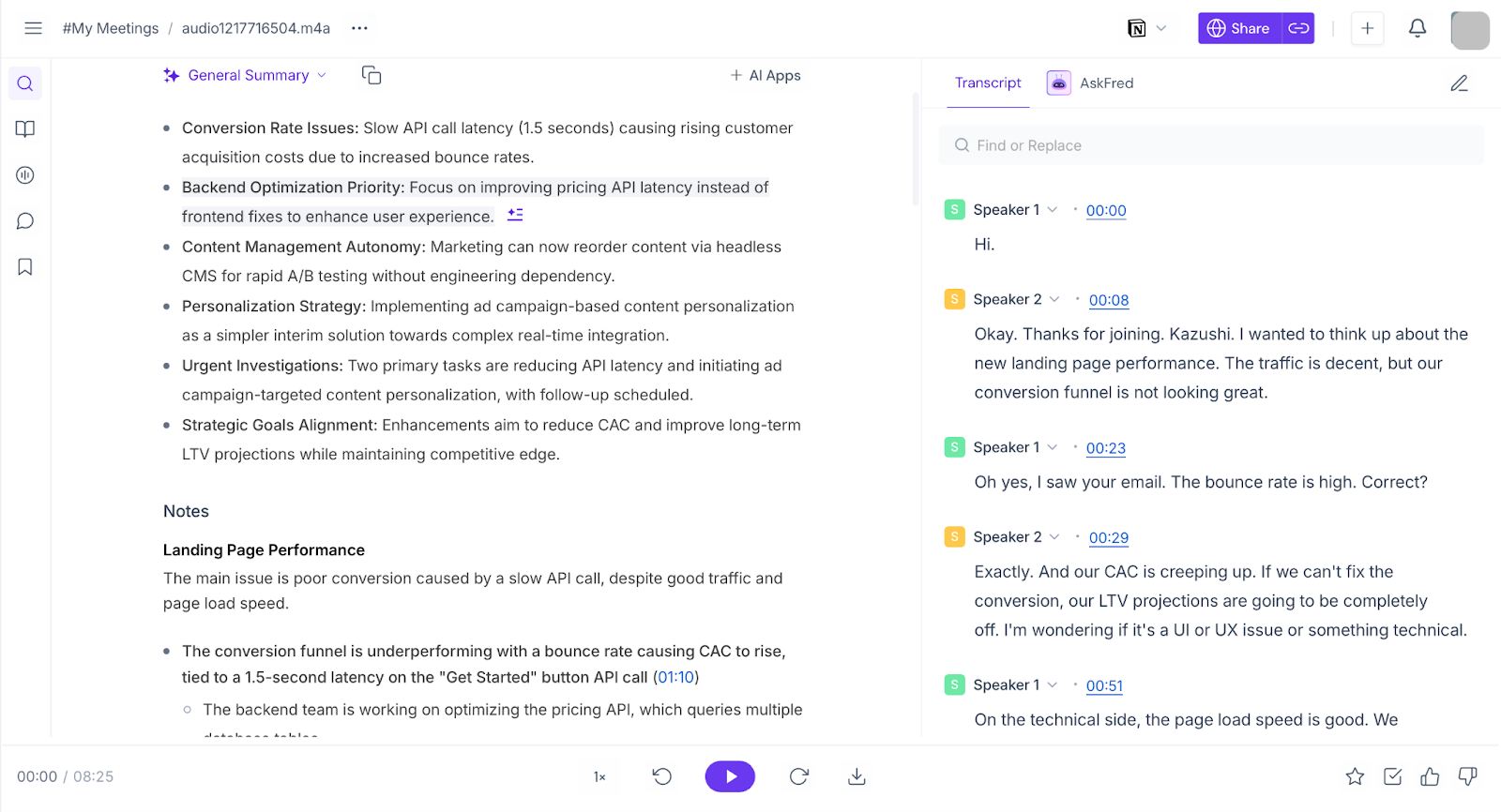
This familiar “record → transcribe → summarize → search” flow is what turns raw conversations into usable information. What sets Fireflies apart is what happens next: instead of stopping at summaries, the platform lets you interact with meetings as data, asking questions and extracting insights whenever you need them.
Supported Platforms and Workflows (Zoom, Meet, Teams, Dialers, Mobile)
One of Fireflies’ strengths is that it doesn’t force you to change how you meet — it works with what you already use.
Here’s how it blends into your calendar:
Zoom — Invite Fireflies to join like any other attendee, or use automated calendar joining.
Google Meet — Capture meetings via bot participation or a browser extension.
Microsoft Teams — Supported for recording, transcription, and post-meeting insights.
Dialers & uploads — Record phone calls and meetings from other sources and upload audio for transcription.
Mobile devices — Record in-person conversations or hybrid discussions on the go.
Whether you’re hopping between apps or mixing remote and in-person meetings, Fireflies tries to make capturing every voice easier.
Ask Fred (Real-Time) — In-Meeting AI Query Interface
Ask Fred (real-time) is Fireflies’ in-meeting AI interface that allows participants to ask questions while a meeting is still in progress.
During a live call, users can type questions such as:
- “What has been discussed so far?”
- “Which action items have been mentioned?”
- “Who was assigned this task?”
Ask Fred generates responses based on:
- The transcript of the current meeting up to that point
- Relevant past meetings stored in the Fireflies workspace (depending on permissions)
Responses appear in chat and are generated without pausing or rewinding the meeting. Ask Fred does not intervene automatically; it only responds when explicitly prompted by a user.
At a functional level, Ask Fred acts as a real-time query layer on top of live transcription and historical meeting data.
Hey Fireflies — Voice-Based AI for Live Meetings
Hey Fireflies is Fireflies’ voice-based interface designed for use during live meetings.
During a meeting, participants can activate the feature by saying “Hey Fireflies” and issue voice commands without switching screens or typing. Supported requests include asking for a summary of the discussion so far, requesting explanations of terms mentioned in the meeting, or retrieving related information.
When a request is made, Fireflies returns responses in two formats: an audible spoken response during the meeting and a written response in the meeting chat for later reference.
Hey Fireflies processes requests using the context of the ongoing meeting. Rather than treating each prompt independently, it interprets commands based on what has already been discussed and can reference earlier parts of the same meeting. If a topic has not yet been resolved, the system may indicate that the discussion is still in progress or suggest reviewing prior context.
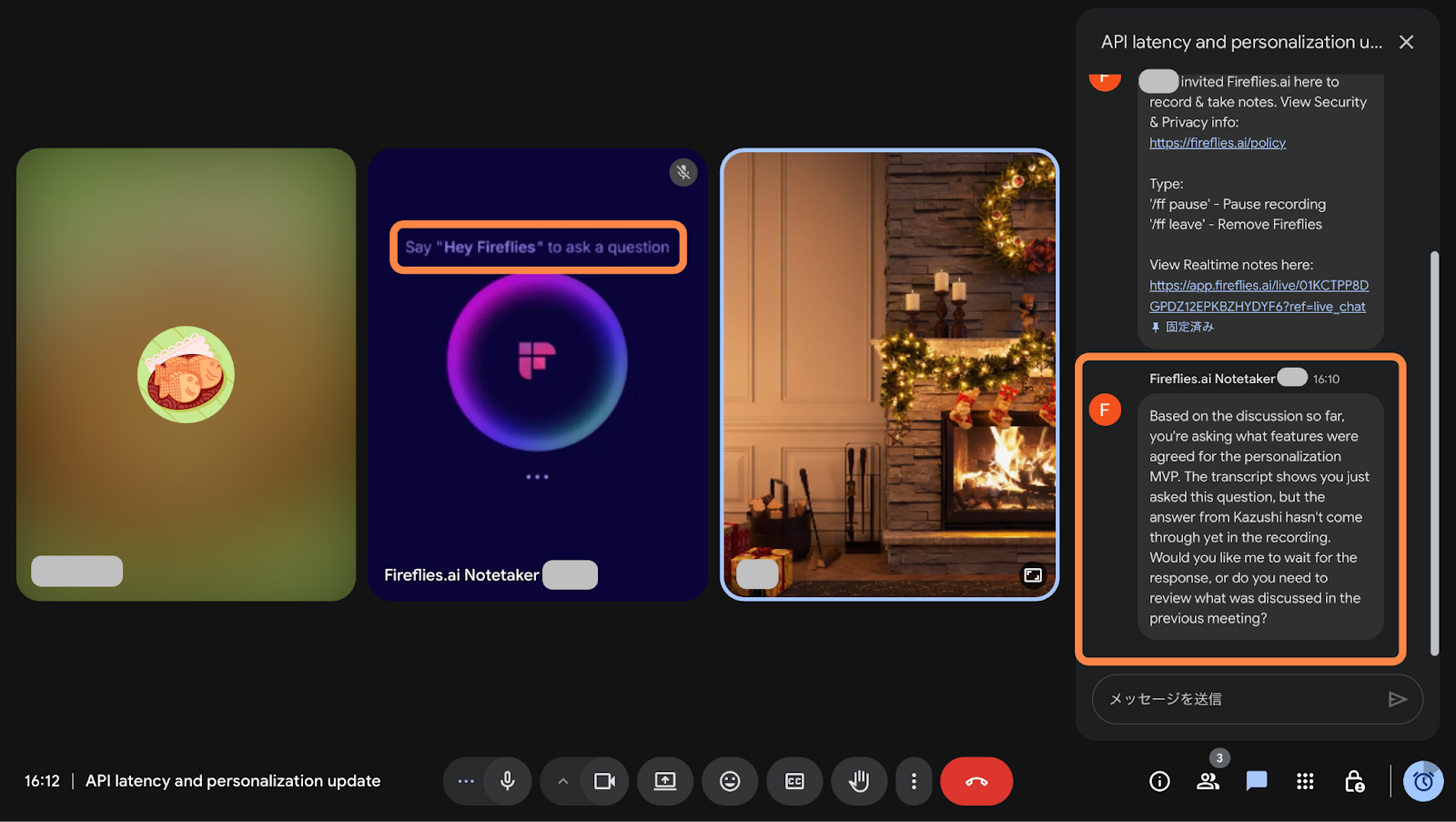
Fireflies is integrated with Perplexity, allowing Hey Fireflies to incorporate up-to-date web information into responses when relevant, combining live meeting context with external knowledge.
Fireflies AI Apps — From Meeting Notes to Execution
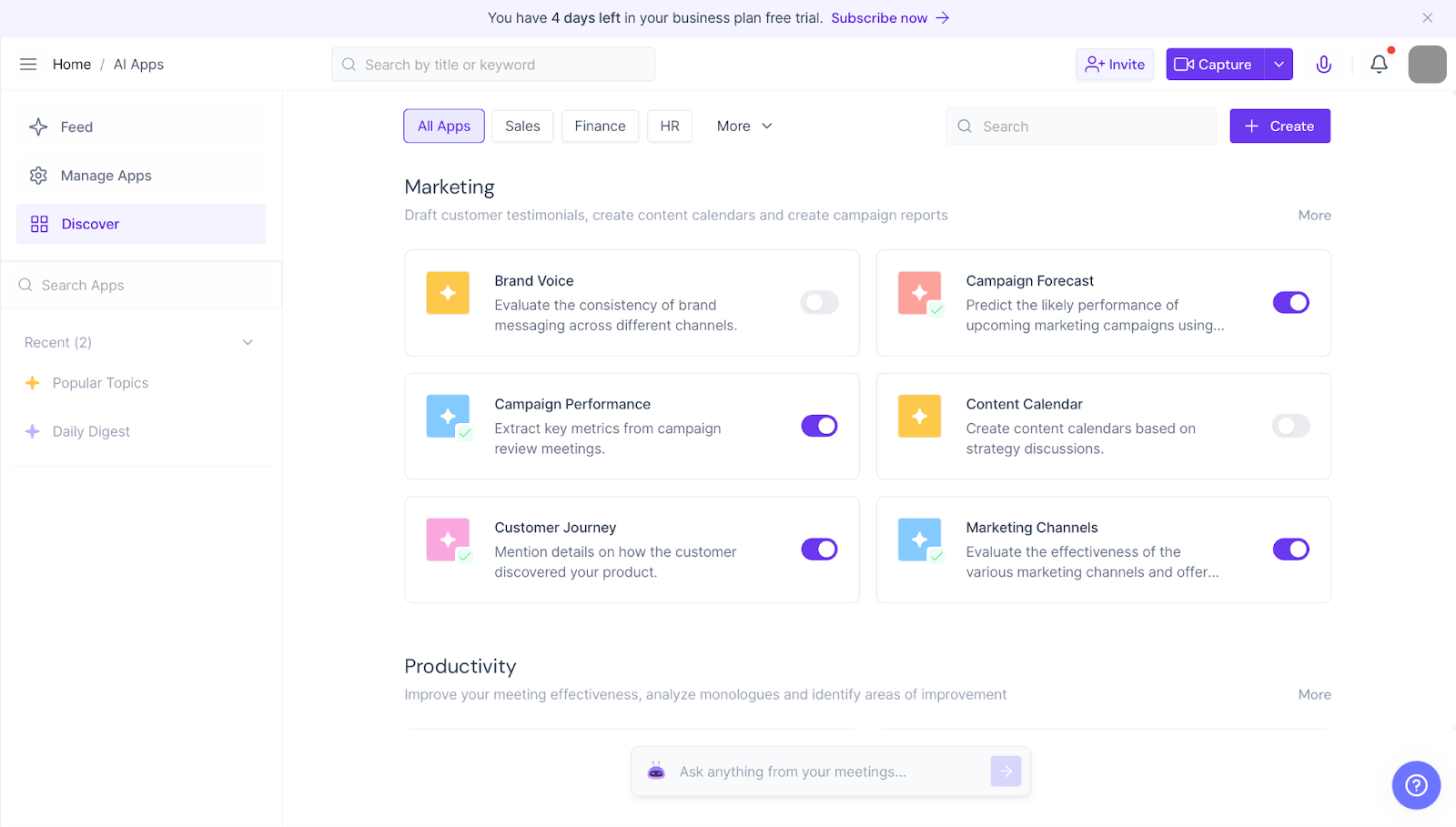
Fireflies AI Apps reflect a longer-term vision: treating meeting data as a reusable organizational asset rather than isolated notes.
Features like Popular Topics surface recurring themes — such as productivity, pricing, or hiring — across multiple meetings. For teams with a high volume of discussions spread across departments, this makes it easier to spot patterns, blind spots, and recurring issues without manually reviewing transcripts.
That said, the value of AI Apps depends heavily on team maturity. Teams that already run many meetings and regularly act on decisions will see clearer benefits. Smaller teams or early-stage startups may find these insights interesting, but not yet essential.
In other words, AI Apps are powerful — but they shine most once meeting data reaches a certain scale.
Core Building Blocks — Transcript, AI Summary, AskFred, Search & Share
Fireflies’ feature stack feels like a Swiss Army knife compared with simple audio recorders. Here’s what really matters:
Transcripts: Word-for-word records with speaker labels and timestamps — perfect for revisiting “who said what.”
AI Summaries: Not just a wall of text, but key takeaways and action items delivered without effort.
AskFred: A built-in AI assistant that answers questions about your meeting content — for example: “What were the next steps we agreed on?” — without manual searching.
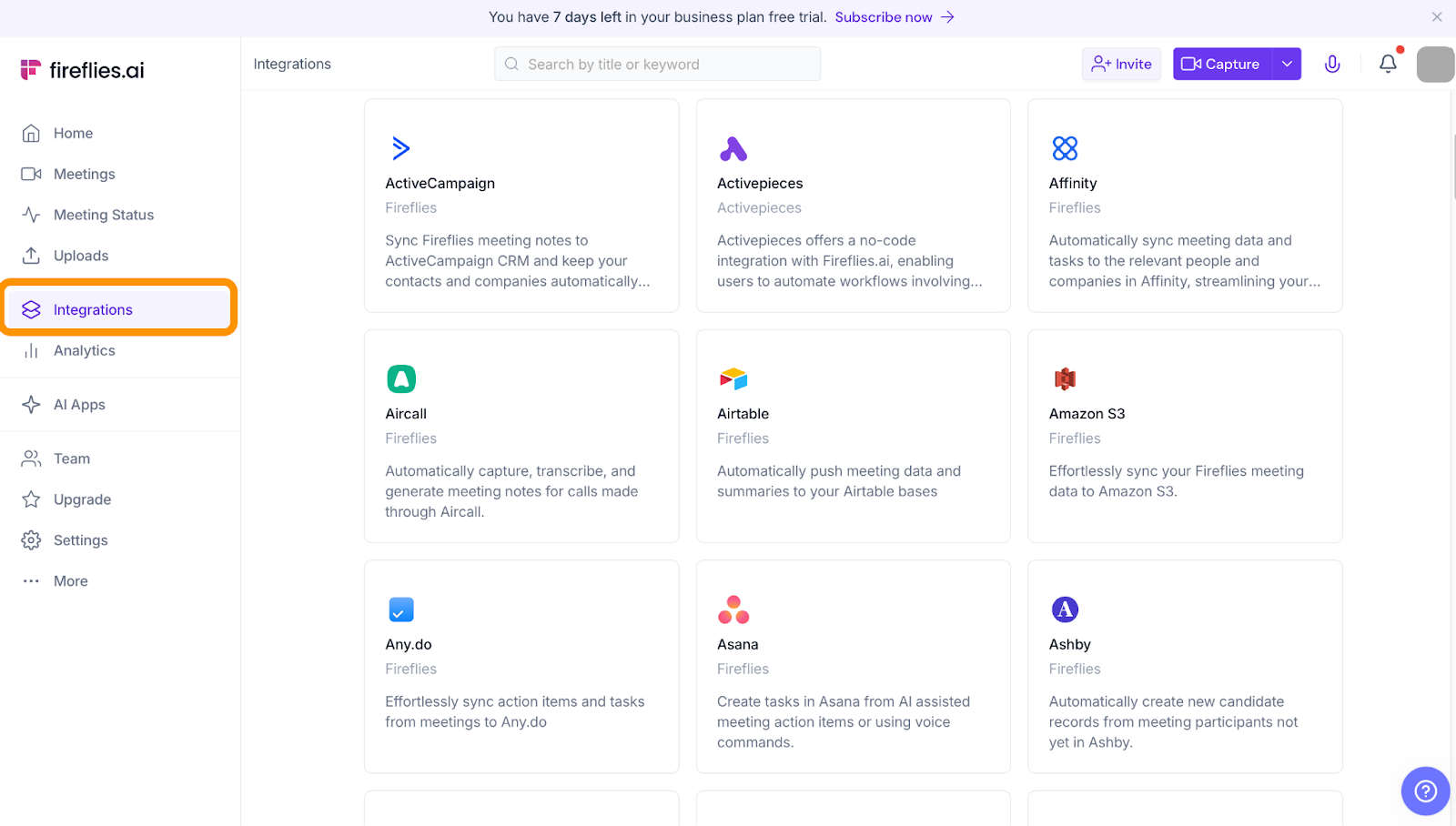
Search & Share: Full-text search across your meeting library, plus the ability to share snippets or export to tools like Slack, Notion, or CRM systems.
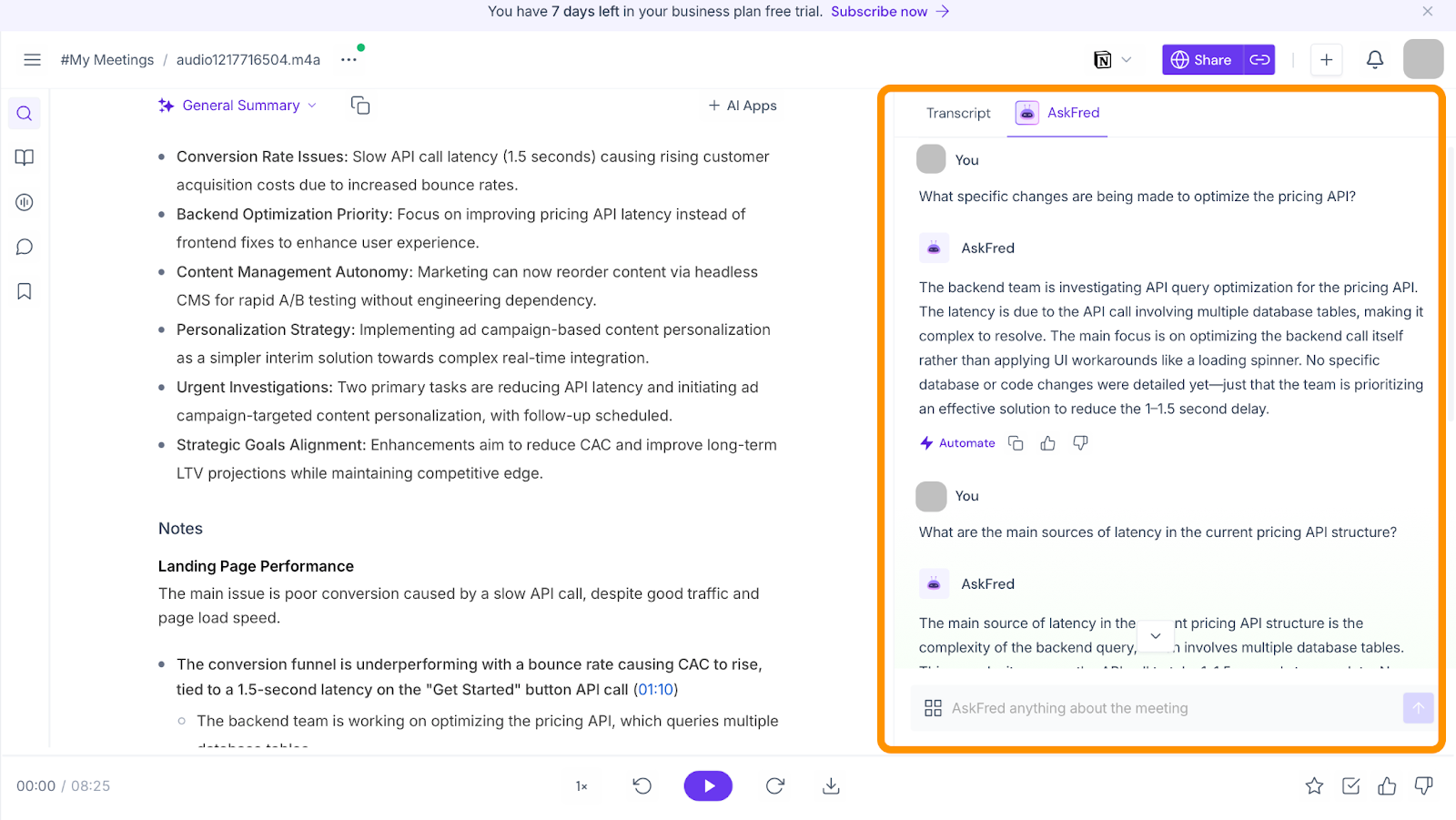
Fireflies tries to turn meetings into a knowledge base, where every discussion becomes searchable and actionable across your team.
What We Learned by Actually Using Fireflies’ New Features — Who the “AI Teammate” Really Helps
Fireflies increasingly positions itself not as a traditional AI notetaker, but as an “AI teammate” that actively supports how teams run meetings. To see how well that idea holds up in real work, we tested its newest capabilities — Ask Fred (real-time), Hey Fireflies, and Fireflies AI Apps — during actual meetings.
Ask Fred (Real-Time) — Powerful as a “Memory Layer” for Ongoing Decisions
Ask Fred (real-time) proved most valuable in meetings where context builds over time and decisions carry over across sessions.
During one discussion, we asked mid-meeting: “What were the action items we agreed on in the previous meeting?” Ask Fred immediately returned a structured response summarizing the relevant tasks and owners based on earlier conversations. This went beyond simple transcript search — it felt like the AI understood the history of the discussion and its implications.
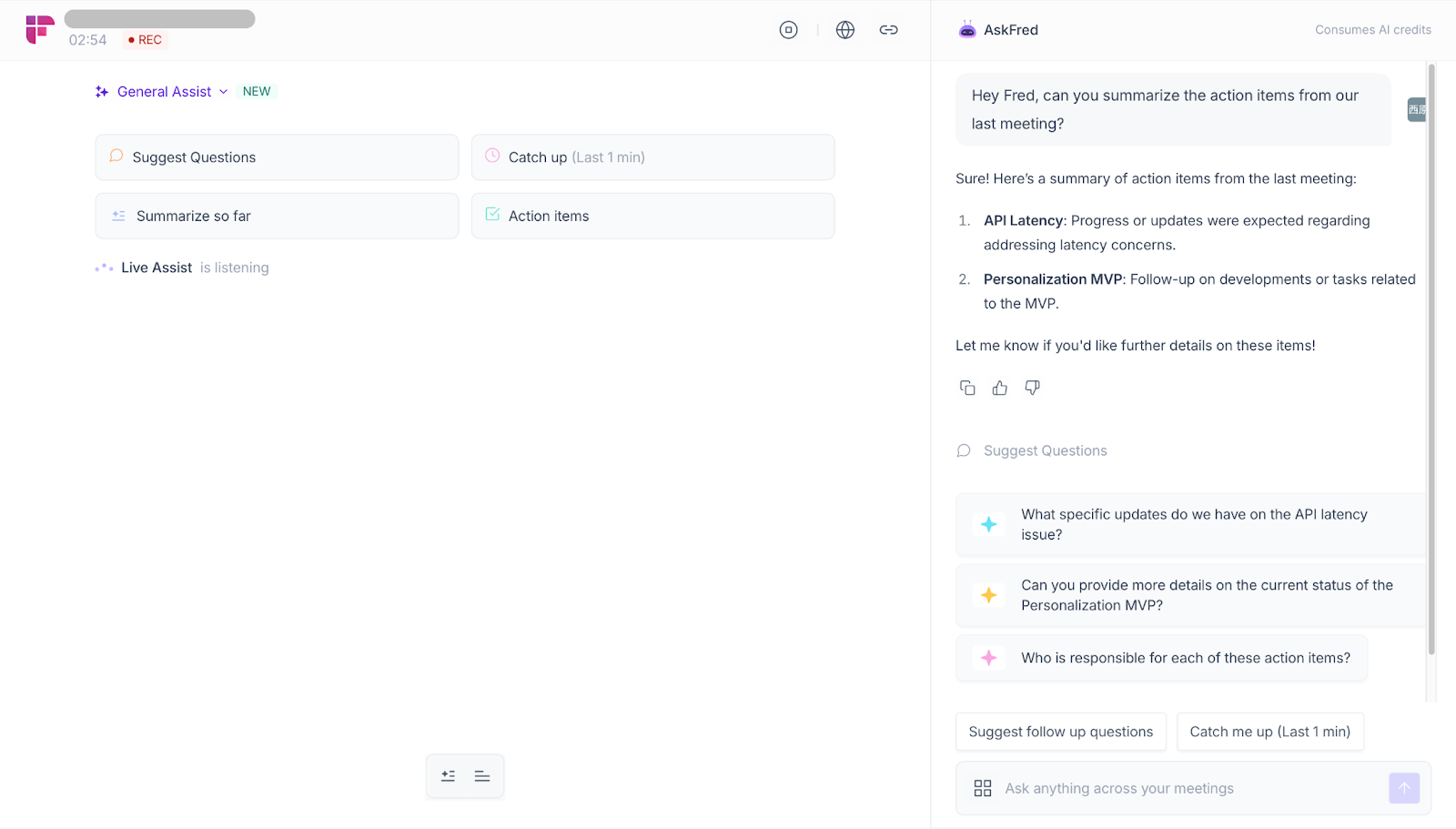
For project managers, product leads, and managers moving between multiple meetings, this “memory layer” can significantly reduce cognitive load. It helps prevent decisions from getting lost and allows late joiners to catch up without interrupting the flow.
That said, in short, tightly structured meetings — such as daily standups with fixed agendas — Ask Fred may feel excessive. Its value scales with meeting complexity, not meeting frequency.
Hey Fireflies — A New Way to Interact With Meetings, But Not for Every Style
Hey Fireflies introduces a different interaction model: talking to your meeting AI by voice while the meeting is happening.
By saying “Hey Fireflies,” participants can ask for summaries, clarifications, or related information without touching the keyboard. Fireflies responds both audibly and in chat, which makes it easy to follow the answer in real time and reference it later.
In our demo meeting, we first focused on making a clear decision around a key issue, such as the direction of the MVP personalization approach.
After that, during the middle and later parts of the meeting, we intentionally allowed the conversation to drift, introducing side comments, follow-up ideas, and tangential questions so that the discussion became less structured.
As a result, we created a situation where the decision itself had been made, but the surrounding conversation made it harder to keep track of the conclusion.
At that point, we invoked Hey Fireflies and asked a simple question:
“So what did we actually decide?”
Fireflies responded by organizing the discussion, clearly separating confirmed decisions from ideas that were discussed but not finalized.
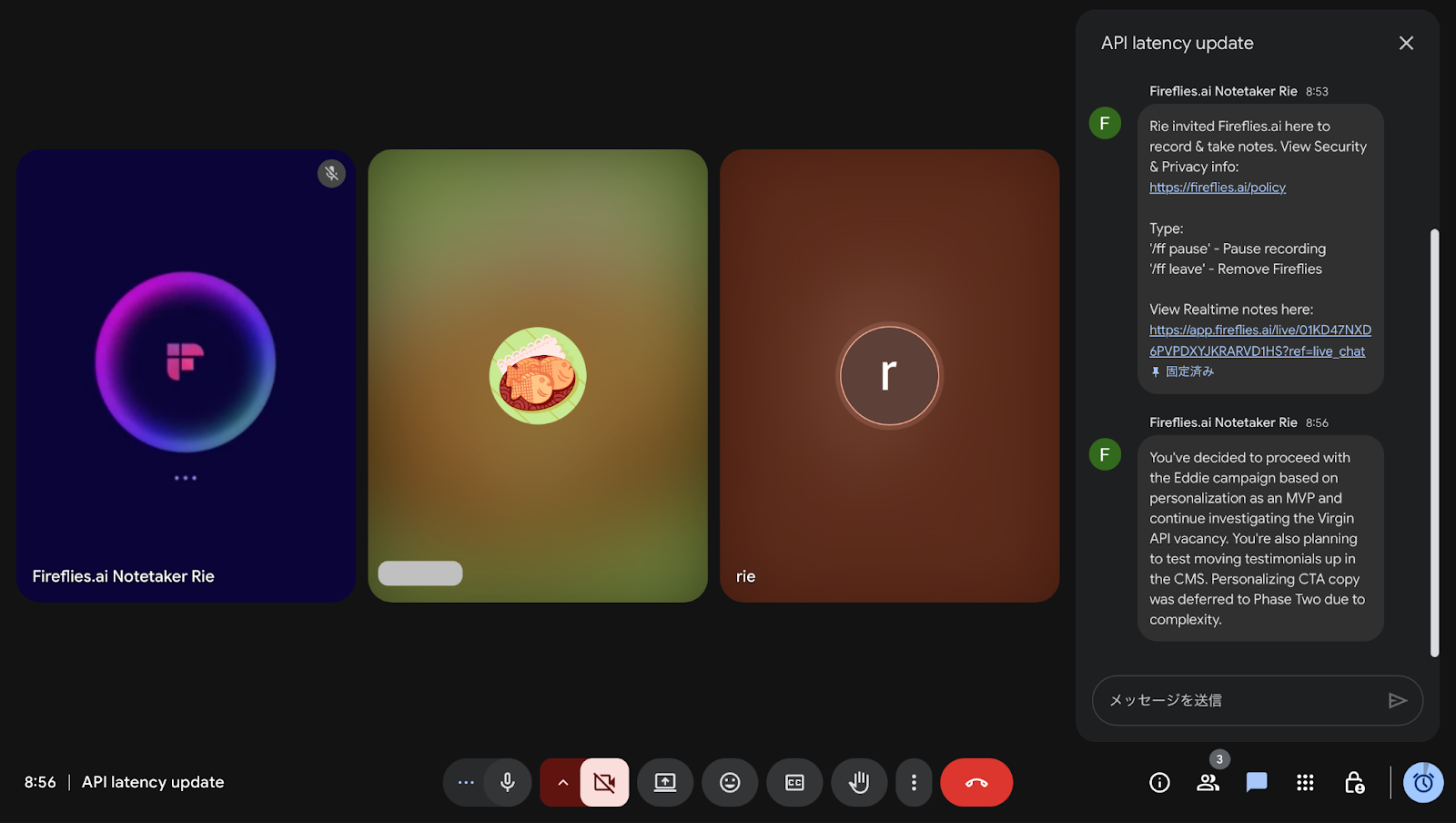
This experience suggests that Hey Fireflies is less about supporting “lively” discussions and more about helping teams recover clarity when conversations naturally drift over time, acting as a thinking aid in meetings where context accumulates and structure gradually erodes.
However, this approach doesn’t fit every meeting culture. In highly formal meetings, or in settings where interruptions are discouraged, voice-based interaction can feel awkward. Hey Fireflies works best in open, conversational environments, and less so in rigid, presentation-driven calls.
Fireflies AI Apps — High Potential for Mature Teams, Optional for Smaller Ones
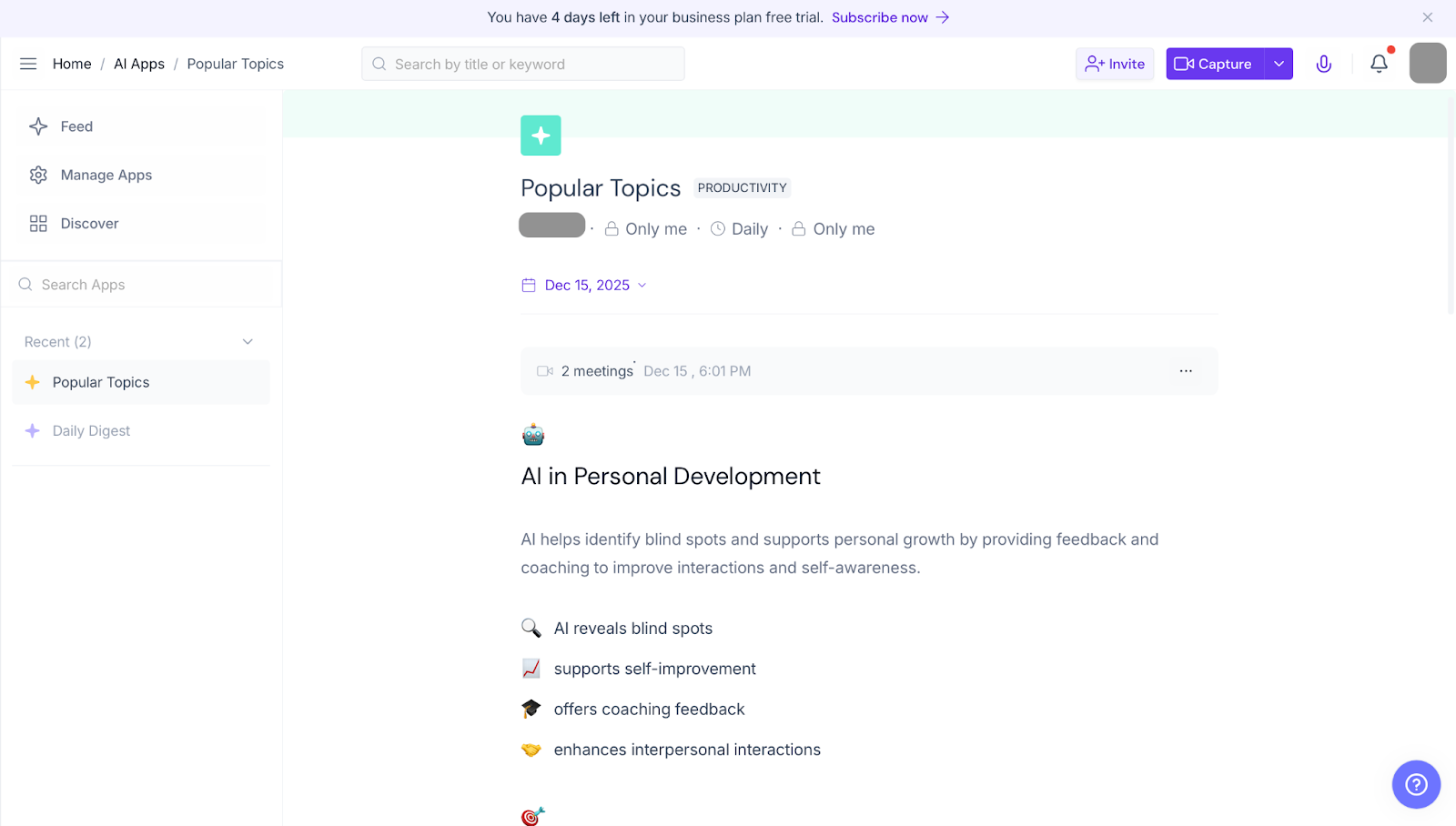
For example, Popular Topics surfaces the themes that appear most frequently across your recent meetings. Instead of looking at each conversation in isolation, Fireflies analyzes your meeting history to identify recurring topics, patterns, and focus areas discussed by your team.
For example, topics like Productivity, Pricing, Hiring, or Customer Feedback may appear once enough meetings are recorded. Each topic acts as an AI-driven lens that groups relevant discussions together, making it easier to understand what your team spends time talking about and where attention is consistently directed.
New users may see this section empty at first. Popular Topics become available only after Fireflies has enough meeting data to detect meaningful patterns.
In practice, teams use Popular Topics to:
Quickly review conversations related to a specific theme
Identify repeated issues or bottlenecks across meetings
Track how often decisions or action items appear within a topic
Reflect on whether meeting time is being spent productively
Rather than reading transcripts one by one, Popular Topics helps teams step back and see the bigger picture of their conversations — turning meeting history into actionable insight.
The Bottom Line — Which Teams the “AI Teammate” Fits (and Which It Doesn’t)
After hands-on testing, the “AI teammate” concept makes the most sense for:
Teams with frequent, overlapping meetings
Managers and leads who need continuity across discussions
Remote or hybrid teams struggling with alignment
Organizations where meetings drive real decisions, not just updates
On the other hand, Fireflies may feel like overkill for individuals who attend few meetings, or teams whose meetings are highly scripted and purely informational.
Ultimately, Fireflies’ newest features are less about automating notes and more about supporting thinking during meetings. Whether that feels transformative or unnecessary depends on how central meetings are to your daily work.
Fireflies.ai Pricing in 2025 — Free vs Pro vs Business vs Enterprise
Fireflies.ai is an AI notetaker that automates core meeting tasks — from audio transcription to AI-generated summaries and action item extraction. It offers a tiered pricing structure with four plans designed to support everyone from individual users to large teams.
Plan Overview — Free, Pro, Business, and Enterprise
Fireflies.ai offers four distinct pricing tiers designed to match different users and team sizes — from individuals who want a taste of automation to enterprise groups requiring compliance and advanced controls.
Free — Completely free entry tier so you can try AI notetaking with no risk.
Pro — Popular plan for individuals and small teams who want unlimited transcription and AI summaries.
Business — Adds collaboration tools, analytics, and expanded storage for active teams.
Enterprise — Large organizations with security, compliance needs, and dedicated support.
Plan | Price (Annual Billing) | Price (Monthly Billing) |
Free | $0 / user / month | $0 / user / month |
Pro | $10 / user / month (billed annually) | ~$18 / user / month (month-to-month) |
Business | $19 / user / month (billed annually) | ~$29 / user / month (month-to-month) |
Enterprise | $39 / user / month (billed annually) | Custom / contact sales |
What You Actually Get on the Free Plan
The Free tier offers a surprisingly generous set of features if you want to test Fireflies.ai without spending any money: the AI notetaker can join meetings, record audio, transcribe text, and provide basic summaries. You also get limited access to Fireflies’ search tools and AI-powered tools like the AskFred chat assistant.
Up to 800 minutes of meeting storage per user
Basic AI summaries
Real-time speech-to-text transcription
Meeting search and AI chat with AskFred
Integrations with Zoom, Google Meet, Teams, and more
This free plan gives you more than enough hands-on experience to understand the value Fireflies can bring to your workflow.
Pro vs Business — Which Makes Sense for Small Teams?
Deciding between Pro and Business comes down to how heavily your team uses meeting intelligence: Pro fits most individuals and smaller teams who want consistent recording and smart summaries. Business adds more power for teams needing collaboration, analytics, and enterprise-grade workflows.
Pro — Unlimited transcription and storage up to some limits, integrated analytics, downloadable transcripts and summaries.
Business — Everything in Pro, plus team analytics, admin controls, video recording, and deeper integrations.
For teams that rely on it daily, this is where the value gap becomes most noticeable.
Hidden Gotchas — Fair-Use Limits, Storage Caps, and AI Credits
While Fireflies.ai advertises “unlimited transcription” on paid plans, it’s worth knowing that there are practical usage caps: lower tiers may restrict storage duration and the number of transcriptions you can keep active, and some advanced features depend on monthly AI credits.
For example, even with paid plans, users can encounter storage limits if they record many long meetings, and AI feature credits can reset monthly or vary by billing cycle — especially for features like post-meeting AI apps and AskFred.
Fireflies.ai vs Alternatives — Otter, Fathom, and Rimo Voice
When you start comparing AI meeting assistants in 2025, it quickly becomes clear that not all tools are built the same. Some excel at straightforward transcription, others focus on deep integrations or highly polished summaries, and a few specialize in handling challenging audio from non-native speakers.
To give you a real-world sense of how these tools stack up, we put four popular notetakers — Fireflies.ai, Otter.ai, Fathom AI, and Rimo Voice — through the same tests using identical source material.
How We Tested These AI Notetakers
In our testing setup:
We used the exact same audio files for all tools, so any differences in results reflect tool performance, not input quality.
One source was a native English dialogue (clear speech, TED Talk–style), and the other was a non-native English business meeting featuring Japanese-accented speakers — a realistic scenario for global teams.
All playback and processing were done in a remote work environment on an older-generation laptop with a built-in mic, so tools had to deal with realistic noise, hardware limits, and imperfect acoustics.
This means the comparison captures how these tools perform in conditions similar to what you’d face in everyday hybrid or remote work.
This fair baseline helps you see the real differences in transcription accuracy, summary quality, ease of use, and support for non-native / mixed language contexts across each tool.
Scorecard — Accuracy, Summaries, Ease of Use, Non-Native Support
Tool | Native Transcription Accuracy | Non-Native Transcription Accuracy | Summary Quality | Ease of Use |
Fireflies.ai | Good (92.5%)
| Fair (78.9%) | Good (4/5) | Excellent (5/5) |
Otter.ai | Excellent (96.5%) | Very Good (86.2%) | Average (3/5) | Excellent (5/5) |
Fathom AI | Good (92%) | Very Good (88.0%) | Excellent (5/5) | Good (3/5) |
Rimo Voice | Very good (93%) | Good (83.43%) | Excellent (5/5) | Very Good (4/5) |
【How to interpret the accuracy columns】
Native Transcription Accuracy: How well the tool captures native English speech with minimal errors — useful if your team mostly speaks clear, standard English.
Non-Native Transcription Accuracy: How well the tool handles accented, non-native English, overlapping speech, and other real-world noise — a critical metric for global teams.
Summary Quality: Assesses how useful the AI-generated summaries and action items are without heavy editing.
Ease of Use: Reflects how intuitive setup and day-to-day interaction feel across platforms.
This split gives you a clearer picture of not just how accurate a tool is overall, but under which speaking conditions it holds up best. In many real remote work environments, audio isn’t perfectly clear — and transcription engines vary significantly in how they handle non-native accents and informal speech patterns.
Fireflies in Our Tests
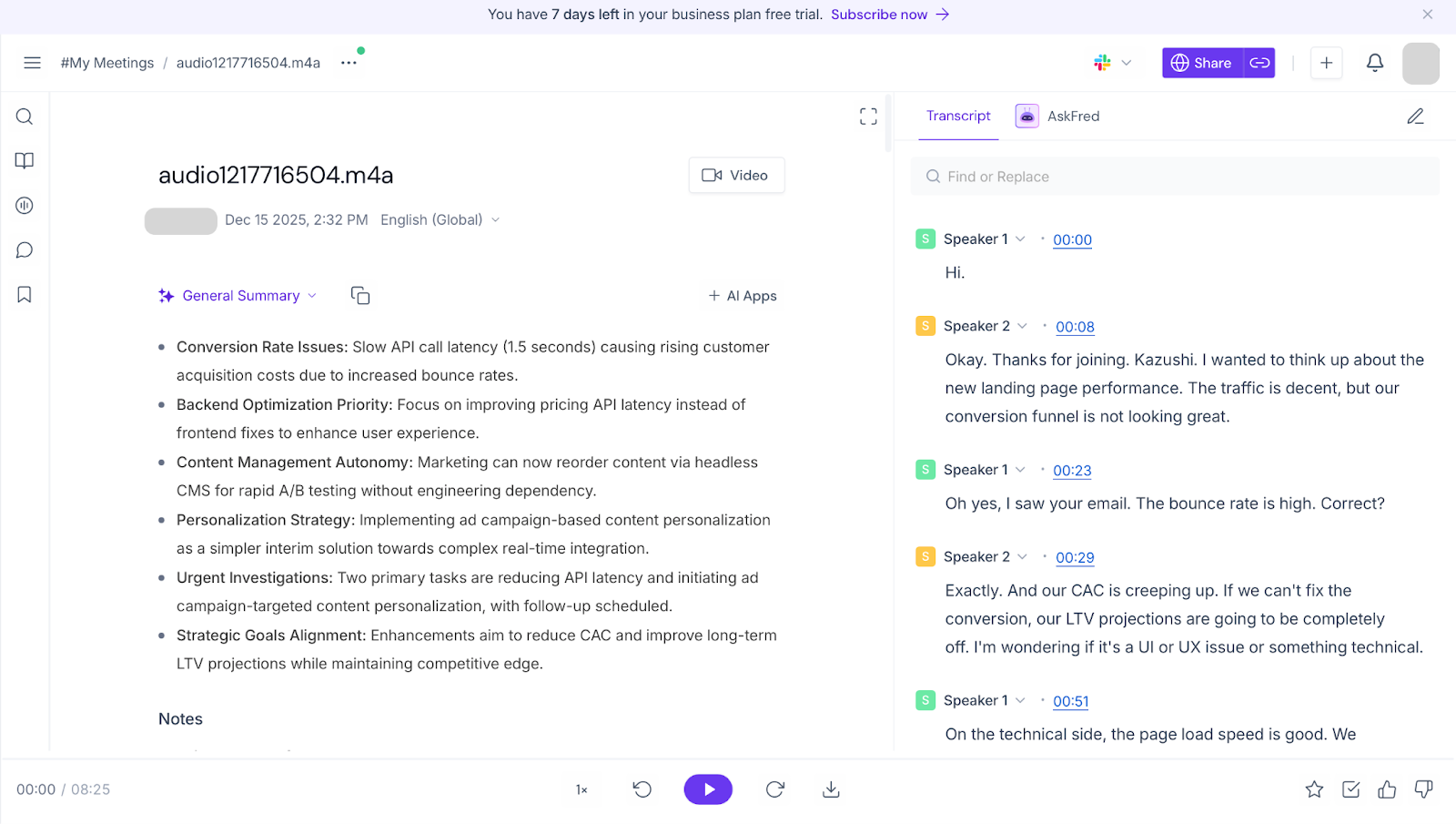
In our hands-on testing and real-world comparison, Fireflies.ai showed strong performance in native English transcription, scoring around 92.5% accuracy when speakers were clear and conversational flow was straightforward. Its integration strength — especially connecting with calendars, CRM systems, Slack, Notion, and other collaboration tools — makes it feel like more than a simple transcript generator. Fireflies doesn’t just capture speech — it helps turn meetings into workflow events by identifying speakers, highlighting decisions, and pulling out follow-ups automatically.
However, when dealing with non-native English speakers, Fireflies’ transcription accuracy was noticeably lower (around 78.9% in our scoring). In mixed-accent or messy meetings with cross talk or overlapping dialogue, the system sometimes treated disputed segments as noise or merged speaker lines, which can lead to gaps in the transcript compared with tools that handle accents more robustly.
The AI summaries Fireflies produces are quite detailed and thorough, but that length can be a double-edged sword: while deep context and action item capture are helpful for documentation, users who prefer quick, high-level overviews may find the summaries a bit too long or dense. They’re not “bad” — in fact, they’re rich — but for fast scanning, they may feel slower to consume compared with more concise summaries
Otter.ai in Our Tests
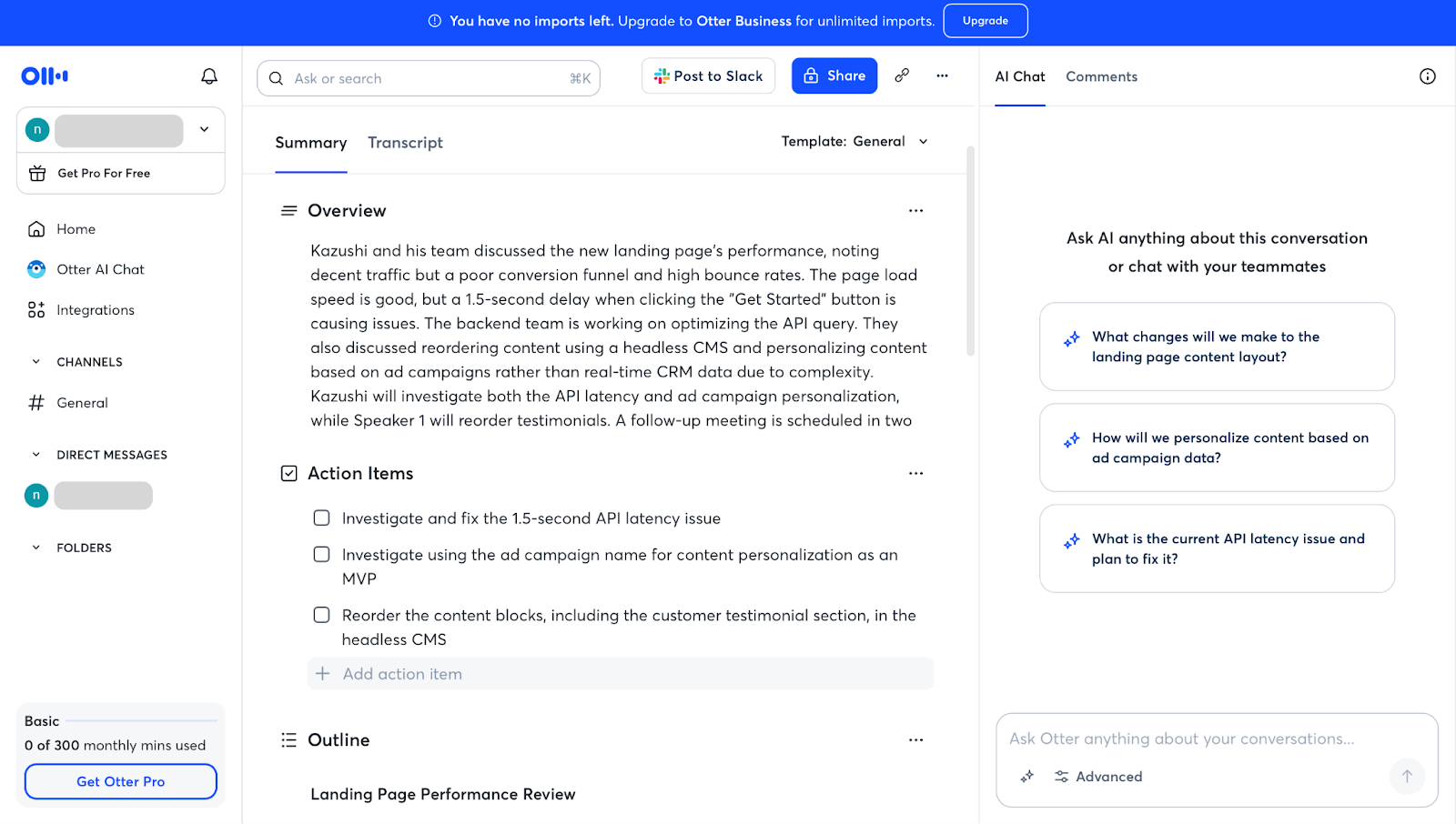
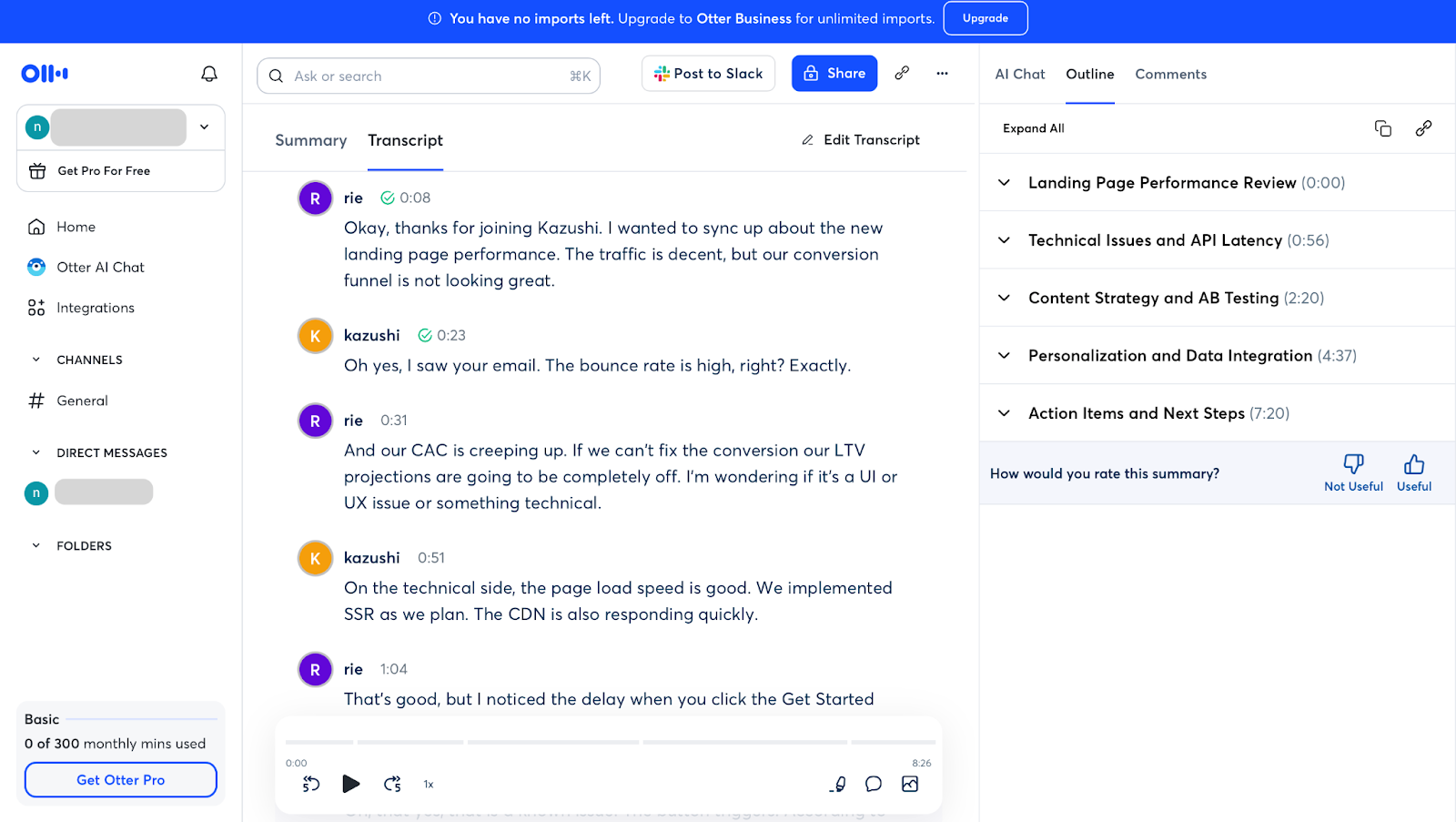
Otter.ai continues to impress with very high transcription accuracy — especially for native English, where it reliably produces clean, readable text. It also performs very well with non-native English speakers, handling accented speech better than many competitors in our mixed tests and showing strength with technical and domain-specific terminology thanks to adaptive vocabulary and smart recognition.
However, like most tools, Otter isn’t perfect with cross-talk or overlapping voices — there were cases where it blended multiple speakers into a single line rather than separating them cleanly, which can affect clarity in complex discussions. Its summaries are generally useful but lean more toward straightforward transcription than highly structured narrative, so some post-editing may still be needed for team distribution.
Fathom AI in Our Tests
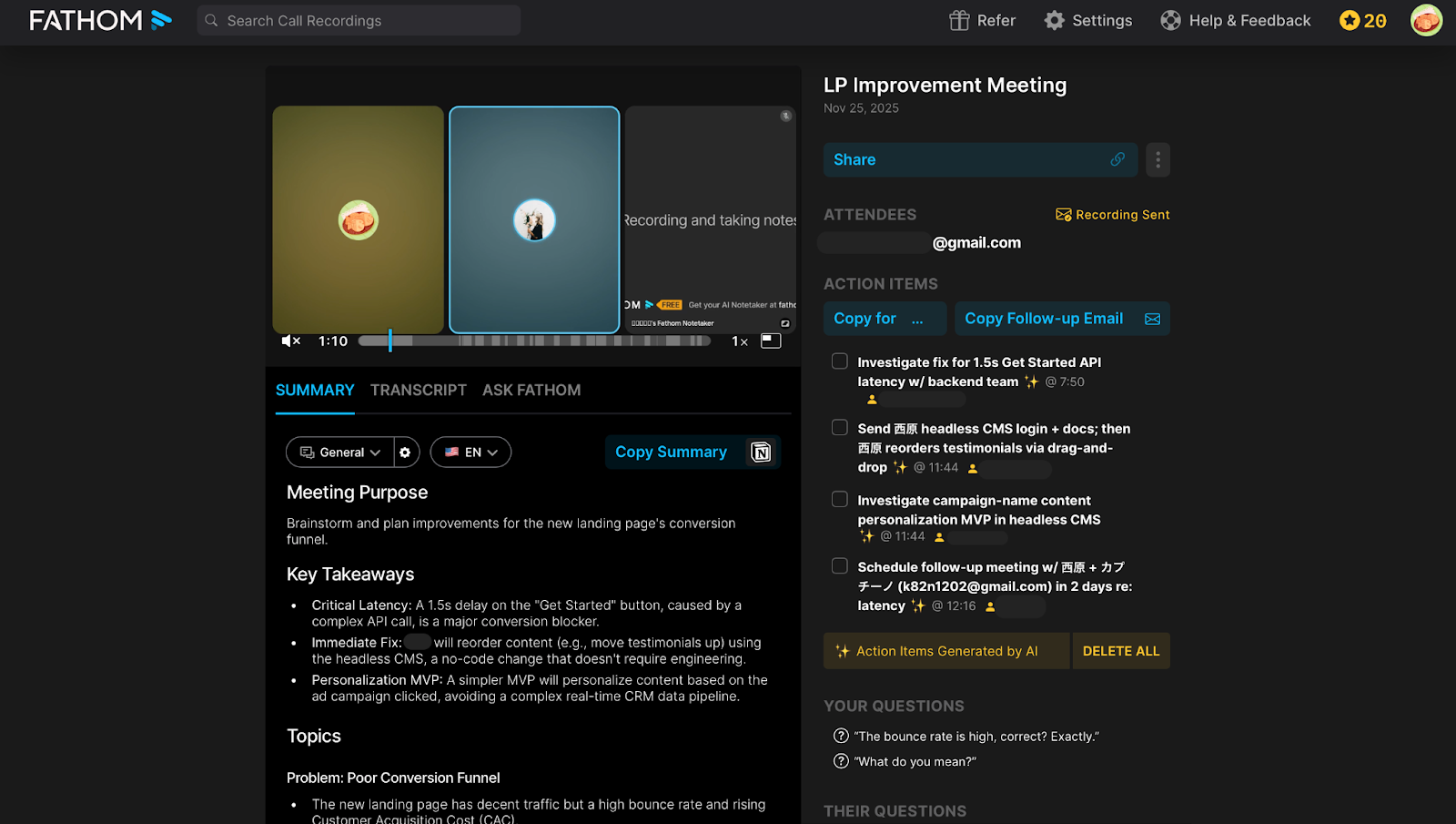
Fathom AI stood out for its polished, structured summaries and strong transcription in live virtual meetings, especially when speakers were clearly audible and native English was used. However, there is an important functional limitation: Fathom currently does not support uploading existing audio or video files for transcription or summarization. It can only record and transcribe live meetings on platforms like Zoom, Google Meet, and Microsoft Teams, meaning you can’t process pre-recorded calls or offline audio clips.
This real-time-only workflow can be restrictive if you want to transcribe recordings from past calls or offline sessions. Despite this limitation, users often praise Fathom’s ability to capture key meeting insights and generate summaries with action items and highlights, which can help teams stay aligned without taking notes manually.
Fathom’s ability to produce structured notes makes it reliable for teams who want clean, polished summaries without a lot of manual cleanup. Its free tier’s generous recording and storage options also make it appealing for users balancing cost and performance.
Rimo Voice in Our Tests
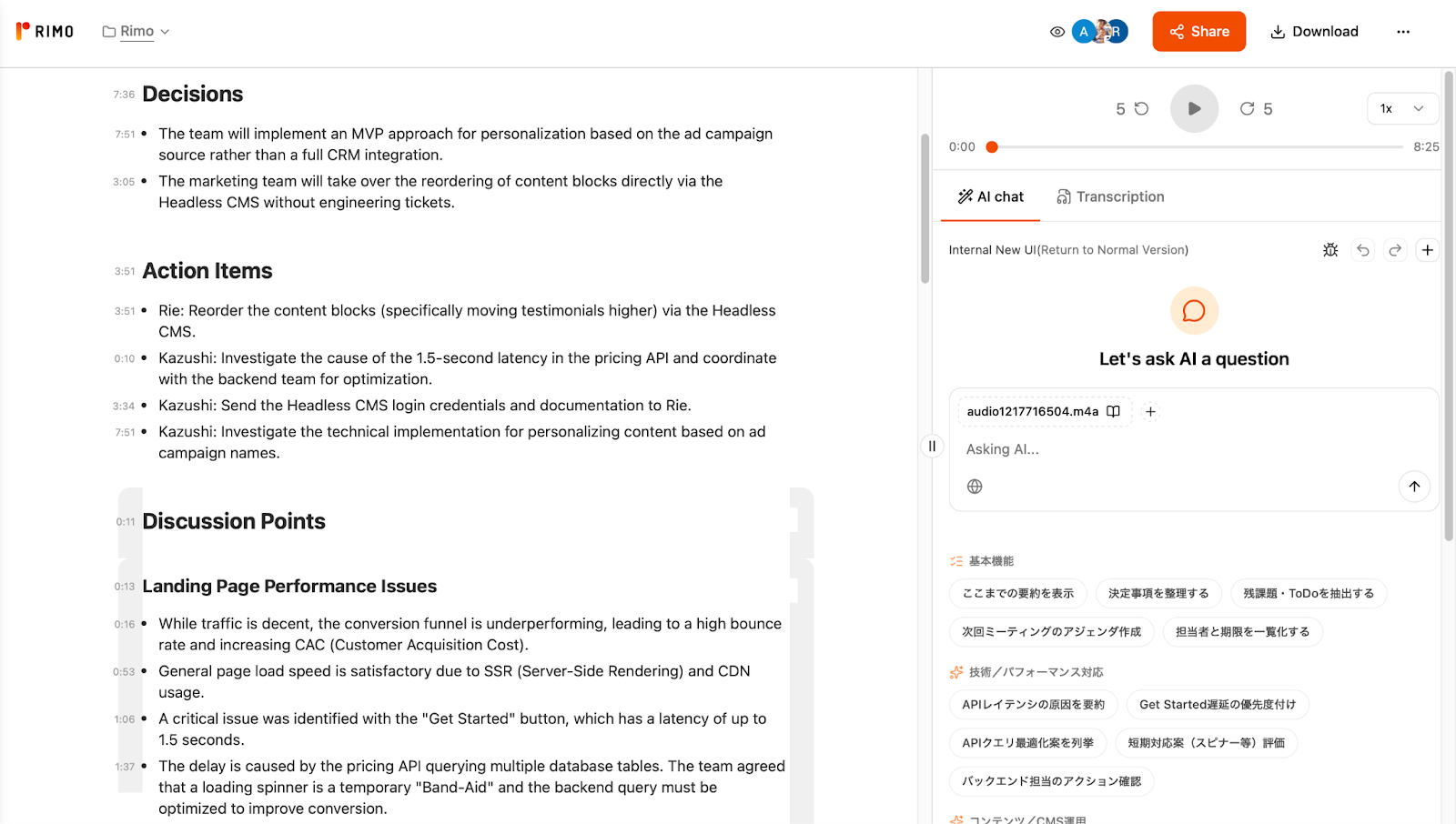
Rimo Voice delivered very good transcription performance in our tests, with strong results for both native English (~93%) and non-native (~83%) speech. What truly set Rimo apart was not just its base transcription scores but its exceptional contextual understanding and summarization ability. Even in cases where raw transcription accuracy was lower due to accented or challenging speech, Rimo’s AI-generated summaries captured meaning, decisions, and flow with up to ~97% accuracy compared to human interpretation — a rare strength among meeting AI tools and a big reason its outputs feel immediately useful and actionable.
This contextual strength means Rimo can go beyond simply converting audio to text: its summaries reflect the intent and structure of the conversation, not just a literal sequence of words. That makes it especially helpful when you want insights you can share right away without heavy editing.
Where Fireflies.ai Falls Short
While Fireflies.ai is a powerful and flexible AI meeting assistant, it isn’t without its limitations — especially when you use it in real-world conditions like mixed accents, overlapping voices, and heavy meeting loads.
Accuracy Drops With Heavy Noise, Overlap, and Certain Accents
One area where Fireflies isn’t quite perfect is transcription accuracy under challenging audio conditions. Even though Fireflies claims high accuracy in ideal settings — often cited around ~90%+ in clean audio environments — its performance can drop when:
Multiple people talk over each other,
There’s background noise in the room, or
Speakers have strong accents or non-native-like speech.
These kinds of conditions are exactly what many hybrid work environments throw at AI assistants every day. In these scenarios, tools that specialize in noise-robust speech models or real-time disfluency handling sometimes outperform Fireflies in simply capturing what was said.
Storage Limits and Admin Overhead for Heavy Users
Another practical limitation shows up when teams try to scale Fireflies to heavy usage:
Storage caps on lower plans — even if transcription is technically “unlimited,” the amount of recorded audio you can keep or search is often limited by storage quotas.
Admin overhead for large teams — setting up and managing integrations, user roles, and data retention policies can take time if you have dozens or hundreds of users.
In short, Fireflies is great for personal use or small teams, but organizations with heavy meeting loads or strict data policies may find themselves needing to manage storage and permissions more actively.
Getting Started — How to Try Fireflies.ai Yourself
Getting started with Fireflies.ai is simple and doesn’t require technical skills. With a few quick steps, you can set up the tool, connect your calendar, and start capturing AI-generated meeting notes. Here’s how to do it:
1.Create an account and log in
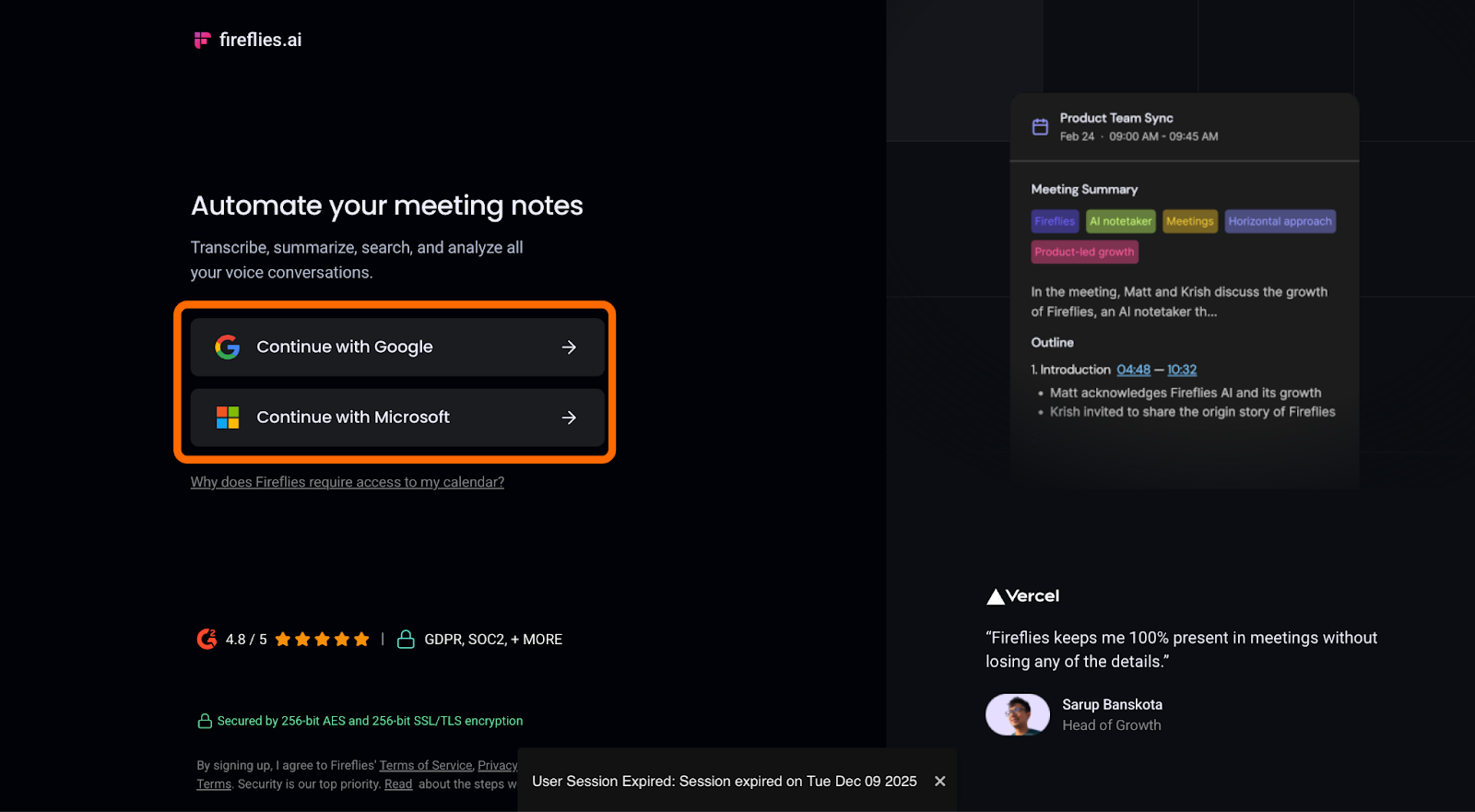
Head to the Fireflies.ai website and sign up using your email or your Google/Microsoft account. Once you’re logged in, you’ll see the dashboard where all your meeting insights and transcripts will appear.
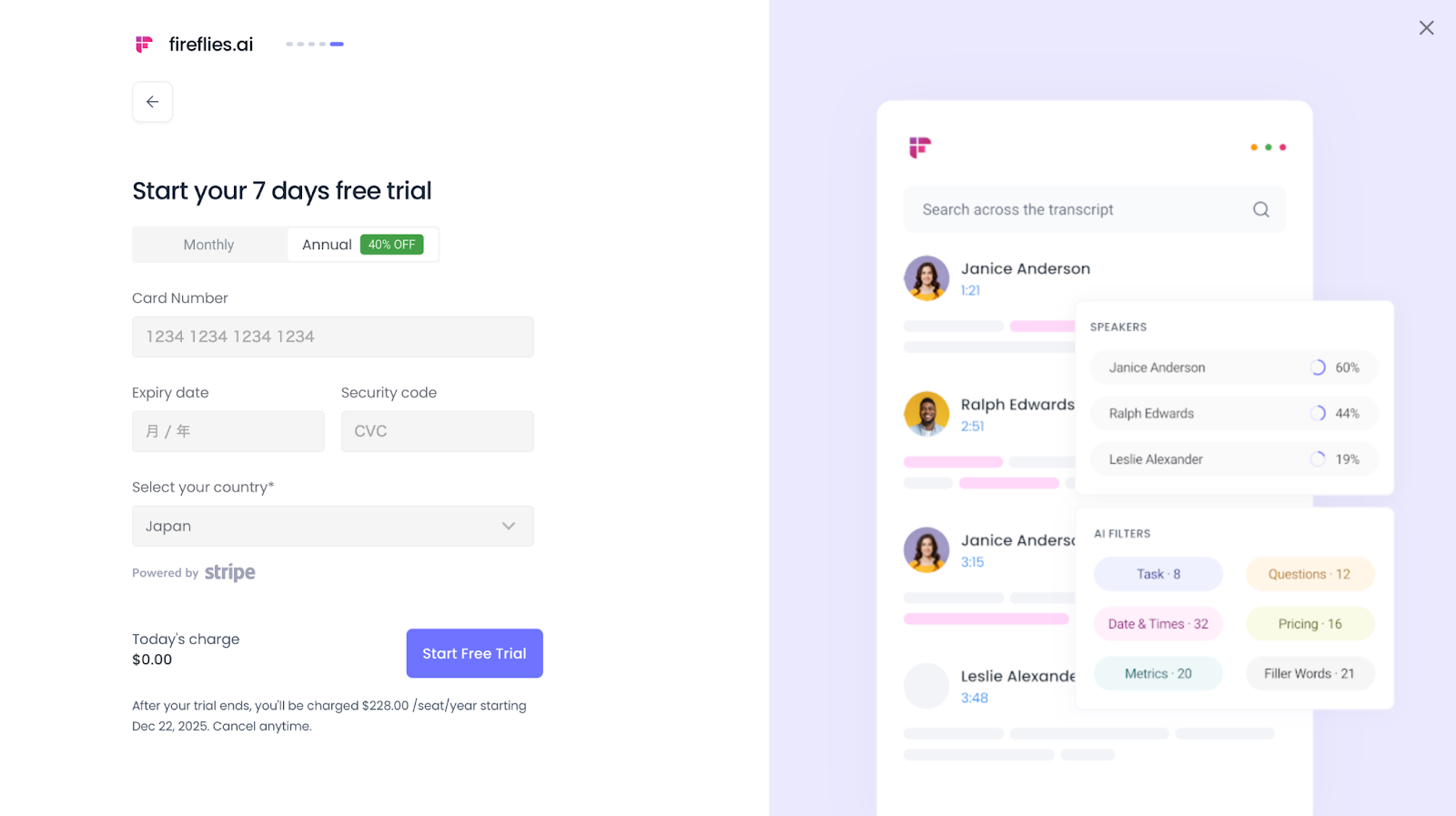
2.Start Your Free Trial
After initial setup, you’ll see the option to start a free trial of Fireflies.ai’s premium features. To activate the trial, you need to select a plan and enter your credit card information, even though you won’t be charged if you cancel before the trial ends. This free trial usually lasts about 7 days and gives you full access to higher-tier features so you can test them in real meetings.
3.Invite Fireflies to meetings
There are a few ways to let Fireflies join:
Turn on auto-join in your Fireflies settings so it joins all meetings with links from your connected calendar.
Add fireflies.ai to the calendar invite as a participant.
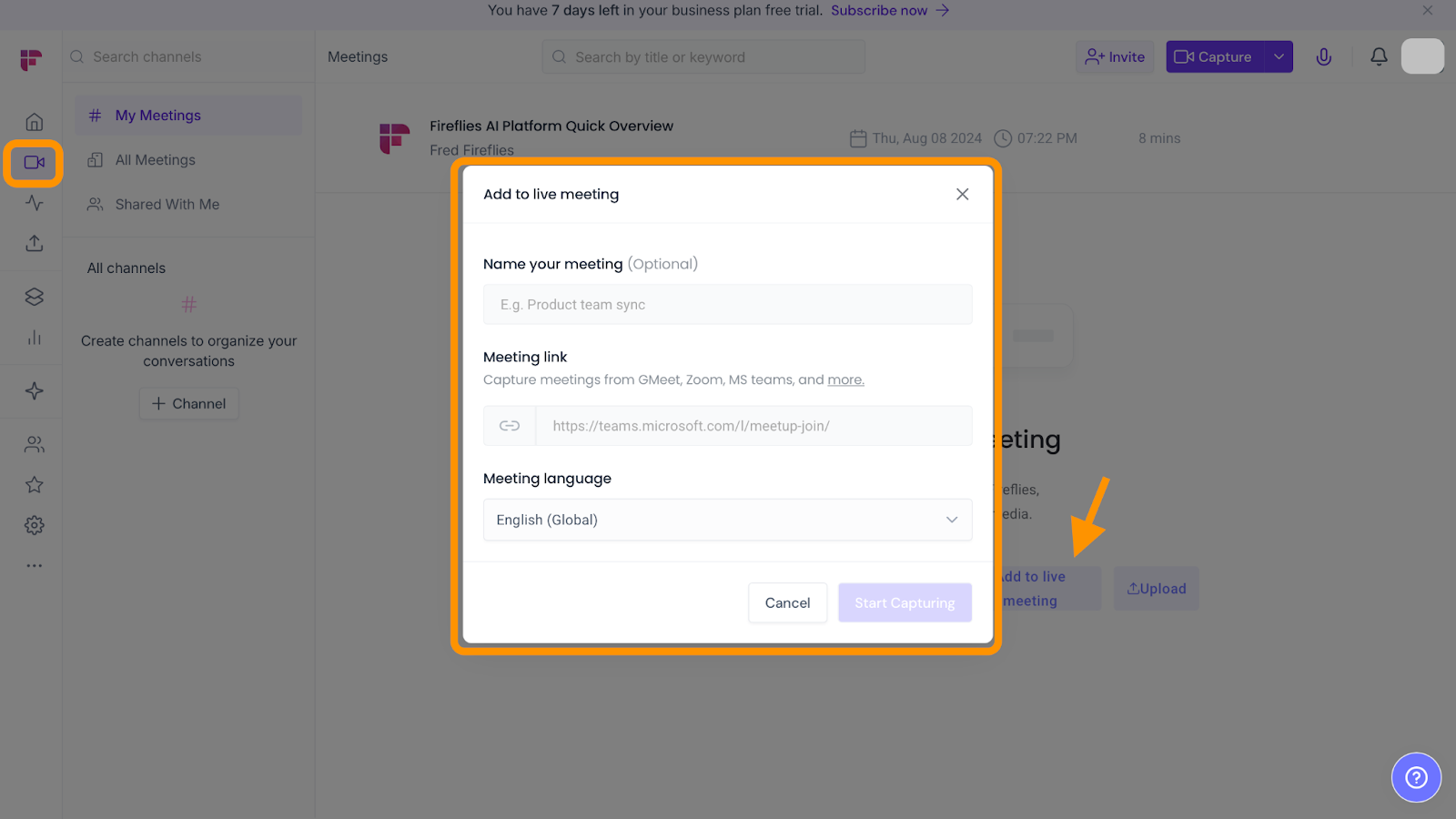
Use the Add to Live Meeting option from the Fireflies dashboard for ad-hoc or unscheduled meetings.
4.Explore built-in AI features
Once Fireflies is connected to your meetings, you can use features like searchable transcripts, AI-generated summaries of key points and decisions, and tools like AskFred that let you ask questions about your meeting content.
That’s it — with these steps, Fireflies.ai begins capturing your meetings automatically and turns them into organized, searchable insights without manual note-taking.
Final Verdict — Is Fireflies.ai Worth It in 2025?
In 2025, Fireflies.ai stands out not merely as another AI notetaker, but as one of the most influential and forward-looking platforms in the meeting intelligence space.
What began as a reliable tool for recording and transcription has evolved significantly. Today, Fireflies functions as an AI teammate that supports teams before, during, and after meetings. With real-time assistance through Ask Fred, voice interaction via Hey Fireflies, and an expanding ecosystem of AI Apps, Fireflies goes beyond capturing what was said and helps teams understand conversations and turn them into next steps.
That said, Fireflies is not without limitations. In meetings with heavy background noise, overlapping speech, or strong non-native accents, transcription accuracy can decline. In such cases, tools like Rimo Voice, which excel at contextual understanding even when raw transcripts are imperfect, can serve as a strong alternative or complement—particularly for global teams.
For teams where meetings are central to daily work, and where a passive recording tool isn’t enough, Fireflies.ai remains a compelling option to consider in 2025.
FAQ — Fireflies.ai Basics, Safety, and Integrations
What is Fireflies.ai?
Fireflies.ai is an AI-powered meeting assistant that automates recording, transcription, summarization, and searchable insights for your conversations. It works with major video conferencing platforms like Zoom, Google Meet, and Microsoft Teams by joining meetings either automatically or when invited. Once a meeting ends, Fireflies delivers a transcript and AI-generated summary with key highlights and action items.
Is Fireflies.ai safe?
Fireflies.ai uses modern security practices and supports integrations with enterprise systems, and its AI transcription and summary generation happens within its secured platform. Like all tools that capture meeting data, it’s important to review privacy and compliance settings in your Fireflies dashboard and ensure participants are informed about recording. Many organizations also enable pre-meeting compliance prompts to notify participants that Fireflies will record the session.
Does Fireflies.ai work with Microsoft Teams?
Yes — Fireflies.ai can be connected to Microsoft Teams by adding the Fireflies integration in your Fireflies dashboard and linking your Outlook/Teams calendar. Once connected, Fireflies can detect Teams meetings from your calendar and join to record and transcribe. For deeper posting or bot behavior, you can also add the Fireflies app directly within Teams channels.
How do I use Fireflies.ai in Microsoft Teams?
To use Fireflies.ai with Teams:
Go to the Fireflies web dashboard and select Integrations.
Find Microsoft Teams and click Connect.
Choose your Team and channel where you want meeting notes to be posted.
Follow the Teams prompts to add the Fireflies AI app and set up the bot in your channel.
Test the connection to confirm it posts correctly.
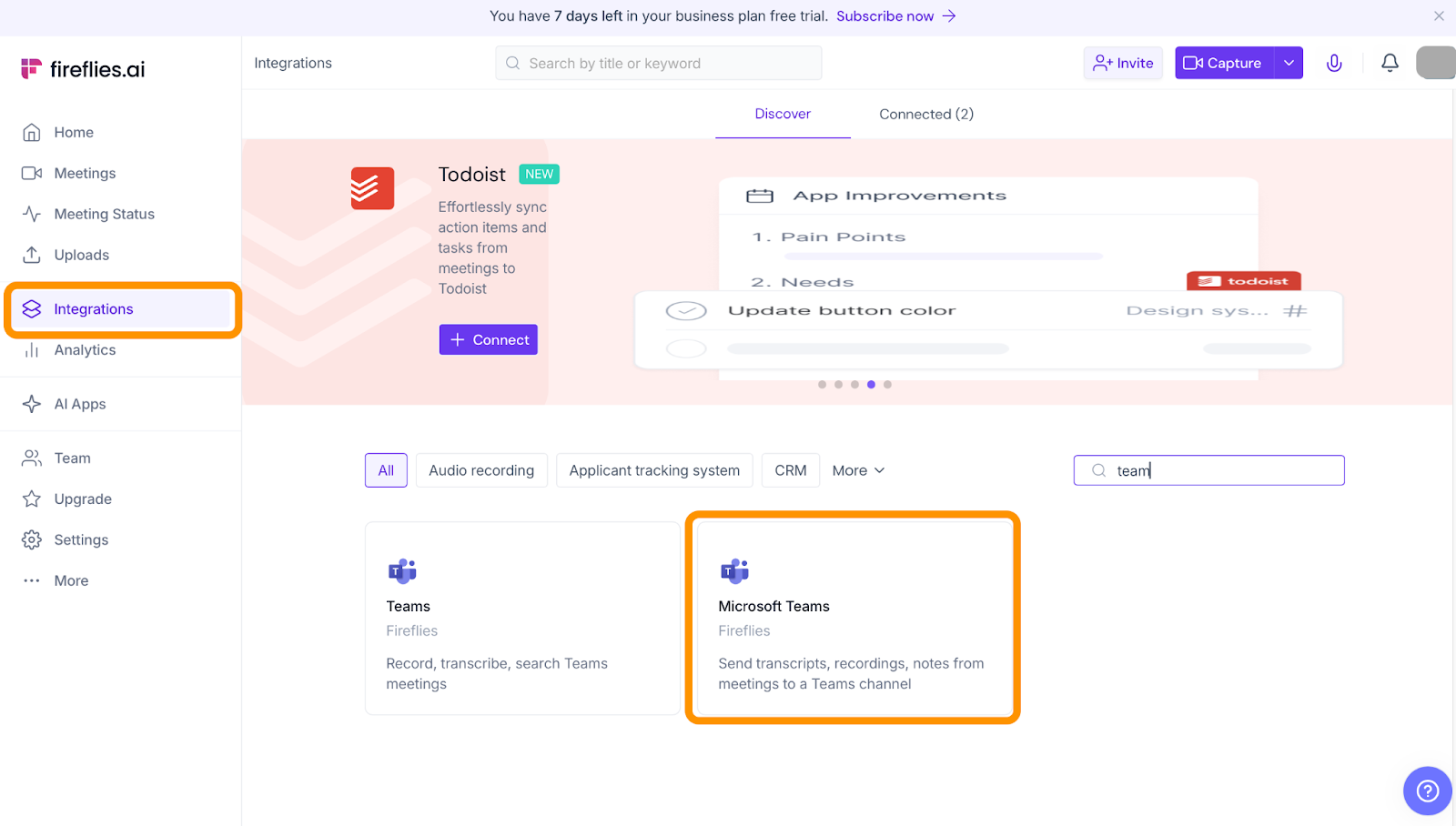
This setup lets Fireflies automatically post summaries or transcriptions to your chosen Teams space.
How do I remove Fireflies.ai from Zoom?
If you want to stop Fireflies from joining your Zoom meetings, you have several options:
During a live meeting, open the participants list, find Fireflies Notetaker, click More → Remove — this removes it from that session.
In your Fireflies dashboard, you can turn off auto-join or stop Fireflies from joining all calendar meetings.
To fully disconnect, remove the Fireflies integration from the Zoom App Marketplace or revoke connected calendar permissions.
This gives you control over where and when Fireflies participates.
Can Fireflies.ai record in-person meetings?
Yes — Fireflies has options for recording in-person or offline audio. Using the Fireflies mobile app, you can start an instant one-touch recording, pause as needed, and save it to your account. Once processed, these recordings appear alongside your other meetings in the dashboard.
Related articles
Return to List