
Motion AI Review (2026): Pricing, Features & Is the AI Calender Worth $19/Month?



Motion has solidified its position as the “AI Calendar App,” moving beyond simple scheduling to become a full-service, intelligent workspace. But does its power and premium price tag deliver the necessary results in the frantic pace of 2026?
This comprehensive review breaks down Motion's core features, pricing structure, and—most critically—how effective its AI is in daily use.
What Is Motion AI? (And Why People Call It the “AI Calendar App”)
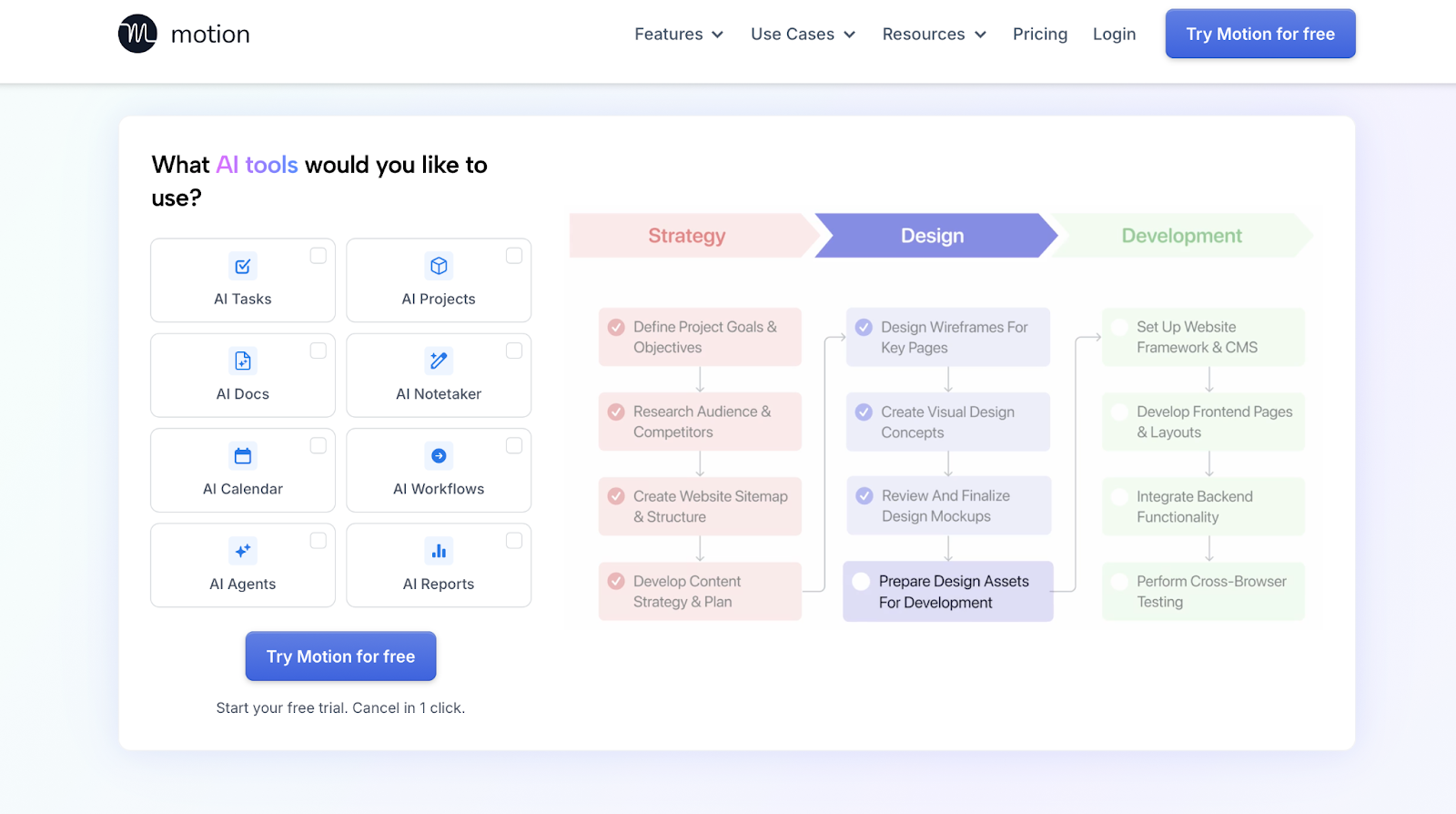
Forget the calendar apps you’ve used before. Motion isn't just a digital interface for your existing events; it’s an autonomous system designed to build your most productive day, every day, using artificial intelligence. In essence, you tell Motion what you need to do and when it needs to be done—and it figures out when and where on your calendar to put it.
Motion at a Glance — AI Calendar, Tasks, Projects & Docs in One Place
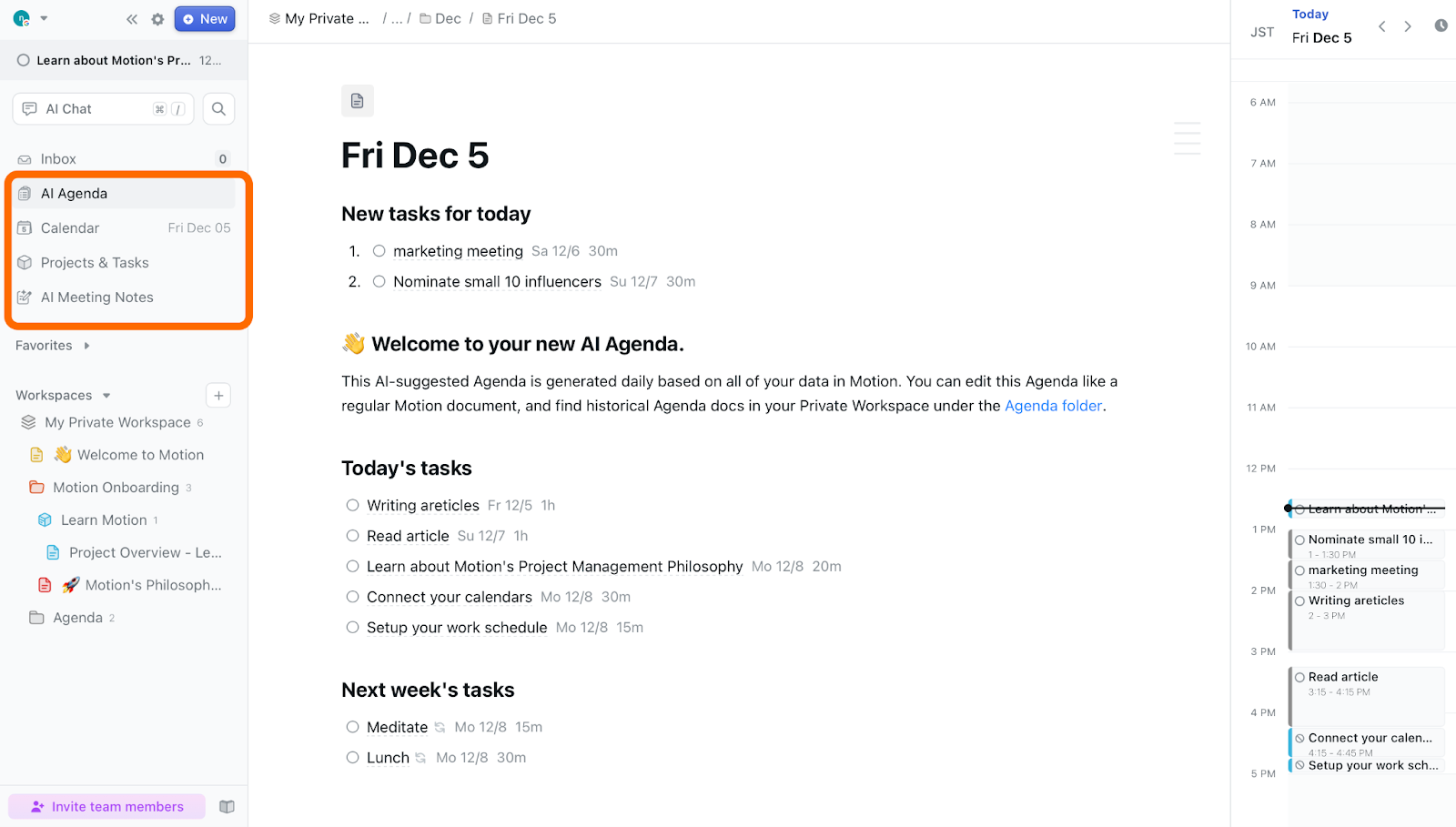
Motion’s unique selling proposition is its comprehensive, all-in-one workspace. It integrates four critical components that often live separately:
AI Calendar: Your central schedule, automatically filled by the AI.
Tasks: Simple to-dos with deadlines and priorities.
Projects: Groupings of related tasks with boards and workflows.
Docs: A place for notes, knowledge, and documentation linked to your work.
By putting all these pieces into a single brain, Motion is better equipped to make holistic scheduling decisions across entire projects than combining disparate, standalone tools.
Who Motion Is Really For (Busy Professionals, Founders, Remote Teams)
Motion is a premium tool for premium productivity challenges. It is best suited for:
Busy Knowledge Workers: Individuals juggling multiple projects, constant meetings, and deep work requirements.
Founders & Executives: Those whose time is their most valuable (and constrained) resource, needing maximum automation to protect focus.
Remote & Cross-Functional Teams: Groups who need a single source of truth for who is working on what, and when they are actually available to collaborate.
If you consistently feel like you’re spending more time planning your work than actually doing it, Motion is designed to solve that problem.
Core Motion AI Features Explained
Motion’s power lies in how its features interlock. Here is a breakdown of the key functionalities and what makes them unique.
AI Calendar & Auto-Scheduling That Rebuilds Your Day Automatically
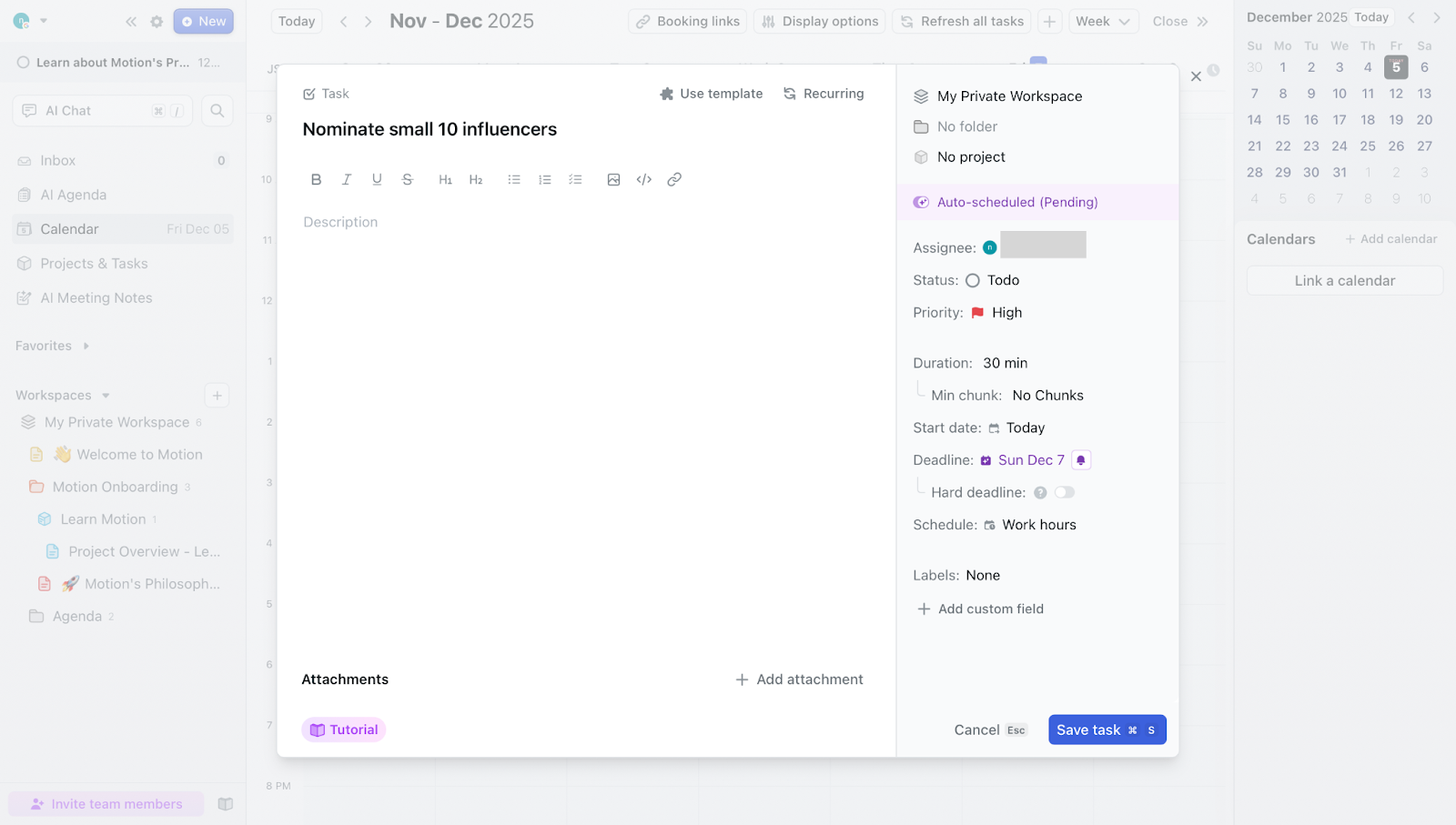
This is Motion's killer feature. You enter a task (e.g., "Nominate 10 small influencer," estimated time: 30 minutes, deadline: Today at 5 PM), and the AI immediately finds the best 30-minute slot in your week, considering meetings and other priorities. If a new meeting pops up, the AI instantly and intelligently reschedules the 30-minute block to the next best available time.
The key takeaway: Motion turns task management into time management by automatically creating time blocks for everything that needs to get done. |
Task & Project Management Inside Motion (Boards, Deadlines, Priorities)

Motion provides robust task and project management tools, where your input directly fuels the scheduling engine:
Priorities & Deadlines: You assign a priority level (High, Medium, Low) and a hard deadline. The AI uses these signals to decide which tasks get scheduled first when calendar space is tight.
Kanban Boards: Tasks can be organized into projects and viewed on a visual board, allowing you to manage workflows just like in specialized PM tools, but with live schedule integration.
AI-Powered Docs, Notes & Knowledge — Beyond Simple Scheduling
Motion’s Docs feature is where it transcends the traditional scheduler. You can create notes, meeting agendas, and documentation directly within the platform. The integration means your notes are contextually tied to your calendar and projects. The AI can also help with summarization or content suggestions, making it a powerful productivity hub.
Time Blocking, Focus Protection & Work-Life Boundaries
Motion is an excellent digital guard dog for your time, allowing you to define crucial boundaries:
Focus Time: The system automatically carves out long, uninterrupted blocks of time for your most important deep work tasks.
Work-Life Boundaries: You can set strict rules, such as “Do not schedule any work tasks after 6 PM or on weekends.” The AI respects these boundaries, protecting your personal time and preventing burnout.
No-Meeting Time: Designate specific days or hours as “No-Meeting Time,” which the AI then uses for high-priority task scheduling and blocks out of your booking link.
Motion AI Pricing & Plans in 2025
Motion offers two main plans, Pro AI and Business AI, with pricing that varies depending on whether you use it as an individual or as a team.
【User Trends】
For individual use: the Pro AI plan is the most popular.
For team use: the Business AI plan is recommended, as it provides access to more advanced features.
Feature Comparison by Plan (Pro AI vs. Business AI)
Feature / Limits | Pro AI | Business AI |
Recommended for | Individuals, small teams | Power users, complex business needs |
AI calendar, tasks, projects | Included | Included |
AI Docs, Sheets, AI Chat | Included | Included |
AI credits per seat per month | 7,500 credits | 15,000 credits |
Team capacity planning | Not included | Included |
Advanced dashboards & reporting | Not included | Included |
Timelines / Gantt charts | Not included | Included |
Time tracking | Not included | Included |
Permissions & access control | Not included | Included |
Centralized billing | Not included | Included |
Priority support | Not included | Included |
Pricing Structure by Use Case (Individual vs. Team)
Motion uses the same plan names for both individuals and teams, but the pricing changes depending on whether you’re purchasing a single license or multiple seats for a team.
Plan | Individual use (monthly) | Team use (monthly) |
Pro AI | $49 | $29 / seat |
Business AI | $69 | $49 / seat |
For solo users, the price is roughly equivalent to the value of saving just a few hours per month. For freelancers and consultants, the ability to seamlessly manage multiple client projects and protect billable time makes the ROI very clear.
Is Motion Worth the Price? How to Think About ROI vs. Simpler Tools
The true cost of using simpler tools (like Google Calendar + Trello + a ToDo list) isn't the monetary price, but the time spent juggling them. Motion's ROI is measured in:
Time Saved on Planning: No more manually dragging blocks or rescheduling.
Reduced Context Switching: Everything lives in one place.
Protected Focus: The AI proactively prevents low-priority items from pushing out deep work.
If you save just 30 minutes of planning and rescheduling per day, the monthly cost is easily offset by the time regained for actual productive work.
Motion AI for Individuals vs. Teams
This section clarifies how the value and usage patterns of Motion differ between a solo user and a collaborative team environment.
Solo Use Cases — Freelancers, Creators & Knowledge Workers
For the individual user, Motion acts as an indispensable personal assistant, ensuring that high-priority tasks always get time on the calendar, even when managing multiple concurrent demands:
Juggling Multiple Clients: Freelancers can assign different projects to different client "tags." Motion's AI ensures time is allocated fairly across all commitments, respecting individual deadlines.
Deep Work Protection: Creators can enforce blocks of uninterrupted time for writing, designing, or coding.
The "Second Brain" Scheduler: Knowledge workers can use the integrated Docs feature to link research and notes directly to the tasks they are scheduling.
Team Use Cases — Cross-Functional Projects, Shared Calendars & Handoffs
Motion dramatically improves team efficiency by removing coordination friction:
Task Assignment & Auto-Scheduling: A manager can assign a task (e.g., "Review Marketing Copy") to a specific team member. Motion schedules that task into the team member’s personal calendar instantly.
Shared Project Visibility: Teams get a high-level view of who is working on what (and when), crucial for cross-functional projects that require careful handoffs.
Efficient Meeting Booking: Using Motion’s booking links, the AI automatically checks the availability of everyone and proposes times that protect their focus periods.
When Motion Becomes “Too Much” for Simple Personal Planning
For users whose planning needs are very simple, Motion may be overkill:
Low Task Volume: If you only have 3-5 tasks per day and your schedule is highly stable (few unplanned meetings), the benefits of AI auto-scheduling are minimal.
Simple To-Do Lists: If all you need is a basic list and checkmarks, a lighter, free tool is sufficient.
The Learning Curve: The initial setup and learning curve—understanding how to feed the AI the right priorities and deadlines—might feel like unnecessary work if your existing system isn't broken.
How Good Is Motion’s AI, Really?
The central question every user asks: Is the "AI Calendar" actually smart, or just a glorified macro? Our assessment shows it is genuinely intelligent, provided you give it the right inputs.
How Motion’s Auto-Scheduling Logic Works (Priorities, Deadlines, Calendar Data)
Motion’s AI operates on a hierarchy of signals you provide:
Hard Deadlines: Non-negotiable anchors.
Priority Level: Determines which tasks fill the time blocks first.
Estimated Duration: The task's size, which the AI looks for continuous free blocks to match.
Existing Calendar Data: Your pre-existing meetings and events are the fixed constraints that the AI must work around.
By weighing these factors, Motion acts as a predictive time allocation engine, constantly recalculating the optimal schedule in real-time.
Where the AI Feels “Smart” in Daily Use (Rescheduling, Dependencies, Conflicts)
The intelligence becomes obvious in dynamic, real-world scenarios:
Fluid rescheduling: When an unexpected meeting eats into your planned task time, Motion automatically finds the next best window (later that day or the following morning) and moves the block, so you can still hit your deadline.
Dependency-aware scheduling: When you define Task A as a prerequisite for Task B, Motion’s AI takes that dependency into account and schedules B after A whenever possible, keeping project work in a logical order.
Conflict resolution: If you accidentally over-schedule yourself, Motion flags conflicts and reshuffles lower-priority items around your most important work, giving you a clear, updated plan without manual rebuilding.
When You’ll Still Want Manual Control (Overriding the AI Gently)
No AI is perfect, and sometimes you need the human touch. Motion allows for this balance:
Pinning Time Blocks: You can "pin" a task block to a specific time (e.g., "I must do this presentation prep at 9 AM"). The AI treats this as a fixed meeting and schedules around it.
Intentional Overrides: You can gently drag a task earlier in the schedule for personal reasons, and the AI will simply adjust the other dynamic tasks accordingly.
Motion AI vs. Top Alternatives (Reclaim, Sunsama, Akiflow & More)
Motion is not the only player in the time-management space. Here is how it compares to its top competitors.
Tool | Core Positioning | Key Strengths |
Motion | Automation-first AI scheduler that auto-plans tasks, projects, and meetings | Real-time auto-scheduling, deadline awareness, project + calendar integration, AI task planning |
Habit-first smart calendar that protects routines and focus time | Powerful Habit scheduling, no-meeting times, team-friendly Smart Meetings & Scheduling Links | |
Sunsama | Mindful daily planning with a guided “daily review” workflow | Beautiful daily planner UI, channel-based task routing, ritual-driven planning |
Akiflow | Inbox-style task hub combined with time-blocking | Fast command palette, strong capture from email/apps, good for “inbox-zero” workflows |
Morgen | Calendar-centric productivity hub | Cross-platform calendar, timezone tools, basic task features, scheduling links |
Asana / ClickUp | Full project & work management suites | Robust project hierarchies, workflows, reporting, collaboration at scale |
Motion vs. — Automation-First vs. Habit-First Scheduling
Motion (Automation-First): Focuses on scheduling project tasks and deadlines. It’s best for managing complex project deliverables.
Reclaim.ai (Habit-First): Excels at scheduling Habits (e.g., "30 minutes of email cleanup daily") and finding smart time for those recurring routines.
What is Reclaim.ai? A Comprehensive Review of the AI Task Scheduler & Pricing
Motion vs. Sunsama & Akiflow — Mindful Daily Planning vs. Full Automation
Motion: Aims for full automation. You define the rules, and the AI executes. Best for users who prefer to "set it and forget it."
Sunsama/Akiflow: Emphasize mindful daily planning. Users spend time each morning deliberately dragging and assigning tasks. Best for those who enjoy the ritual of daily planning.
Motion vs. Morgen & Project Management Suites
Motion is a calendar-centric integrated tool. While it has task and document features, it doesn’t replace the deep capabilities of tools like Asana, or ClickUp for complex database or reporting needs. Motion’s strength is its real-time scheduling power, which those PM suites generally lack.
When Motion Is the Best Pick (And When a Lighter Tool Is Enough)
Best Pick If: You manage $5+$ projects concurrently, have $>10$ meetings per week, and frequently deal with shifting priorities and deadlines.
Lighter Tool If: You have simple, routine tasks, low meeting volume, and value the lowest possible monthly cost.
Motion vs Free Alternatives: Price Comparison
At $19/month, Motion isn't cheap. So how does it compare to free calendar and task management tools?
Motion vs Google Calendar (Free)
Feature | Motion ($19/mo) | Google Calendar (Free) |
|---|---|---|
Auto-scheduling | ✅ AI-powered | ❌ Manual only |
Task management | ✅ Built-in | ❌ Requires Tasks app |
Time blocking | ✅ Automatic | ❌ Manual drag-and-drop |
Priority-based scheduling | ✅ Yes | ❌ No |
Team capacity view | ✅ Business plan | ❌ No |
Verdict: Google Calendar is fine for simple scheduling, but Motion wins if you need AI to manage a complex workload.
Motion vs Notion Calendar (Free)
Feature | Motion ($19/mo) | Notion Calendar (Free) |
|---|---|---|
Auto-scheduling | ✅ AI-powered | ❌ Manual only |
Database integration | ❌ Limited | ✅ Full Notion integration |
Project management | ✅ Built-in boards | ✅ Via Notion |
Learning curve | Medium | Low |
Verdict: Notion Calendar is better if you already live in Notion. Motion is better if you want true AI automation.
When Free Tools Are Enough
You probably don't need Motion if:
Your task list has fewer than 5 items per day
Your meetings rarely conflict with deep work
You're comfortable manually scheduling time blocks
But if you're drowning in competing priorities, Motion's AI scheduling can reclaim hours of planning time each week.
Motion AI Pros & Things to Know Before You Subscribe
Before you commit your schedule (and budget) to Motion, it’s worth looking at both sides of the equation. On the plus side, Motion can dramatically reduce the mental overhead of planning and juggling multiple projects. At the same time, its automation-first design, setup requirements, and pricing model mean it won’t be the perfect fit for everyone. The sections below break down what users tend to love — and the trade-offs you should be aware of before subscribing.
What Users Consistently Love — Auto-Scheduling & a Single Workspace
The two primary reasons users stick with Motion are:
Elimination of Scheduling Overhead: The daily mental load of "what should I do next?" is virtually eliminated.
Single Pane of Glass: Having all tasks, projects, and the calendar view unified reduces cognitive load and context-switching fatigue.
Trade-Offs to Be Aware Of — Setup, Learning Curve & Pricing
Motion is a premium tool designed for deep automation, which comes with certain trade-offs that users should understand:
Initial Setup Investment: The AI is only as good as the inputs you give it. Defining all tasks, estimating durations, and setting up project rules initially requires dedicated time and attention.
The "Surrender" Period: Users must be willing to relinquish manual control to the AI. This period of learning to trust the auto-scheduler can feel disruptive at first, but is essential for realizing its benefits.
The Premium Price Tag: Compared to free or low-cost tools, Motion's subscription cost is significant. The ROI only becomes clear if the automation truly saves several hours of planning per month.
Analytics & Meeting Insight — Great at Scheduling, Lighter on Deep Reporting
Motion is exceptionally powerful at planning your day and ensuring tasks are scheduled. However, its reporting capabilities are lighter when it comes to organizational time usage. While you can view your own project progress, Motion doesn't offer deep, aggregate analytics for team-wide metrics like "Total time spent in internal meetings across all teams," or "Meeting load visualization" that are often required by leadership. This is where specialized tools like Rimo Time Insight are needed to provide the strategic, organizational view.

From Scheduling to Insight: How Rimo Time Insight Complements Motion
This is where the combination of Motion and Rimo Time Insight creates a complete "Time Intelligence" workflow. Motion handles the execution of your plan, and Rimo Time Insight handles the strategic analysis of your actual time usage.
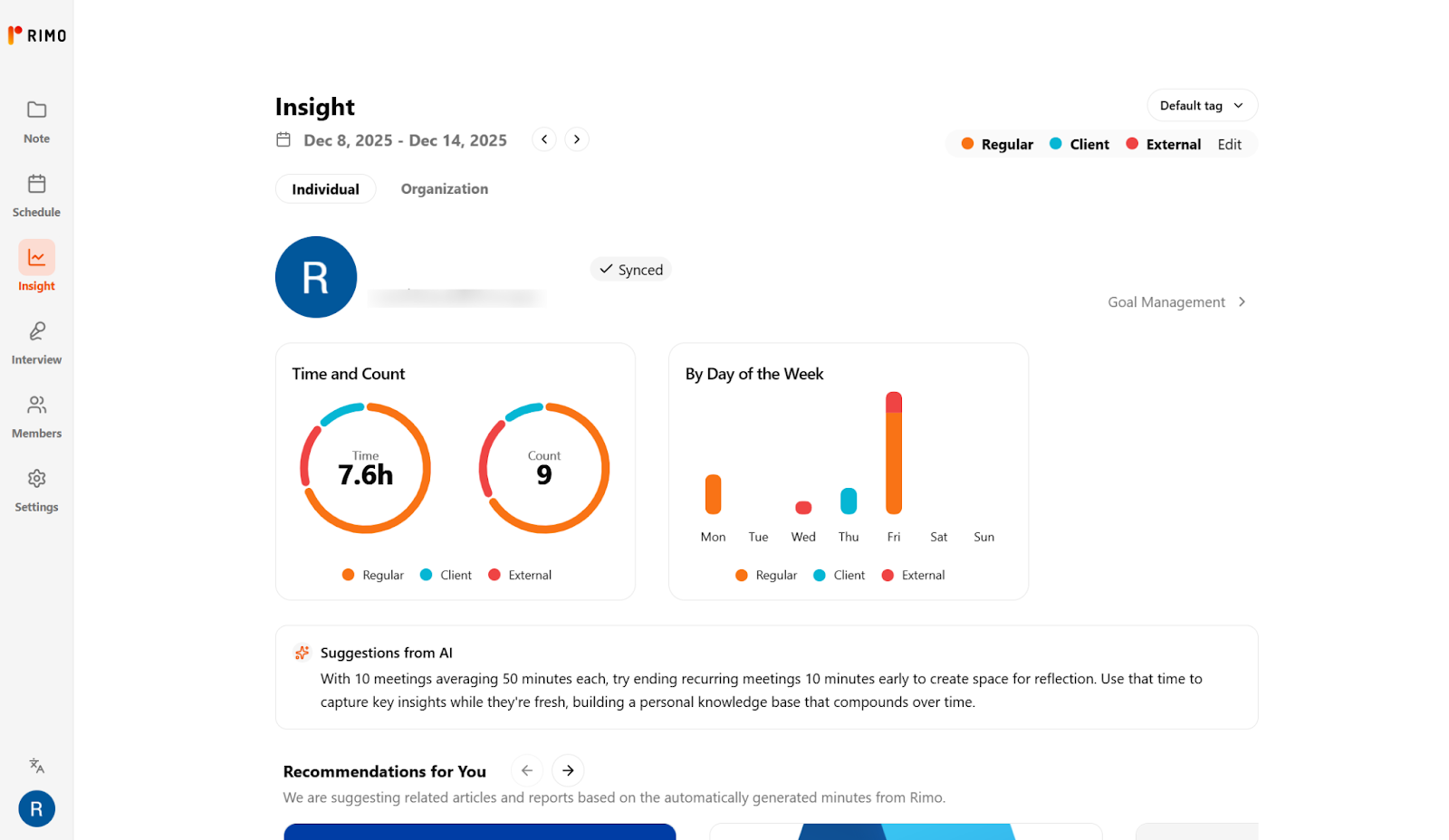
What Is Time Insight? Visualizing Meeting Load & Collaboration Patterns
Rimo Time Insight is an analytics platform that connects to your organization’s calendars to provide deep, actionable insights into how time is spent in meetings and collaborations. It visualizes:
Meeting Load (Organizational Benefit): How much time individuals and teams spend in internal vs. external meetings.
AI Productivity Nudges (Individual Benefit): The platform analyzes the content and context of individual meetings and can proactively suggest relevant research papers, articles, or resources to aid post-meeting deep work or follow-up tasks. Example: After a meeting on "Quantum Computing Strategy," the AI may suggest a recent, high-impact research paper on the topic.
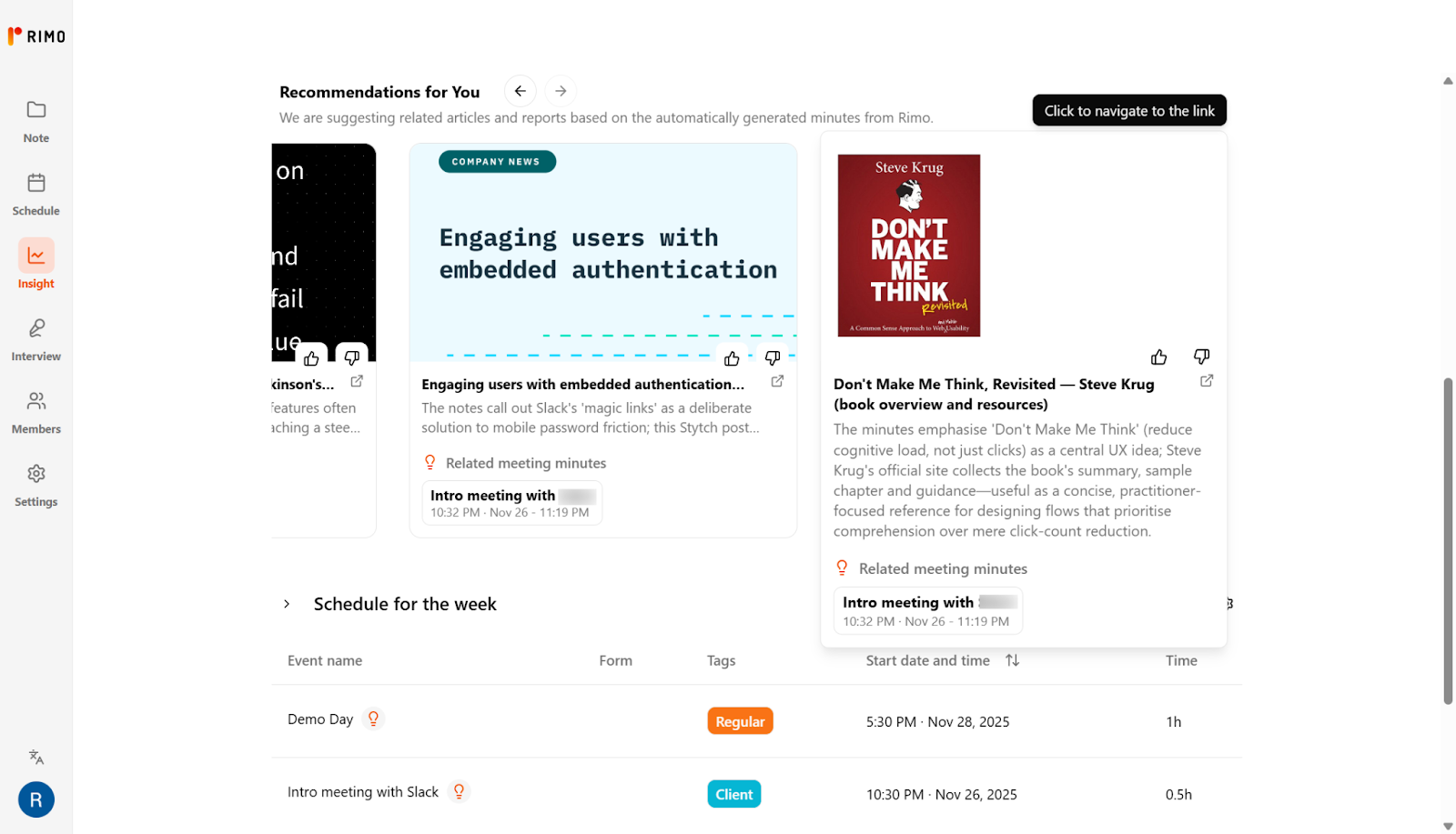
Key Differences vs. Motion — Meeting-Level Analytics & Team Dashboards
Feature | Motion AI | Time Insight |
Primary Goal | Automated scheduling and focus protection. | Strategic time analysis and organizational efficiency. |
Focus | Individual task and calendar optimization. | Team-wide meeting metrics and collaboration trends. |
Data Scope | Tasks, deadlines, and individual calendar. | Aggregated organizational meeting data. |
Motion focuses on the micro level of scheduling: ensuring an individual's tasks fit around their fixed commitments. Rimo Time Insight operates at the macro level: providing strategic insights into organizational meeting habits, while also offering smart, contextual guidance for individuals after key events, which Motion is not designed to track.
Motion + Rimo Time Insight Workflow — From “Planned Calendar” to “Time Intelligence”
Motion (Execution): The team uses Motion daily to automatically schedule tasks, protect deep work, and coordinate handoffs. The result is a highly efficient planned schedule.
Rimo Time Insight(Analysis): Leadership and managers periodically review Rimo Time Insight dashboards to see the actual time cost of their meeting culture. Individuals receive contextual AI nudges to maximize productivity following meetings.
Refinement: Insights (e.g., "Engineering is spending 40% of their time in non-essential status meetings") inform policy changes, which feed back into Motion's configuration (e.g., setting stricter "No-Meeting Time" rules for Engineering).
Final Verdict — Who Should Use Motion, Time Insight, or Both?
Motion is best suited for individuals and teams with a high volume of tasks and meetings who simply need each day to run smoothly without breaking down. In contrast, when you reach the stage of asking, “Why are we this busy?” or “How much time are we actually spending in meetings?”, Rimo Time Insight starts to play a crucial role. By letting Motion handle day-to-day scheduling and using Rimo Time Insight to visualize meeting load and collaboration patterns, you can move beyond basic efficiency gains and begin building a true, organization-wide strategy for how time is invested.
Motion AI FAQ
Before you subscribe, it’s natural to have practical questions about how Motion fits into your existing tools, whether it can replace your current task manager, and how safe your data is. This FAQ section addresses the most common questions people ask before adopting Motion, so you can quickly decide whether it matches your workflow, security expectations, and budget.
Is Motion AI free to use?
Motion does not offer a free plan, but it generally offers a generous free trial period (typically 7 days) which allows users to fully test the AI’s auto-scheduling capabilities before committing to a paid subscription.
Does Motion replace my existing calendar or work with it?
Motion works with your existing calendar (Google Calendar, Outlook, etc.). It syncs with these calendars and acts as an intelligent layer on top of them. It pulls in your fixed meetings and then pushes its AI-scheduled tasks back into your calendar as time blocks. Your existing calendar remains the source of truth.
Can Motion AI fully replace my task manager or project management tool?
For individuals and small teams, Motion can often fully replace simple to-do list apps. However, it will not replace powerful, specialized PM tools like Jira, Asana, or ClickUp, which are required for complex issue tracking, advanced reporting, or large-scale product development.
Is my data safe with Motion AI?
Motion utilizes industry-standard security measures, including data encryption in transit and at rest. As a premium SaaS product, they prioritize robust security protocols to protect sensitive calendar and task data.
Does Motion work well for teams with a lot of meetings?
Yes, Motion is highly effective for meeting-heavy teams. The AI’s ability to find the absolute best time for tasks around a dense meeting schedule is one of its greatest strengths. However, as noted, for analyzing whether those meetings are necessary in the first place, combining Motion with a tool like Rimo Time Insight is recommended.
How is Motion different from “Motion Muse AI” and other AI motion tools?
"Motion" in the context of this review refers specifically to the AI Calendar and Productivity App. This is a software tool for time and work management. It is completely unrelated to "Motion Muse AI" or other generative AI tools focused on creating video, animation, or physical movement ("motion").
Related articles

Return to List