
What is Reclaim.ai? A Comprehensive Review of the AI Task Scheduler & Pricing


If your calendar feels like someone else’s to-do list, you’re not alone. According to Reclaim’s own user data, the average full-time professional spends around 18 hours a week in meetings — and for many managers, that climbs to 30–50% of their time.
At the same time, the “golden hours” of the day (roughly 9–11 a.m. and 1–3 p.m.) are exactly when most meetings get booked, cutting directly into deep work.
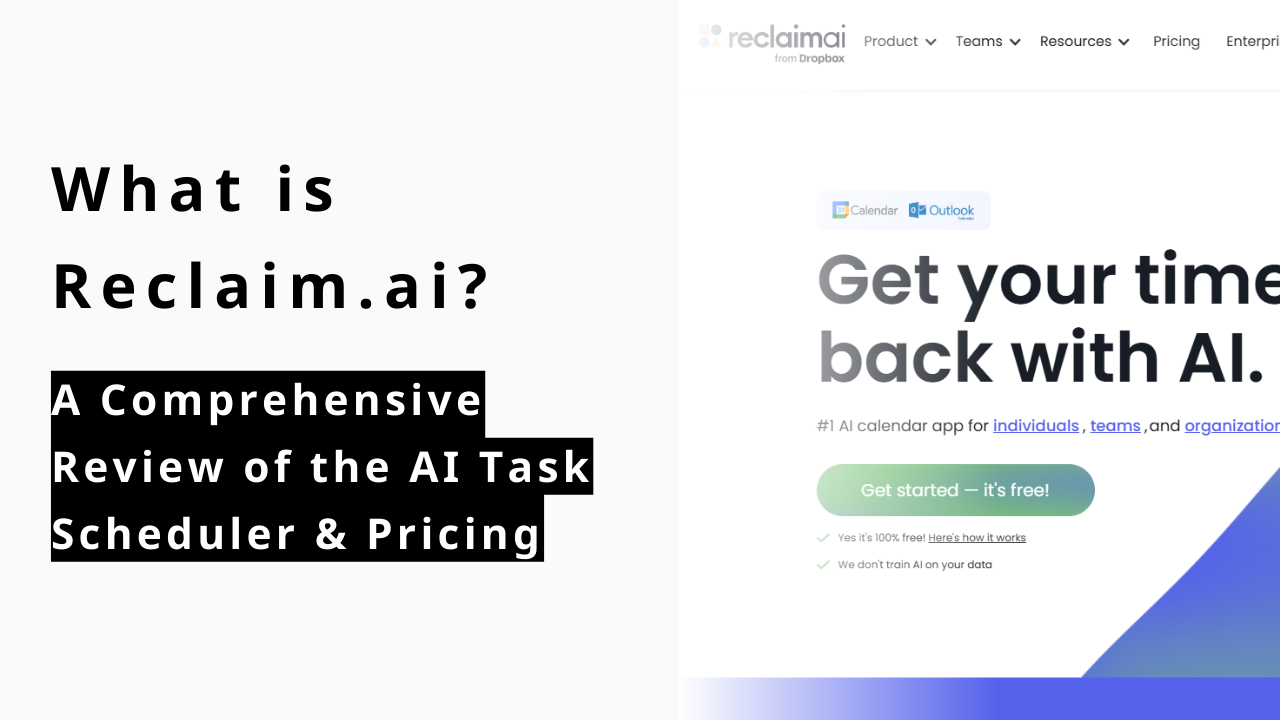
Reclaim.ai promises to solve that. It connects to Google Calendar and Outlook, then automatically schedules your focus time, tasks, habits, meetings, breaks, and even buffers around existing events. If priorities change, it reshuffles your week for you.
In this review, we’ll dive into:
What Reclaim.ai actually does (and how it feels to use)
Its pricing and where the free plan hits its limits
How it stacks up against Motion, Sunsama, and SkedPal
Where AI scheduling stops being enough—and why you need meeting analytics tools like Rimo’s Time Insight on top
FAQs on security, Outlook support, and how to cancel
The Modern Calendar Problem: Why We Need AI Scheduling
Most teams don’t have a “time problem” so much as a coordination problem:
Meetings dominate the very hours when people are naturally most productive.
Up to one-third of meetings are unnecessary, yet cancelling them is politically hard.
Even when you do have a to-do list, turning that into realistic calendar time is a manual chore.
Traditional tools (Google Calendar, Outlook) are great at storing events, but terrible at negotiating them. They don’t ask:
“When should this task really happen?”
“How much focus time do you actually need this week?”
“What happens to your habits when an urgent meeting appears?”
That’s where AI schedulers like Reclaim.ai come in. Instead of treating your calendar as a static grid, they treat it like a living schedule—constantly adjusting as your week changes.
Reclaim’s promise is simple:
Connect your calendars, set your priorities, and let AI build (and re-build) your ideal week around what matters most. |
Core Reclaim.ai Features Explained
Reclaim isn’t “just another scheduling link”. It’s closer to an AI operations layer for your time—sitting on top of Google or Outlook Calendar and orchestrating tasks, habits, and meetings in one timeline.
Automating Your Focus Time with Task Scheduling
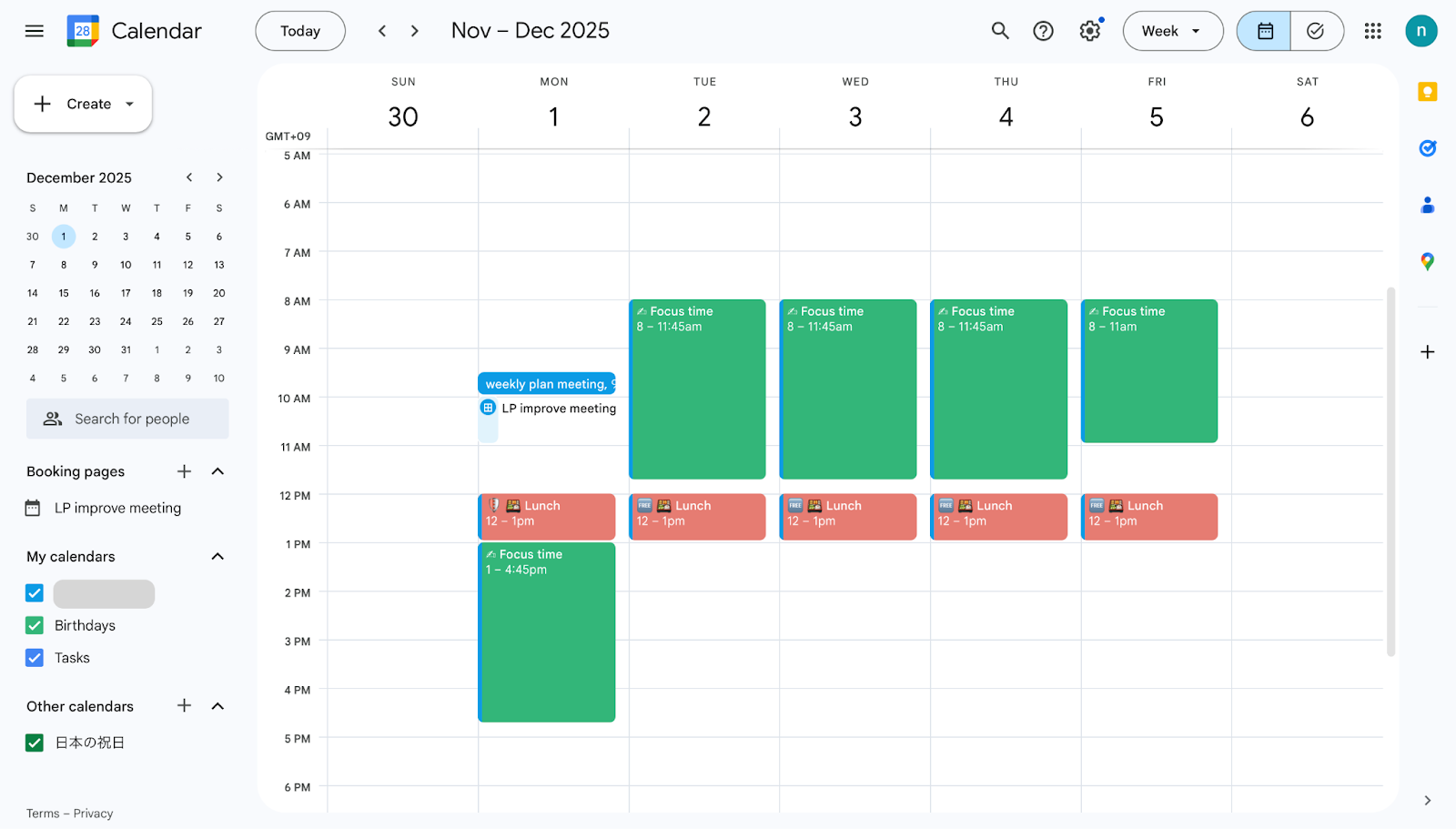
In Reclaim, a “Task” isn’t just a checkbox—it’s a negotiation with your calendar.
You tell Reclaim:
What the task is
How long it will take (or how many hours total)
When it’s due
How important it is
Reclaim then:
Breaks large projects into smaller chunks if needed.
Slots those blocks into your calendar before the deadline, around existing meetings.
Automatically reschedules them when conflicts appear (urgent call, PTO, surprise all-hands).
Typical “aha” moments:
Client-facing teams: Instead of losing an entire afternoon to meetings and then realizing at 5 p.m. that you never touched that proposal, Reclaim has already carved out two focused 60-minute windows earlier in the week.
Product & engineering: Long-running initiatives stop getting endlessly delayed because their work is pre-allocated in realistic time blocks, not wishful thinking.
This is also where the “Heal” concept comes in: when your calendar changes, tasks and focus blocks automatically “heal” themselves, sliding to the next best slot instead of just evaporating.
Protecting Routines: The Power of Habit Scheduling
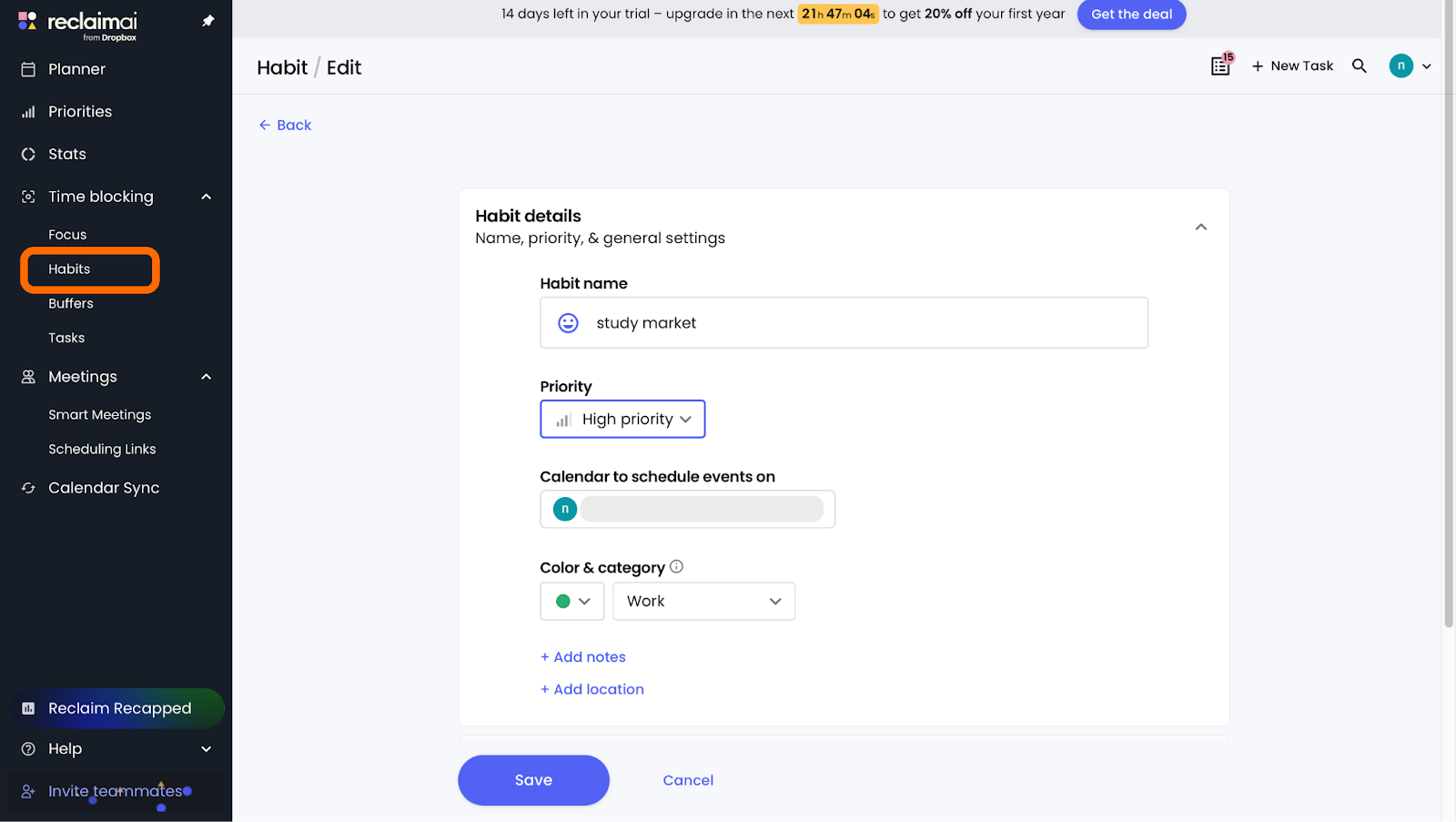
Where Tasks are about deadlines, Habits are about routines.
A Habit in Reclaim is a recurring block like:
Daily deep work from 9:00–10:30
Weekly 1-hour learning block
Workout three times per week
Lunch that actually stays on your calendar
Unlike normal recurring events, Habits are:
Flexible – they move within a time window you define.
Adaptive – they’ll self-reschedule if an important event conflicts.
Defended – they still show up as real calendar events, which discourages people from booking over them.
Real-world scenarios:
A VP blocks “no-meeting mornings” three days a week. Reclaim slides those blocks around mandatory meetings but still protects some deep work in prime hours.
A remote worker keeps losing lunch. A Lunch Habit ensures there’s always at least 30–45 minutes protected, flexing between 11:30–13:30.
For teams that care about burnout and work-life balance, this is one of Reclaim’s most underrated strengths.
Smart Meetings: Optimizing Collaboration for Teams
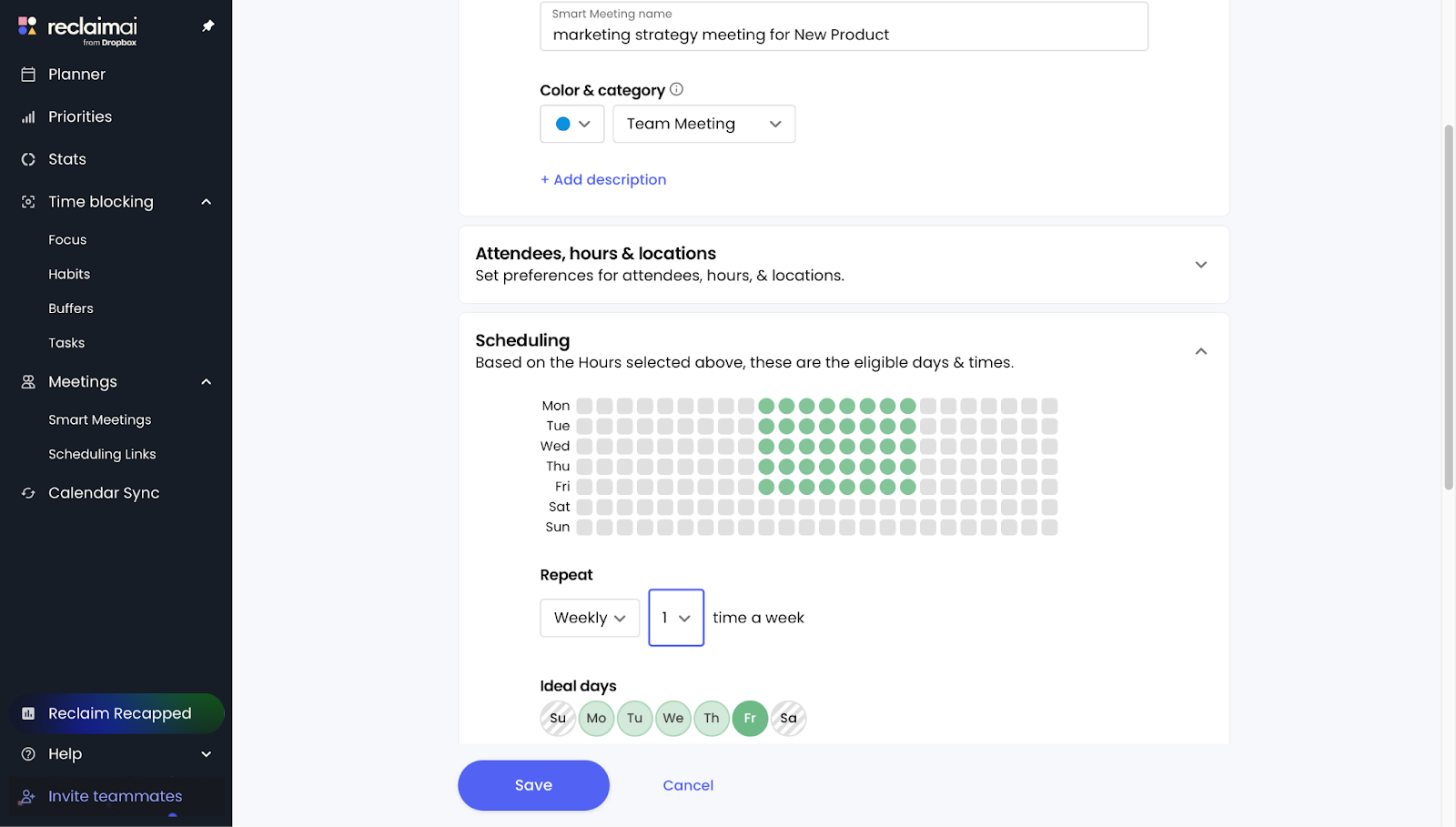
Smart Meetings are Reclaim’s answer to recurring 1:1s, team syncs, and cross-functional check-ins.
Instead of manually hunting for a slot, you:
Define who’s attending.
Set a cadence (e.g., weekly, bi-weekly).
Define preferences (time windows, duration, time zones).
Reclaim then finds and maintains the best recurring slot across everyone’s schedules, automatically rescheduling when conflicts arise—without endless email threads.
This is especially useful when:
You run cross-time-zone teams.
You have a lot of recurring 1:1s (e.g., managers with 8–12 direct reports).
Your company is experimenting with “no-meeting days” or trying to reduce context-switching.
Because Smart Meetings integrate with Reclaim’s People Analytics and Time Tracking on paid plans, you can also start to see how much of your week is swallowed by recurring meetings versus deep work.
Scheduling Links: Simplifying External Bookings
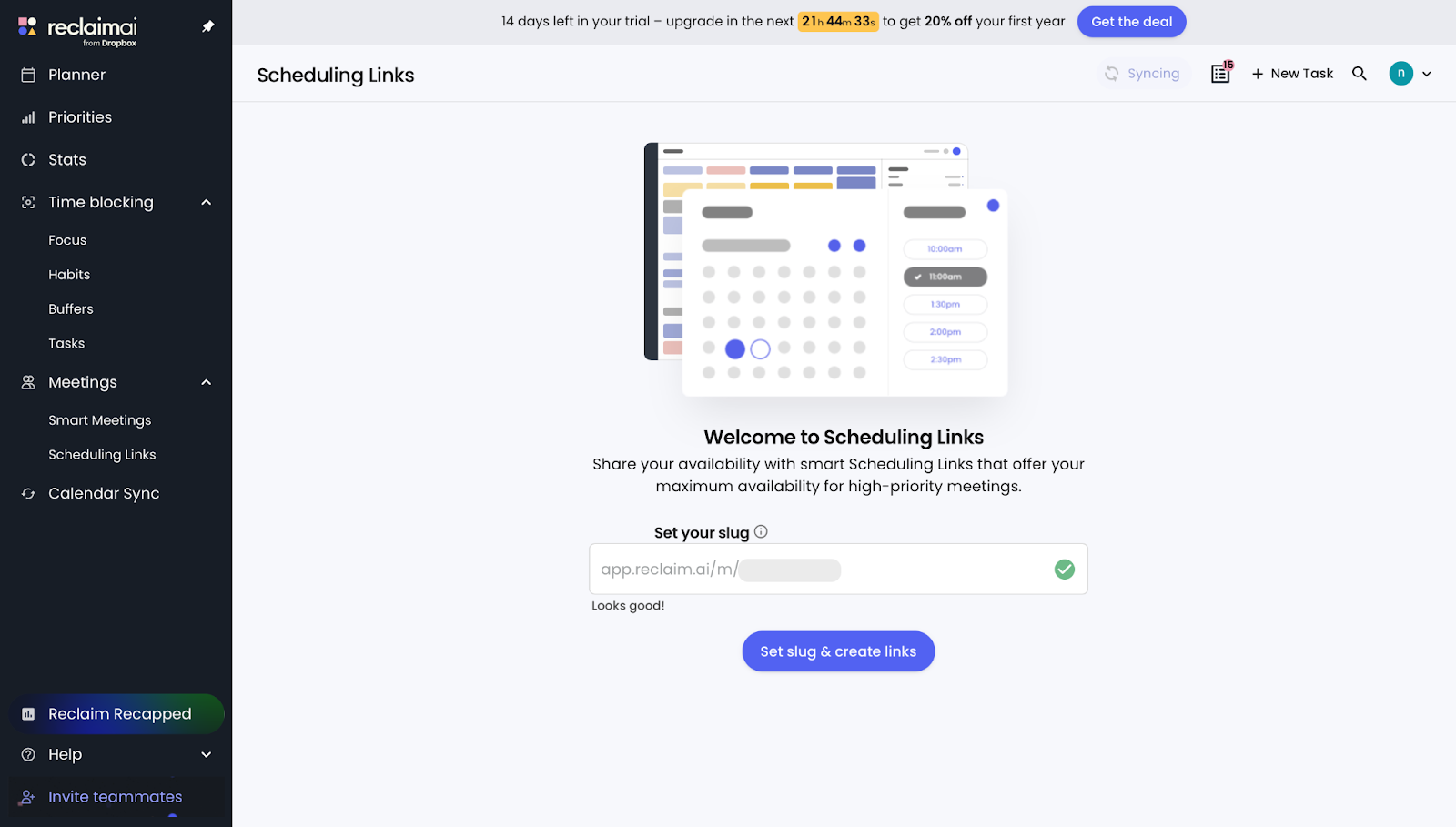
Reclaim also offers AI-powered scheduling links — the kind of booking pages that let others pick a time from your live availability — but with one big difference: they’re aware of your:
Focus time
Tasks
Habits
Buffers (built-in prep and cool-down time before and after meetings)
When someone books through your link, Reclaim will show only slots that respect your existing commitments, prioritize more important meetings over less important ones, and avoid creating the days full of random 15–30 minute gaps.
For customer-facing teams, this means less manual rescheduling and fewer “I’m actually not free then” surprises.
Reclaim.ai Pricing & Value: Is It Worth the Investment?
Reclaim’s pricing is built around team size and how far ahead you want the AI to plan.
At a high level:
Lite (Free) – great for individuals testing AI scheduling.
Starter ($10/seat/month) – aimed at small teams.
Business ($15/seat/month) – for larger teams that want unlimited meetings, links, and analytics.
Enterprise – custom pricing and deeper governance.
Breakdown of the Lite(Free), Starter, Business, and Enterprise Plans
Here’s a simplified snapshot based on the current pricing page:
Plan | Price (monthly) | Users | Scheduling Range | Habits | Scheduling Links | Smart Meetings | Integrations & Analytics |
Lite | Free forever | 1 user | 1 week | 1 | 1 | – | Limited integrations, unlimited Tasks & Buffers |
Starter | $10/seat/mo | Up to 10 seats | 8 weeks | Unlimited | 3 | 3 | Unlimited integrations; People Analytics & Time Tracking; unlimited Tasks & Buffer Time |
Business | $15/seat/mo | Up to 100 seats | 12 weeks | Unlimited | Unlimited | Unlimited | Unlimited integrations; Analytics; Delegated Access; Webhooks; unlimited Tasks & Buffer Time |
Enterprise | $22/seat/mo | 100+ seats / organization scale | 12 weeks | Unlimited | Unlimited | Unlimited | All Business plan features + SSO & SCIM user provisioning, enterprise-grade support/security, full integrations & analytics |
For most individuals or very small teams, Lite is a surprisingly generous test drive: unlimited Tasks and Buffer Time with basic Habits and calendar sync.
But the real value kicks in at Starter and Business, where you unlock:
Unlimited Habits (essential for serious routine design)
Smart Meetings
People Analytics & Time Tracking
Wider integrations (Asana, ClickUp, Jira, Todoist, Linear, etc.)
Key Features Locked Behind Paid Tiers
There are three big “paywall moments” you should know about:
Habits at scale – Only one Habit on Lite makes it hard to fully redesign your week around deep work, self-care, and recurring operational tasks. Unlimited Habits on paid plans is a huge upgrade.
Smart Meetings & Scheduling Links at scale – The 3-meeting/3-link caps on Starter force you to choose your most valuable workflows. Business removes those ceilings, which matters for managers, EAs, and sales teams who live in their calendars.
Team Analytics & People Insights – Paid plans unlock Time Tracking and People Analytics—anonymous team-level metrics on how time is allocated across meetings, focus time, and work-life balance.
If you just want to save your personal calendar from chaos, Lite may be enough.
If you’re trying to shift a team or org’s time culture, you’ll realistically want Starter or Business.
The Contenders: Brief Introduction to the Alternatives
Motion is the all-in-one AI workspace that delivers maximum automation, acting as your AI secretary to automatically schedule and continuously optimize all your tasks, meetings, and projects for peak team efficiency.
Sunsama is a daily planner that champions a mindful, low-stress routine, focusing on intentional planning where users manually time-block their tasks rather than relying on deep automation, aiming to prevent burnout.
SkedPal is a highly configurable, high-precision AI scheduler, best for rule-driven power-users who set complex constraints (like Time Maps) for the algorithm to follow, ensuring tasks are optimally placed according to their specific working patterns.
Head-to-Head Comparison: Which Tool is Right for You?
Here’s a high-level comparison focused on philosophy and best-fit use cases:
Factor | Reclaim.ai | Motion | Sunsama | SkedPal |
Core Philosophy | Protect calendar & habits; balance focus, collaboration & work-life | All-in-one task + PM + calendar in one app | Mindful daily planning & end-of-day rituals | Advanced algorithmic time-blocking |
Habit / Routine Logic | Flexible Habits that auto-reschedule around events | Task-driven; routines more implicit | Manual blocks; routines via daily review | Very rule-driven; strict and programmable |
Team Scheduling | Strong: Smart Meetings, Scheduling Links, No-Meeting Days, People Analytics | Good for internal team planning, more PM-centric | Primarily individual; light collaboration | Primarily individual, not team-first |
PM Integration Depth | Deep integrations (Asana, ClickUp, Jira, Todoist, Linear) | Native PM is built in | Broad but lighter integrations | Good task sync from select tools |
Core Strength | Dynamic, flexible rescheduling across tasks, habits, meetings + analytics | Tight coupling of projects, tasks, and calendar | Mindful, low-stress personal planning | Highly tunable rules engine for complex schedules |
Best For | Teams & individuals with busy, fluid schedules who want shared norms around focus time | Teams wanting a single app for PM + scheduling | Knowledge workers who love daily planning rituals | Power users with very complex time-blocking needs |
Reclaim.ai Pros and Cons
No tool is perfect, and Reclaim is no exception. Here’s where it shines—and where it may frustrate you.
Reclaim.ai Strengths and Weaknesses
Strengths
Deep calendar intelligence across work and life – Reclaim was built to run on top of Google and Outlook, not replace them, which makes adoption smoother for most teams.
Flexible Habits & Focus Time – Turning routines (exercise, deep work, lunch) into flexible yet defended events is one of Reclaim’s most powerful differentiators.
Team-grade scheduling – Smart Meetings, Scheduling Links, Calendar Sync, and No-Meeting Days allow teams to coordinate intelligently without endless Slack/Email threads.
People Analytics & Time Tracking – Paid plans provide analytics on how time is divided between meetings, tasks, and personal time, helping both individuals and leaders see where capacity is going.
Security & compliance – SOC 2 Type II, GDPR and CCPA compliance, and Data Privacy Framework certification are all in place—critical for enterprise buyers.
Weaknesses
Onboarding complexity for power users – Because Reclaim can touch tasks, habits, meetings, links, and analytics, it takes some time to fully tune. Less structured users may feel overwhelmed initially.
A limited free plan for routine-heavy users – One Habit and one Scheduling Link on Lite is enough to test the concept, but not enough to fully redesign your working week.
Opinionated around “calendar as source of truth” – If you dislike living inside a calendar and prefer pure Kanban boards or lists, Reclaim’s calendar-centric worldview may feel constraining.
How
Compares to Key AI Schedulers
Compared to Motion:
Reclaim assumes you’re keeping your existing PM tools and focuses on turning their tasks into smart time blocks.
Motion instead tries to be your primary work hub—projects, tasks, and scheduling in one proprietary interface.
Compared to Sunsama:
Reclaim automates more: once configured, it quietly defends focus and habits with minimal daily input.
Sunsama asks you to touch your plan every day—dragging tasks into the calendar and doing an end-of-day review. Great for reflection, less great if you’re overwhelmed.
Compared to SkedPal:
Reclaim keeps its rules approachable and team-friendly, adding People Analytics and Smart Meetings for managers.
SkedPal goes deeper into customizable rules and algorithms, ideal for personal power users but less obviously suited to large teams.
The Limit of Scheduling: Beyond Blocked Time
Here’s the uncomfortable truth: even the smartest AI scheduler only answers the question “when”.
It doesn’t ask:
“Should this meeting exist at all?”
“Was that 60-minute sync worth sacrificing two hours of deep work (including context-switch costs)?”
“What did your team actually learn in those 30,000 lifetime meeting hours?”
This is where tools like Rimo’s Time Insight come in.
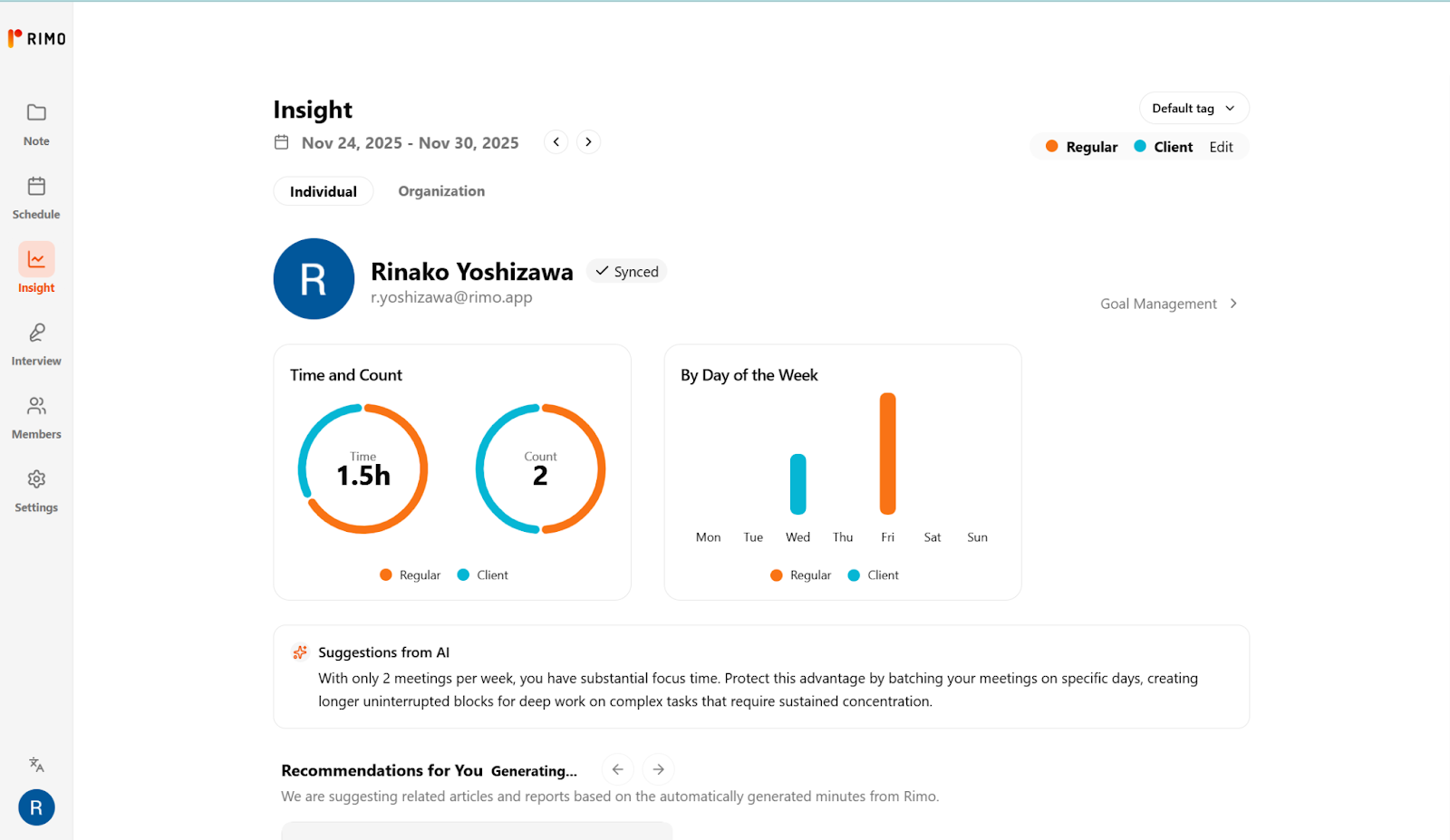
Reclaim gives you:
Great auto-scheduling
Solid analytics on time categories (focus, meetings, tasks, work-life balance)
But it doesn’t deeply analyze meeting content—the agendas, decisions, topics, sentiment, and long-term patterns of your conversations.
The Hidden Cost of Meetings: What AI Schedulers Miss
Even if Reclaim perfectly optimizes:
When your meetings happen
How protected your focus time is
How evenly workloads are distributed
…you still don’t know:
Which recurring meetings are low-ROI and ripe for elimination.
Where discussions go in circles with no decisions.
Which teams are stuck in status updates instead of problem-solving.
How many hours are lost to meetings that could have been async updates.
That’s exactly the problem Rimo frames in its own “Meeting DX” vision: organizations need not only digitized meetings, but also the ability to analyze them at scale using big data + AI.
Reclaim optimizes calendar time.
Rimo’s Time Insight layer is about optimizing meeting value.
Moving from Scheduling to Meeting Analytics
If you’re serious about reclaiming time at an organizational level, the natural progression looks like:
Digitize meetings – Use tools like Rimo Voice to capture high-quality transcripts and AI summaries across all important calls.
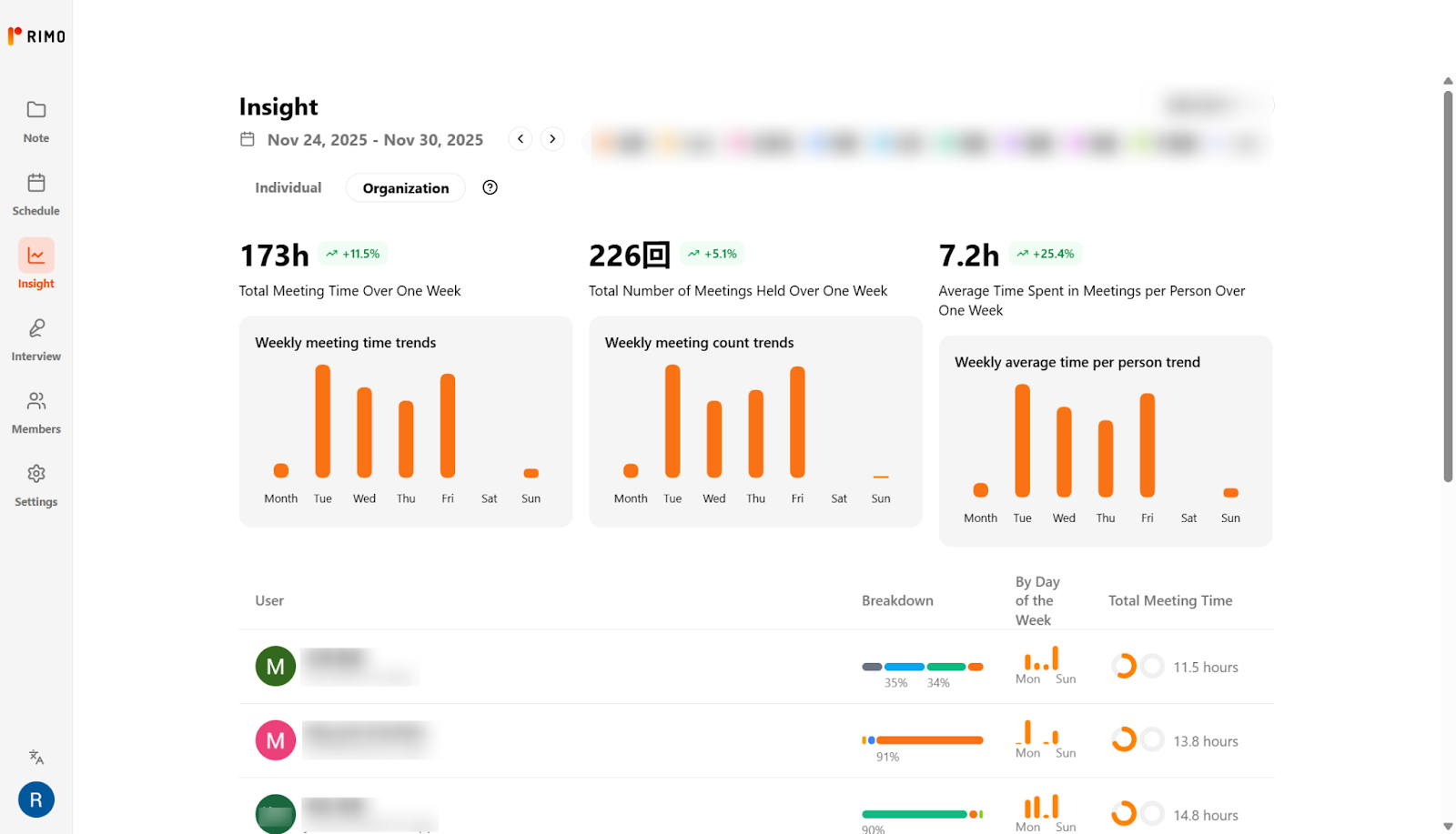
Analyze patterns at scale – Apply Time Insight-style analytics to understand:
How many hours are spent in recurring vs. ad-hoc meetings
Which topics keep resurfacing without resolution
Where cross-functional collaboration is thriving—or stuck
Act on insights – Use those analytics to:
Kill or shorten low-ROI meetings
Move certain updates to async formats
Redesign rituals (e.g., fewer status meetings, more decision-making sessions)
Support individual productivity & learning – Going beyond org-level dashboards to personalized hints.
A Time Insight–type system can, for example:
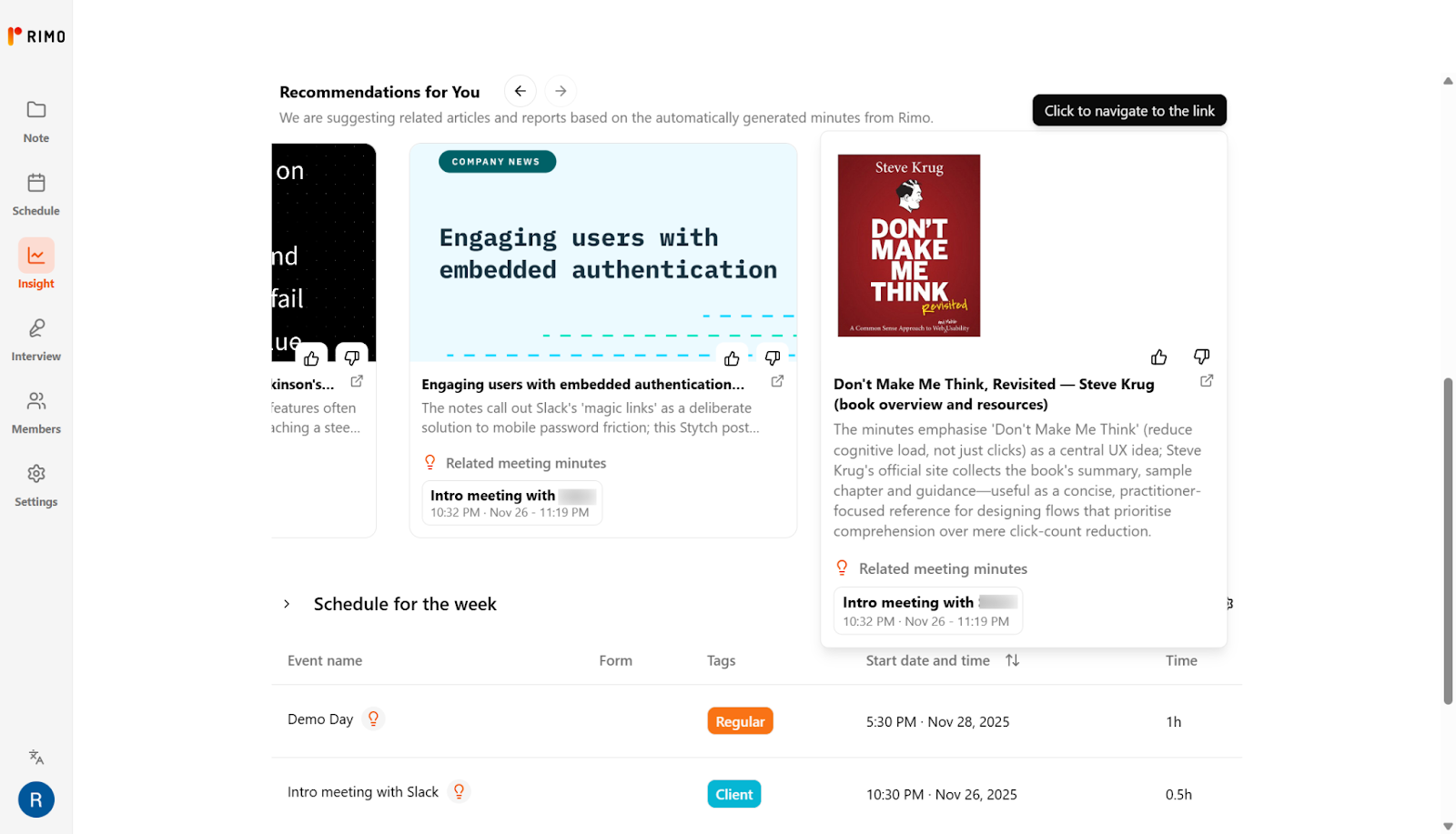
Surface relevant internal docs, past decisions, or project pages right after a meeting.
Suggest external articles, research papers, or best-practice guides based on what was discussed—turning every meeting into a mini-learning opportunity for participants.
Help individuals spot their own patterns (“You’re in repetitive status updates three times a week—consider consolidating or changing the format.”).
In short:
Reclaim.ai helps your calendar breathe.
Rimo Time Insight helps your organization and individuals learn from those meetings—and optimize the number and timing of them.
Final Verdict: Is Reclaim.ai the Best AI Calendar for You?
Reclaim.ai is one of the strongest options if you want an AI that lives on top of Google Calendar or Outlook and quietly protects your focus time, habits, and team meetings—without forcing you into a new all-in-one workspace.
Reclaim.ai is a great fit if…
You live in Google Calendar / Outlook and want AI to orchestrate tasks, habits, and focus time around real meetings.
You manage a team and need shared norms for focus time, no-meeting days, and booking rules.
You want your calendar to “heal itself” when priorities change, instead of manually repairing your week.
Even if you choose Reclaim for scheduling, it only answers “when should this happen?”.
Time Insight aims to answer “was it worth it, and what should we change next?” at both organizational and individual levels—by analyzing meeting content and surfacing useful hints and resources after each call.
Frequently Asked Questions (FAQ)
Still have questions before you connect Reclaim to your calendar? In this FAQ, we’ll quickly walk through the most common concerns we hear from teams—what Reclaim.ai actually does, how the free plan works, how it handles security, and how to disconnect it if you ever need to.
What is Reclaim.ai, and how do I use it?
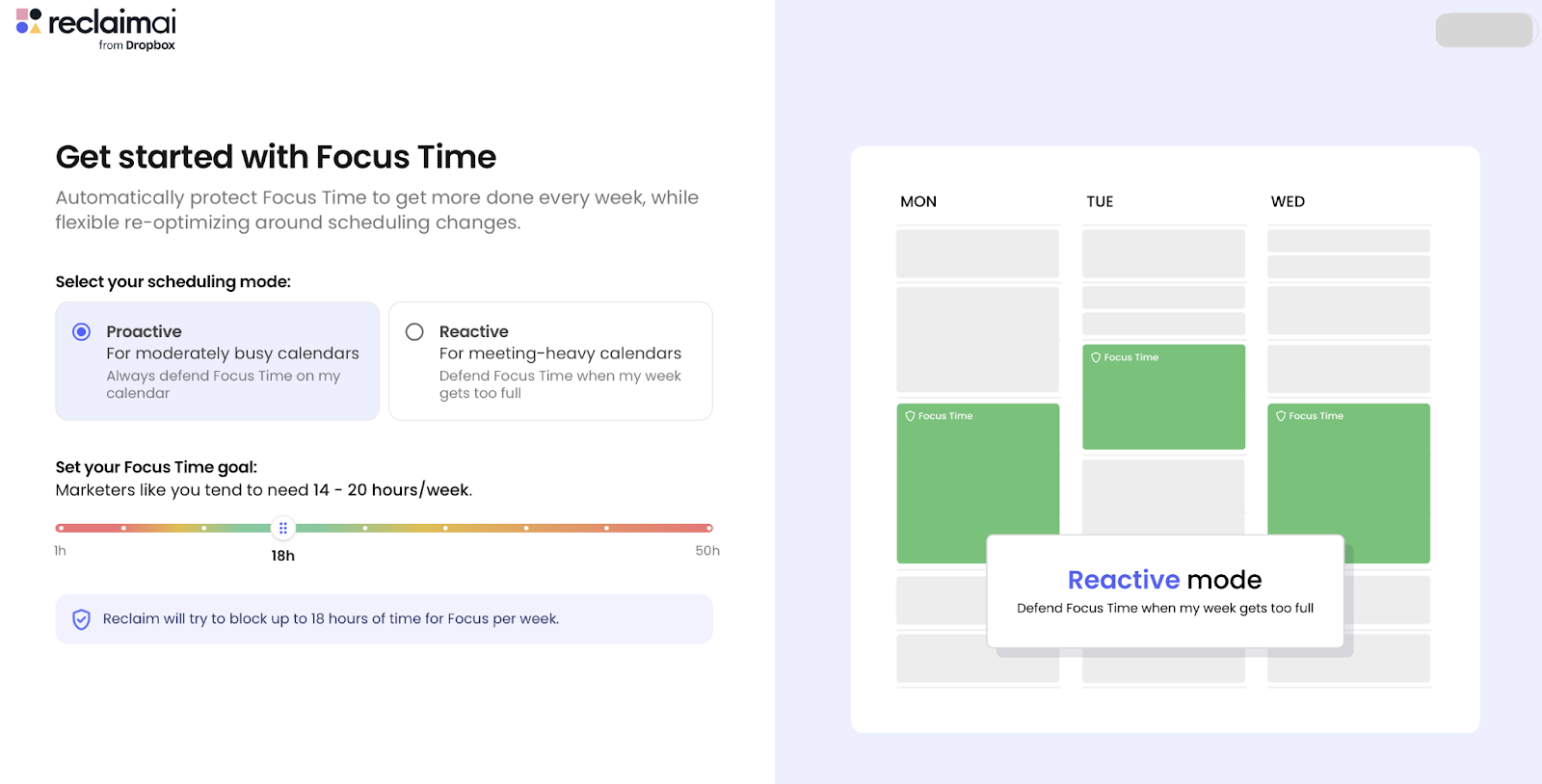
Reclaim.ai is an AI-powered scheduling assistant that connects to your Google Calendar or Outlook Calendar and automatically finds the best time for your focus time, tasks, habits, meetings, and breaks.
Connect your calendar(s).
Define Focus Time goals, Tasks, Habits, and Smart Meetings.
Let Reclaim auto-schedule and continuously adjust events as your week changes.
You still work inside Google/Outlook; Reclaim just manages the “smart events” on top.
Is Reclaim.ai free, and what are the limitations of the free plan?
Yes. The Lite plan is free forever and includes:
1 user
1 Habit
1 Scheduling Link
1-week scheduling range
Unlimited Tasks and Buffer Time
Limited integrations
It’s ideal for testing the product, but if you rely heavily on routines, team scheduling, or analytics, you’ll quickly feel the need to upgrade.
Is Reclaim.ai safe, and is my data secure?
Reclaim treats security as “Priority Zero” and has:
SOC 2 Type II certification
Compliance with GDPR, CCPA, and Data Privacy Framework
Their security docs emphasize that your calendar data belongs to you, and detail how data is collected, stored, and processed.
As always, your IT/security team should review their Trust Center and DPA, but for most organizations, Reclaim meets modern SaaS security expectations.
How does 's "Heal" function work?
Reclaim doesn’t market a button literally called “Heal”, but the concept maps to its auto-rescheduling engine:
When new events, PTO, or urgent meetings appear, Reclaim automatically moves your Tasks, Focus Time, Habits, and Buffers to the next best available slots based on your preferences.
In practice, this feels like your calendar “healing itself” after chaos—rather than leaving you with a broken schedule full of conflicts and missed work blocks.
Does Reclaim.ai work with Outlook/Microsoft 365, and does it replace my existing PM tool?
Yes. Reclaim works with both Google Calendar and Outlook Calendar, and you can connect multiple accounts (e.g., work + personal) for conflict-free scheduling.
It does not aim to replace your project management tools. Instead, it integrates with tools like Asana, ClickUp, Jira, Todoist, and others, pulling tasks into your calendar and defending time to work on them.
How do I cancel my Reclaim.ai subscription or disconnect it from Google Calendar?
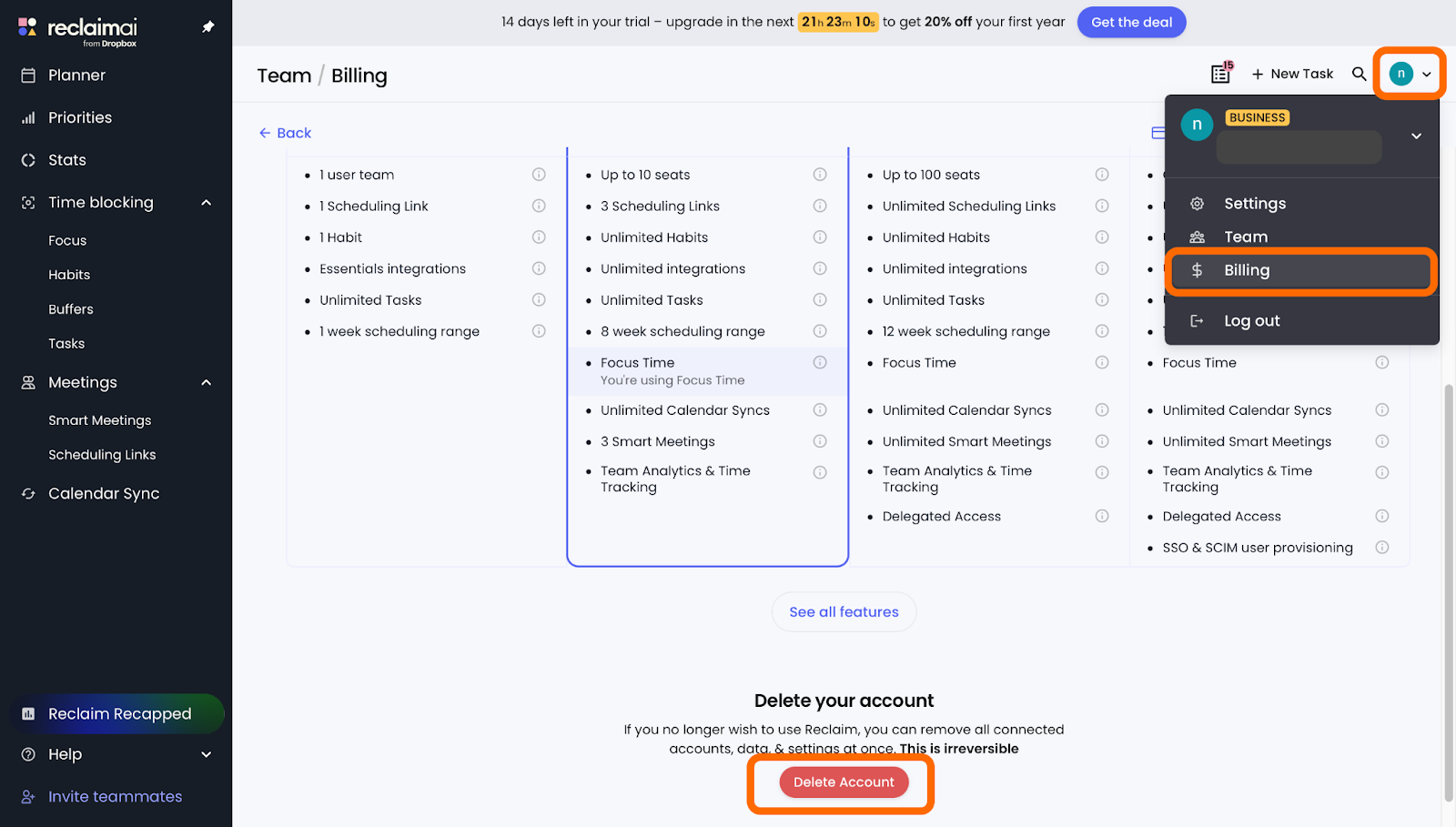
To cancel a paid subscription:
Go to Billing and Team in Reclaim.
Click “Delete Account”.
Click “Switch to Reclaim's free forever plan” and follow the prompts to finalize.
To fully disconnect from Google Calendar:
Go to Billing and Team in Reclaim.
Click “Delete Account”.
Click “Delete Your Account” and follow the prompts to finalize.
Related articles
Dramatically increase work efficiency with an AI secretary! 5 amazing tools to automate task management
Oct 20, 2025
Fellow app Review 2026: Why It’s the Only "AI Chief of Staff" Your Team Needs
Jan 27, 2026
Lindy AI Review (2026): The Best "AI Employee" or Just Hype? A Deep Dive into Agents and Automation
Jan 26, 2026
Return to List