
Coconote Review 2026: App Reviews, Pricing, and a Real Lecture Recording Test


Taking notes during class sounds easy until the lecture starts moving faster than your hands can type.
You may understand the main idea while listening, but still miss key terms, numbers, examples, or the professor’s final point. Recording the lecture can help, but replaying a full class before an exam is not always realistic.
Coconote is an AI study app that helps students turn lecture recordings, PDFs, and study materials into AI notes, flashcards, quizzes, and review content.
In this Coconote review, we look at what the app does, what users say about it in App Store, Google Play, and Reddit reviews, how much it costs, and which students may benefit from it most. We also test Coconote with a lecture-style recording to see whether it can actually help students review class content more easily.
If your lecture recordings usually stay untouched, or if your notes feel too messy to study from before an exam, this review will help you decide whether Coconote is worth trying.
What Is Coconote?
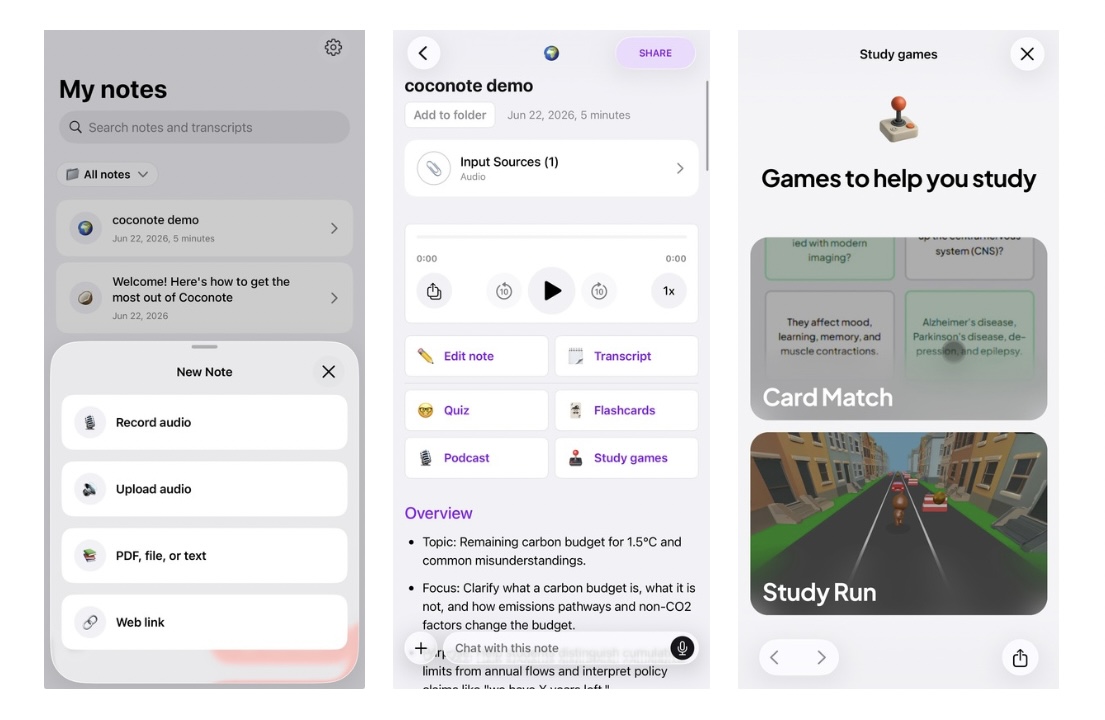
Coconote is an AI note-taking and study app that helps students turn class content into review materials.
It is not just a lecture recorder. Coconote is designed for what happens after class: reviewing key points, checking important terms, and turning lecture content into flashcards, quizzes, or study guides.
For example, a student might record a biology lecture, upload a class PDF, and use Coconote to review the main concepts before an exam. Another student might use it after an English-language lecture to check terms or details they missed during class.
Coconote is best for students who want to make lecture review faster. It does not replace learning or checking the original class materials, but it can reduce the gap between “I recorded the lecture” and “I can actually study from this.”
What Is the Coconote App Used For?
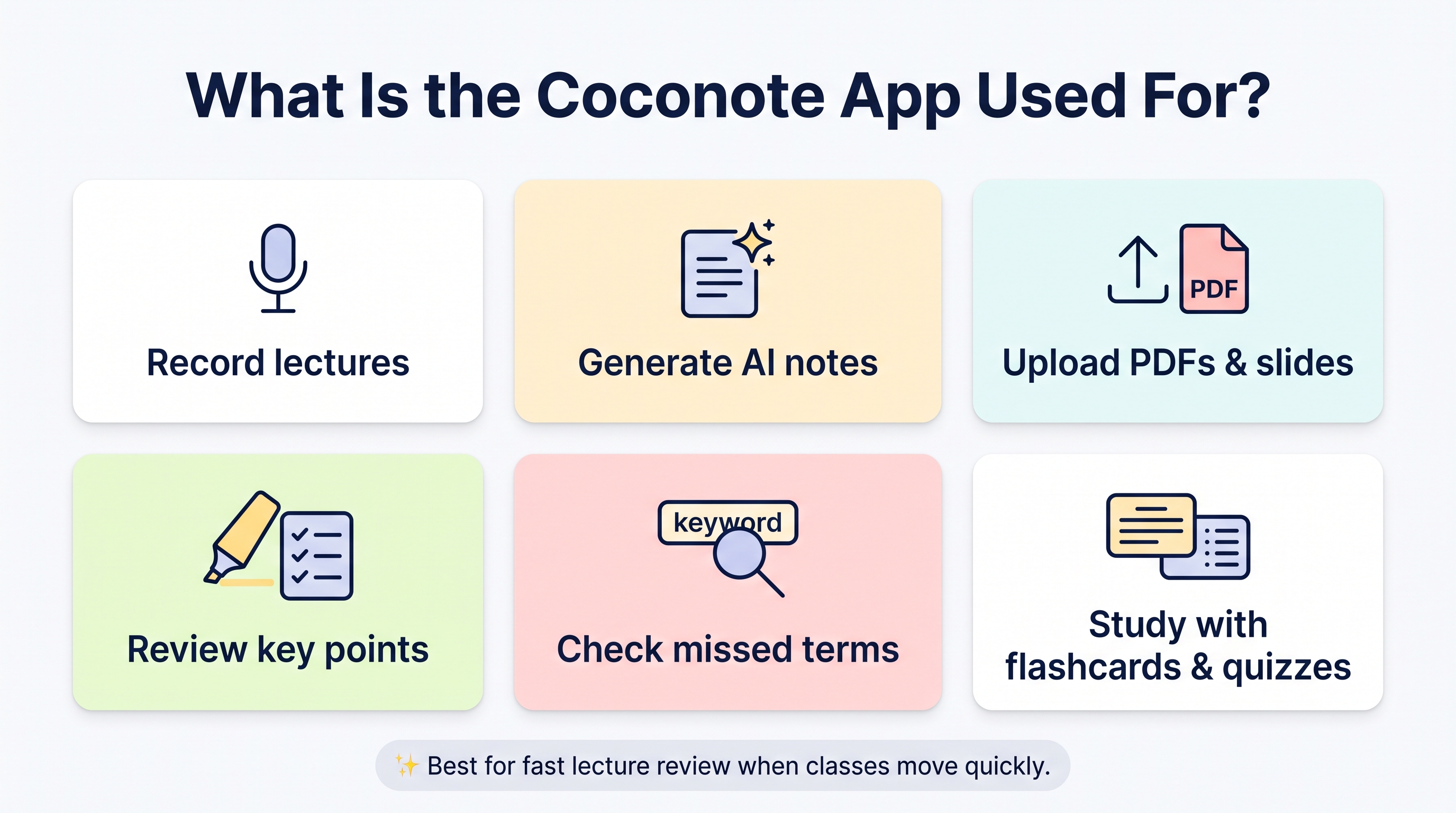
The Coconote app is used to turn class content into materials students can review after the lecture.
With Coconote, students can:
record lectures during class
create AI notes from lecture audio
upload PDFs, slides, or other study materials
review key points after class
check important terms they may have missed on supported plans
study with flashcards or quizzes before exams
This makes Coconote useful when a class moves quickly. In a psychology lecture, for example, a professor may mention cognitive dissonance, confirmation bias, availability heuristic, and operant conditioning in the same session. If you stop to write down one term, you may miss the next explanation.
Coconote gives students something to return to after class. Instead of relying only on memory or messy notes, you can review AI-generated notes, check key terms, and use study tools before a quiz or exam.
It may also help students who already have slides, PDFs, or reading materials but do not have time to turn them into study notes manually.
How to use Coconote
The basic Coconote workflow is simple: record or upload, generate AI notes, then review the content with flashcards, quizzes, or study materials.
A typical student workflow may look like this:
Record a lecture during class.(Upload a PDF, slide deck, or reading material if needed.)
Let Coconote generate AI notes and key points.
Review the notes after class.
Use flashcards or quizzes before a test.
This workflow is useful because many students do not only struggle with taking notes. They also struggle with using those notes later.
A one-hour lecture recording can still feel like homework if you have to replay the entire thing. AI notes and study tools can make the recording easier to return to.
What Students Should Know Before Using Coconote
Coconote can be useful, but students should not treat AI-generated notes as perfect.
The quality of the notes can depend on the recording environment, the professor’s voice, classroom noise, the speed of the lecture, and how many technical terms appear in the audio.
If you record from the back of a large lecture hall, the app may not capture every word clearly. If you record a seminar where several students speak, you may also need to think about permission and privacy.
A good way to use Coconote is to treat it as a review assistant, not as the final version of your notes. After class, check the AI notes, correct anything that looks wrong, and add your own understanding before relying on them for exams or essays.
What Do Coconote Reviews Say?
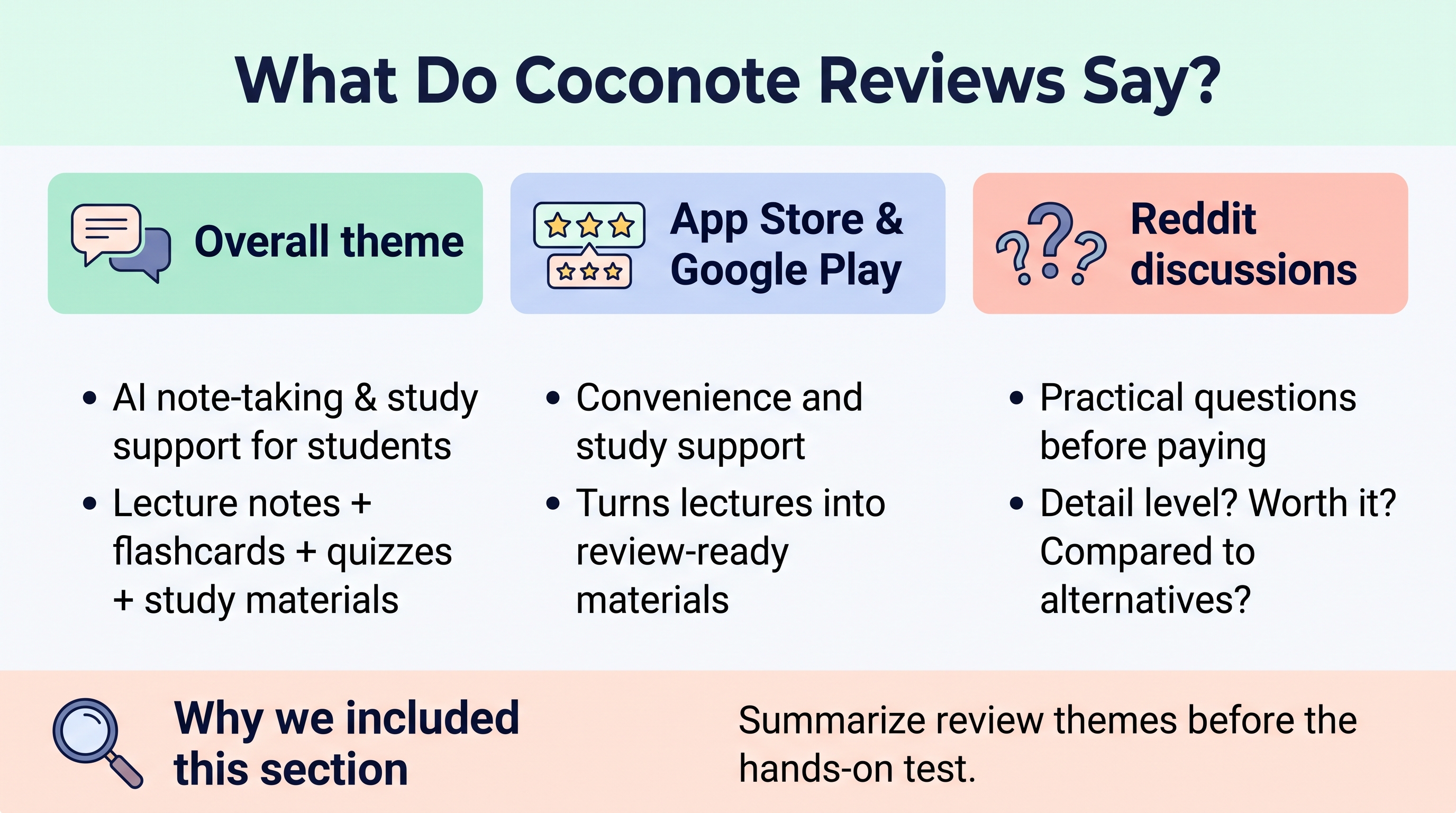
Across App Store, Google Play, and Reddit discussions, Coconote is generally described as an AI note-taking app for students who want lecture notes, flashcards, quizzes, and study materials.
App store reviews tend to focus on convenience and study support. Reddit comments often include more practical questions: Is it detailed enough? Is it worth paying for? Is it better than another AI note taker or a flashcard app?
This section summarizes those review themes before moving into the hands-on test.
What Users Like About Coconote in App Store Reviews
App Store and Google Play listings suggest that users are interested in Coconote because it turns lectures into something easier to study.
As of our check, the US App Store lists Coconote with a 4.8 out of 5 rating and 16K ratings, which suggests that the app has already been used and reviewed by a large number of users.
For example, one App Store review says Coconote turns PowerPoints and lectures into notes the user can actually study from. The same review also mentions that the podcast-style breakdown helps them understand why the material matters. This suggests that some users value Coconote not just as a transcription tool, but as a way to make class content easier to process after the lecture.
Other reviews and app listings point to similar use cases. Students seem to like that Coconote can:
“I recorded the lecture, and now I have notes I can study from.”
“I do not have to replay the whole class just to find the important points.”
“The quizzes and flashcards make review feel easier before an exam.”
“It helps me go back to difficult material when my own notes are too messy.”
“This is useful when I understand the lecture in the moment but forget the details later.”
For a student with three lectures in one day, this matters. Replaying every recording before a test is unrealistic. Reviewing notes, checking key terms, and using quizzes can make exam preparation feel more manageable.
What Reddit Users Seem to Ask About Coconote
Reddit discussions show a slightly different side of Coconote reviews. While app store reviews often focus on what users like, Reddit comments tend to sound more like students comparing options before committing to an app.
The questions are practical. Students are not only asking, “Does Coconote have AI notes?” They are asking whether it will actually help when they are behind on lectures, preparing for exams, or trying to avoid paying for another subscription.
From Reddit discussions, the concerns often sound like this:
“Has anyone actually used Coconote for class notes?”
“Is it good enough for real lectures, or does it just make short summaries?”
“Are the quizzes and flashcards useful, or would Quizlet be enough?”
“Can I use it for free, or will I need to keep paying?”
“How does it compare with other AI note-taking apps?”
These questions are important because they show what students really care about. A study app does not only need to look useful on the app store. It needs to help when a lecture was hard to follow, when notes are incomplete, or when an exam is close and there is no time to replay every recording.
What We Decided to Test Based on These Reviews
Based on the App Store listing, Google Play description, and Reddit discussions, we tested Coconote around the questions students are most likely to ask before relying on it for class review:
Can Coconote turn a lecture recording into AI notes that are detailed enough to study from?
Does it capture key terms, examples, and the overall flow of the lecture?
Are the flashcards and quizzes useful for exam review, or are they too basic?
Can PDFs and other study materials be turned into review-friendly content?
How much can students actually do for free before needing a paid plan?
These questions help us evaluate Coconote as a practical study tool, not just as an app with AI note-taking features. For students, the app is only useful if it works well with real class materials and if the free or paid plan fits the way they study.
Coconote Recording Test: Do the Reviews Match the Real Results?
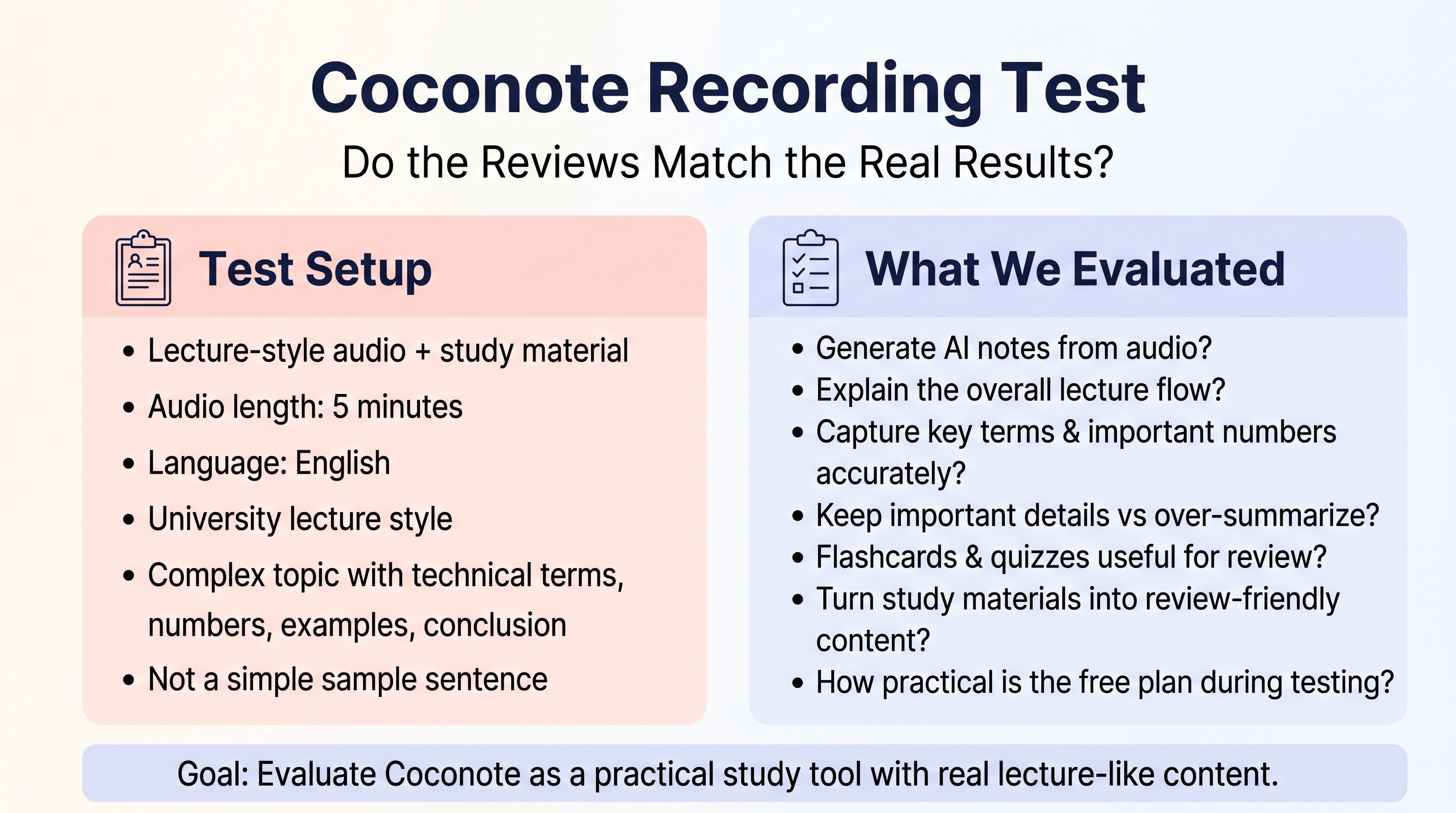
We tested Coconote with a lecture-style audio recording and study material.
For this test, we prepared a lecture-style audio recording instead of using a simple sample sentence or short memo.
The test audio was:
five minutes long
in English
recorded in a university lecture style
based on a complex topic
designed to include technical terms, numbers, examples, and a clear conclusion
complex enough to test how well Coconote could handle difficult lecture content
We checked Coconote based on the same questions that came up in reviews and student discussions:
Could it create AI notes from the lecture recording?
Could the notes explain the overall flow of the lecture?
Did it capture technical terms and important numbers correctly?
Did it keep important details, or did it summarize too much?
Were the flashcards and quizzes useful for review?
Could study materials be turned into review-friendly content?
How practical did the free plan feel during the test?
・
AI Notes Test: Did Coconote Capture the Lecture Clearly?
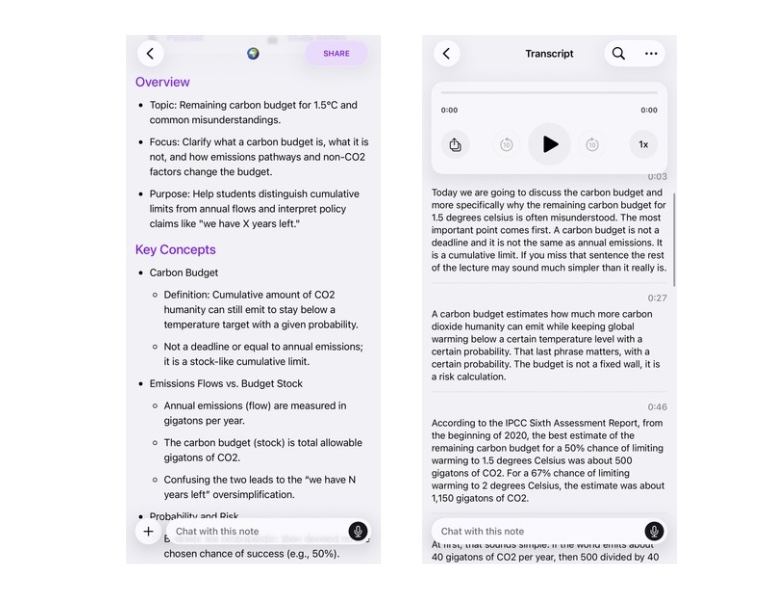
Overall, Coconote did a good job of turning the lecture recording into a structured study summary. The output was easier to review than a full audio recording, especially for checking the main topic, important terms, and the overall logic of the lecture.
Test Point | Result | What We Found |
Overall summary | Good | Coconote captured the main topic and central argument of the lecture. |
Structure | Good | The notes were organized into sections such as an overview, key concepts, definitions, a summary table, and next steps. |
Key concepts | Good | The app identified related concepts that could easily be confused and separated them clearly. |
Important details | Mostly good | The notes included important points, but some explanations were condensed. Students may still need to check the original material for deeper understanding. |
Review usefulness | Good | The output was useful for quick review, key term checking, and exam preparation. |
Lecture flow | Mixed | The notes were easy to read, but they felt more like a structured study summary than a step-by-step explanation of the original lecture. |
Best use case | Strong | Coconote worked well for turning a complex lecture into review-friendly notes. |
This result matches what many students seem to expect from Coconote. It is useful when you do not want to replay the full recording but still need to understand the main points and review the lecture later.
However, students should not treat the AI notes as a complete replacement for the original class material. For deeper understanding, essay writing, or more detailed analysis, it may still be necessary to add personal notes or compare the summary with the original lecture.
Flashcards and Quizzes Test: Useful for Review or Too Shallow?
We also tested the flashcards and quizzes generated from the lecture content.
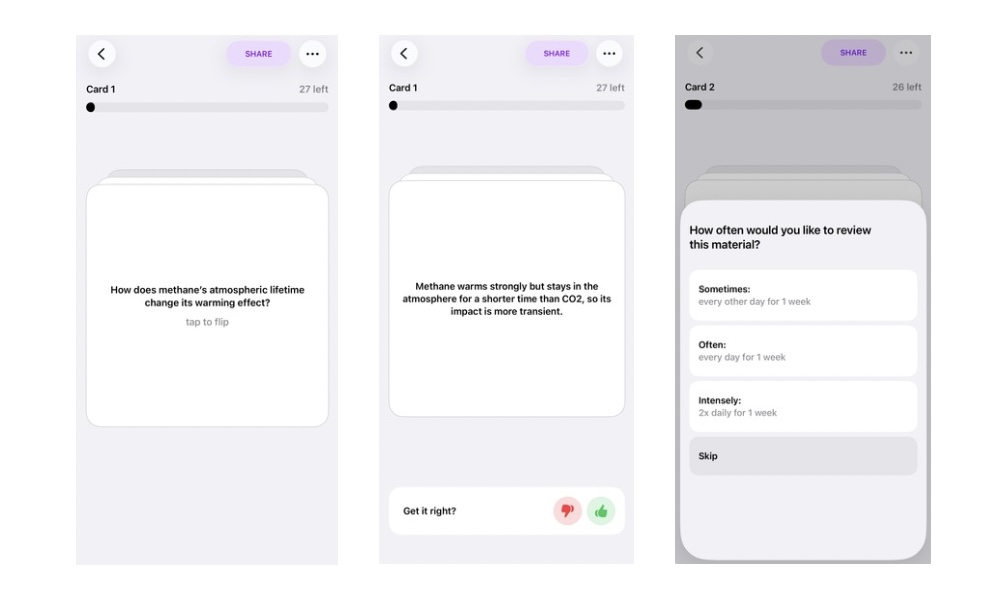
Flashcards
The flashcards were useful for reviewing key terms and basic concepts without reading the full AI notes again. Students can also mark cards based on how well they understand them, so difficult or insufficiently understood cards can appear more often.
This makes the flashcards helpful for quick review and for focusing on weak points before a quiz or exam.
Quizzes
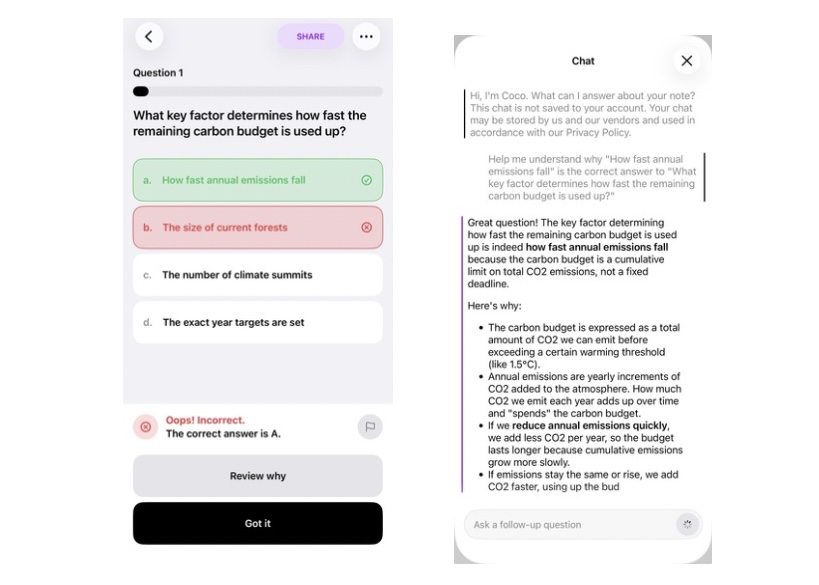
The quizzes helped check whether students understood the main points of the lecture. After each answer, Coconote showed whether it was correct or incorrect.
When an answer was wrong, students could move to an explanation and review the related content. If the explanation was still not clear enough, they could also ask additional questions.
This made the quiz feature more useful than a simple right-or-wrong check. It helped students find weak points and return to the material without replaying the full lecture.
Overall, the flashcards and quizzes were useful for quick review, but students may still need deeper study for more complex topics.
PDF and Study Material Test: Can Coconote Turn Materials into Study Aids?
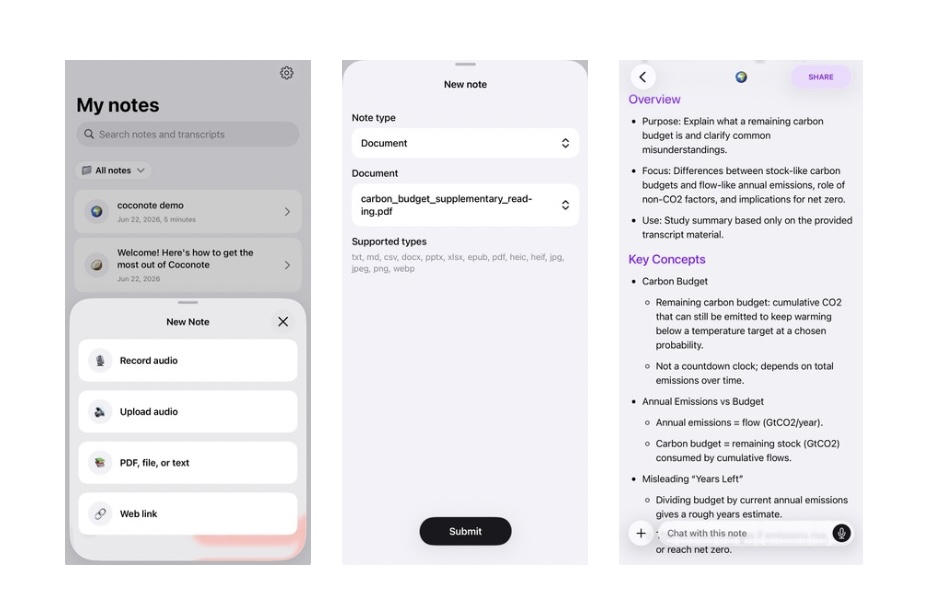
We also tested Coconote with a PDF study material.
One important point is that PDF and document uploads were not available on the free plan in our test. To upload study materials, students need a paid version. This is worth noting because students who want to use Coconote only for lecture recordings may be able to start more easily, while students who want to upload PDFs, handouts, or class documents should check the plan requirements before subscribing.
Once the PDF was uploaded, Coconote was able to turn the material into study-friendly content. It created notes from the document and also generated review tools such as quizzes.
The output captured the main points of the PDF well. It identified the central topic, picked up important explanations, and organized the content in a way that was easier to review than reading the document from the beginning again.
This was useful because many students do not study from audio alone. They often have lecture slides, PDFs, handouts, or reading materials. Coconote’s PDF feature can help turn those materials into notes and review questions, making it easier to prepare before a quiz or exam.
Where Coconote Matched the Reviews — and Where It Needed a Second Look
After testing Coconote with a lecture recording and PDF study material, many of the positive reviews made sense.
Coconote worked well for turning class content into review materials quickly. It created structured AI notes, picked up the main points, and generated flashcards and quizzes for quick review. The PDF test also showed that it could turn written study material into notes and review questions.
This matched what many students seem to expect from Coconote: less time replaying recordings, easier access to key points, and more ways to review before a quiz or exam.
However, the test also showed a few points to check. The AI notes were useful, but they felt more like a structured study summary than a deep explanation of the lecture. For deeper understanding, essay planning, or research notes, students may need to add their own notes or use another tool for further organization.
Pricing is another point to consider. In our test, PDF and document upload required a paid plan, so students who want to use Coconote with slides, handouts, or PDFs should check the plan details before subscribing.
Overall, Coconote matched many of the positive review points. It is useful for quick review and exam preparation, but students should think about whether they need simple review materials or more reusable, structured notes.
Rimo Comparison: What Changed When We Used the Same Lecture in Rimo?
We also tested the same lecture recording in Rimo.
Rimo is an AI transcription and note-taking tool that turns recorded audio into transcripts, summaries, and structured notes. Although it is often used for meetings, it can also be useful for students who want to review lecture recordings, ask follow-up questions, or reuse lecture content for study materials.
In our test, Rimo organized the lecture into clear sections and kept the logic of the lecture easy to follow. It separated the main definition, common misunderstandings, supporting examples, and key takeaways in a way that felt closer to a structured written note than a quick review card.
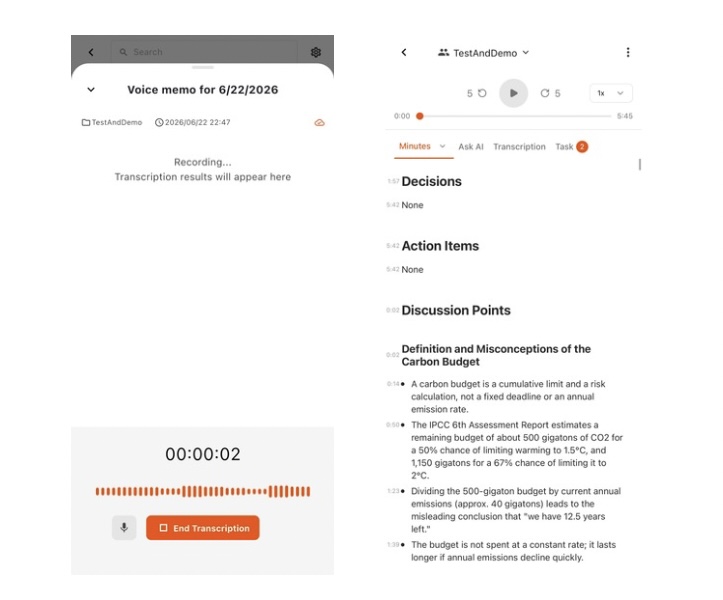
Test Point | Result | What We Found |
Overall summary | Good | Rimo captured the main topic and organized the lecture into a readable summary. |
Lecture structure | Strong | The lecture was divided into sections, making the flow easier to follow. |
Key concepts | Good | Important concepts, examples, and conclusions were separated clearly. |
Detail level | Good | The output kept enough detail to review the lecture beyond a short summary. |
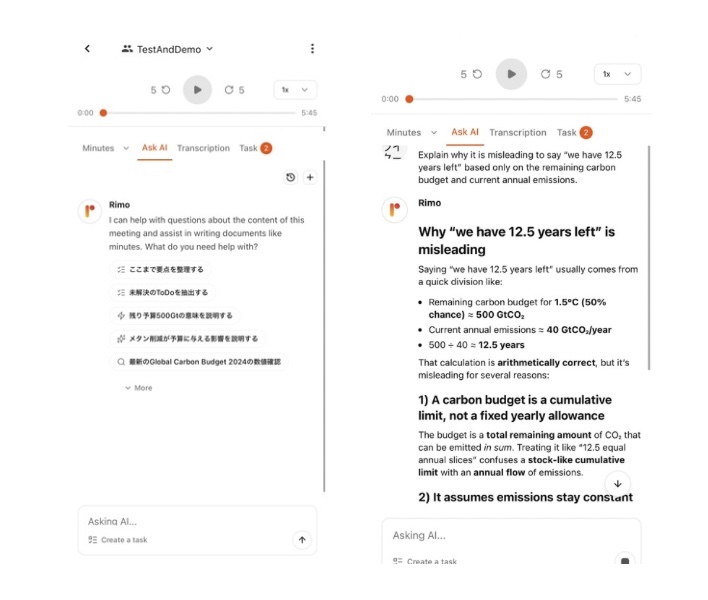
AI chat | Strong | Students could ask follow-up questions about confusing points in the lecture. |
Reuse | Strong | The notes could be developed into a study guide, essay outline, or research memo. |
The AI chat was especially useful. For example, when we asked why a common interpretation from the lecture was misleading, Rimo broke the answer into clear points and explained the logic behind the mistake. This made it useful not only for reviewing what was said, but also for checking whether the student understood the reasoning.
Compared with Coconote, the main difference was the study style. Coconote was more convenient for quick review because it generated flashcards and quizzes. Rimo did not offer the same quiz-style workflow, but it was useful for asking questions, following the lecture structure, and turning the content into reusable study outputs.
This does not mean one tool is better for every student. Coconote may fit students who want fast review materials before a quiz or exam. Rimo may fit students who want to understand a lecture more deeply, ask follow-up questions, or reuse the content for writing and research.
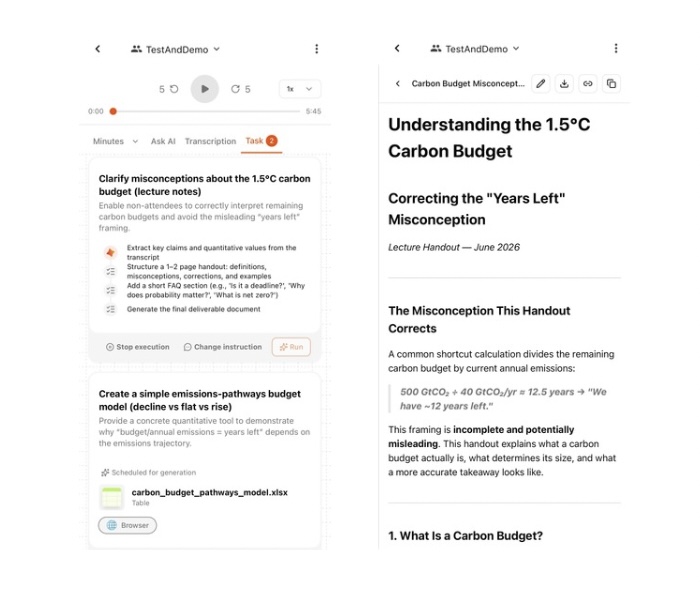
Rimo also offers Rimo Actions, a feature designed to turn recorded content into next actions or written outputs. It is more business-focused than student-focused, but it shows Rimo’s broader direction: not only saving what was said, but also helping users turn recorded content into something they can use next.
Our Verdict from the Test: Quick Review vs Deeper Lecture Understanding
The test results matched many of the points we saw in Coconote reviews. Coconote was useful when the goal was to turn lecture content into review materials quickly. It created AI notes, flashcards, quizzes, and PDF-based review content in a way that made studying feel more manageable.
At the same time, the test also showed that students should choose a tool based on what they want to do after class. Quick review and deeper understanding are not always the same task.
Study Goal | Tool That May Fit Better | Why |
Memorizing key terms | Coconote | Flashcards make it easy to review important terms repeatedly. |
Quick review before a quiz or exam | Coconote | AI notes, quizzes, and review tools help students check the main points quickly. |
Reviewing PDFs and class materials | Coconote | Uploaded materials can be turned into notes and quizzes, although this may require a paid plan. |
Understanding the lecture flow | Rimo may also be worth considering | Rimo organizes the lecture into structured sections and makes the logic easier to follow. |
Asking follow-up questions | Rimo may also be worth considering | Students can ask AI chat to explain confusing points in simpler terms. |
Reusing lecture content for essays or research | Rimo may fit better | Structured notes can be easier to develop into a study guide, essay outline, or research memo. |
Overall, Coconote is a strong option for students who want fast, review-friendly study materials. It is especially useful when you want to turn a lecture into notes, flashcards, and quizzes without spending a lot of time organizing everything manually.
Rimo, on the other hand, may be helpful when students want to go beyond quick review. If the goal is to understand the lecture more deeply, ask questions, or reuse the content for writing, Rimo is also worth comparing.
The best choice is not about which app is better overall. It depends on what kind of student you are and what you want to do with the lecture after class.
Coconote Pricing: Is Coconote Free?
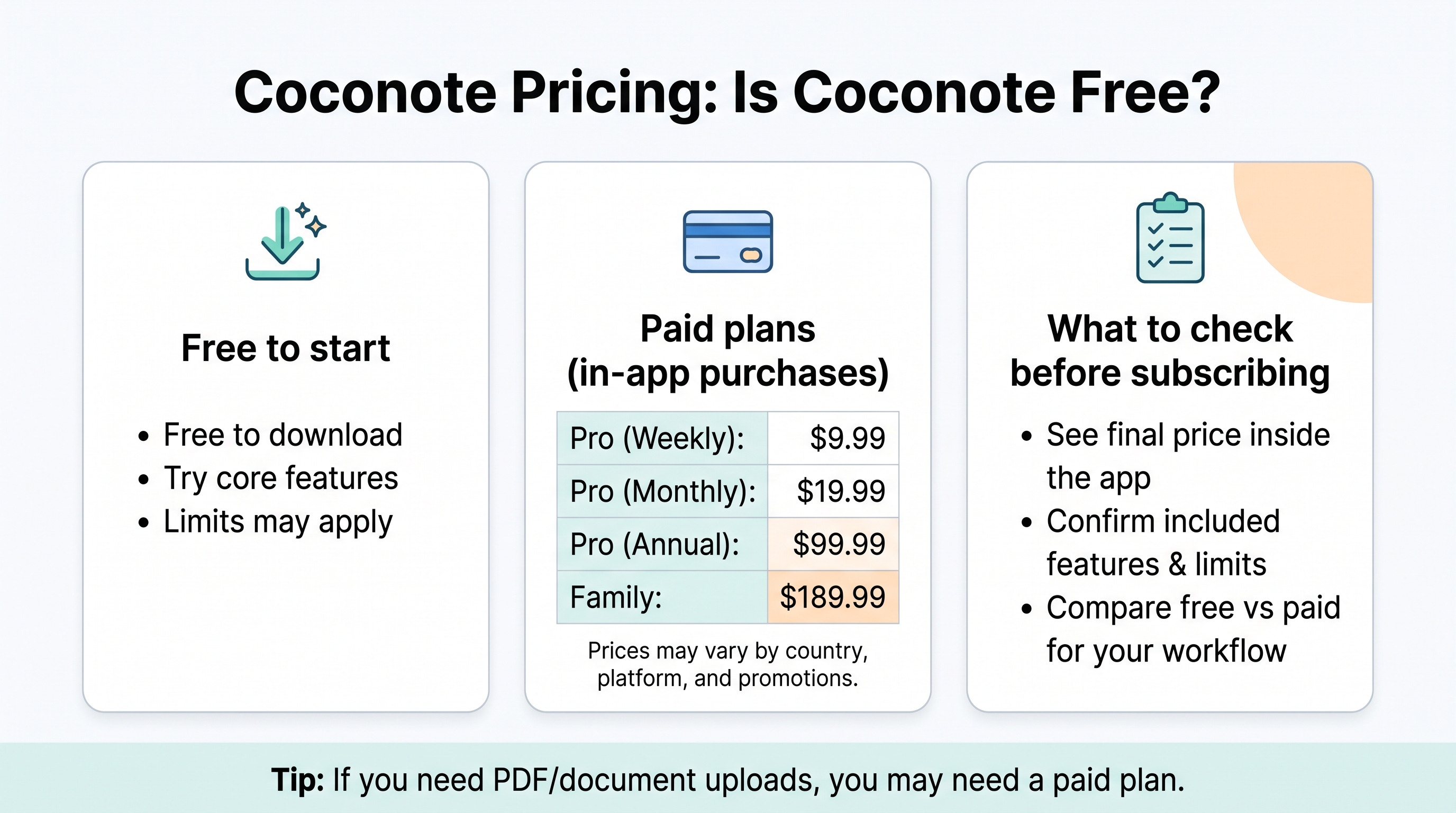
Coconote is free to download and use to get started, but it also offers paid options for students who need more usage or added features.
Because pricing can vary by country, platform, and promotion, students should check the final price inside the app before subscribing. Still, the publicly available information gives a useful snapshot of what to expect.
Here is the current pricing information we found at the time of writing:
Plan | Price |
Free Plan | Free |
Pro Plan | Weekly: $9.99~ Monthly: $19.99~ Annual: $99.99~ |
Family Plan | $189.99 |
Coconote Free Plan: What You Can and Cannot Do
Coconote can be downloaded for free, and students can use the basic study features to get started. This means that free users can try core functions such as lecture recording, AI notes, study guides, quizzes, and flashcards.
However, the free plan is not unlimited. While the main features are available to try, there may be limits on how often students can use them. For example, the free version may limit the number of notes, recordings, uploads, or AI-generated study materials a student can create.
This makes the free plan useful for testing Coconote with real class content. Students can record or upload a lecture, check the quality of the AI notes, and see whether the quizzes and flashcards are helpful before deciding whether to upgrade.
Coconote Paid Plan: How Much Does Coconote Cost?
Coconote’s paid plan is for students who want to use the app beyond basic lecture recording and light review.
The biggest reason to upgrade is access. According to Coconote’s public information, the Unlimited Pass includes unlimited notes, priority support, and added features. In our test, PDF and document uploads also required a paid plan, so students who want to study from slides, handouts, or PDFs should pay attention to this point.
This matters because Coconote becomes more useful when students can combine different study materials. For example, a student may record a lecture, upload the class PDF, and then generate notes, flashcards, and quizzes from both. That kind of workflow is closer to using Coconote as a full study app, not just a lecture recorder.
For students who only want to test one or two lecture recordings, the free plan may be enough to start. But if you want unlimited notes, document uploads, and more room to generate study materials, the paid plan may be worth considering.
Before subscribing, check the latest in-app pricing and limits, because prices and included features may vary by country, platform, and billing period.
Coconote Alternatives: Which Study App Fits Your Workflow?
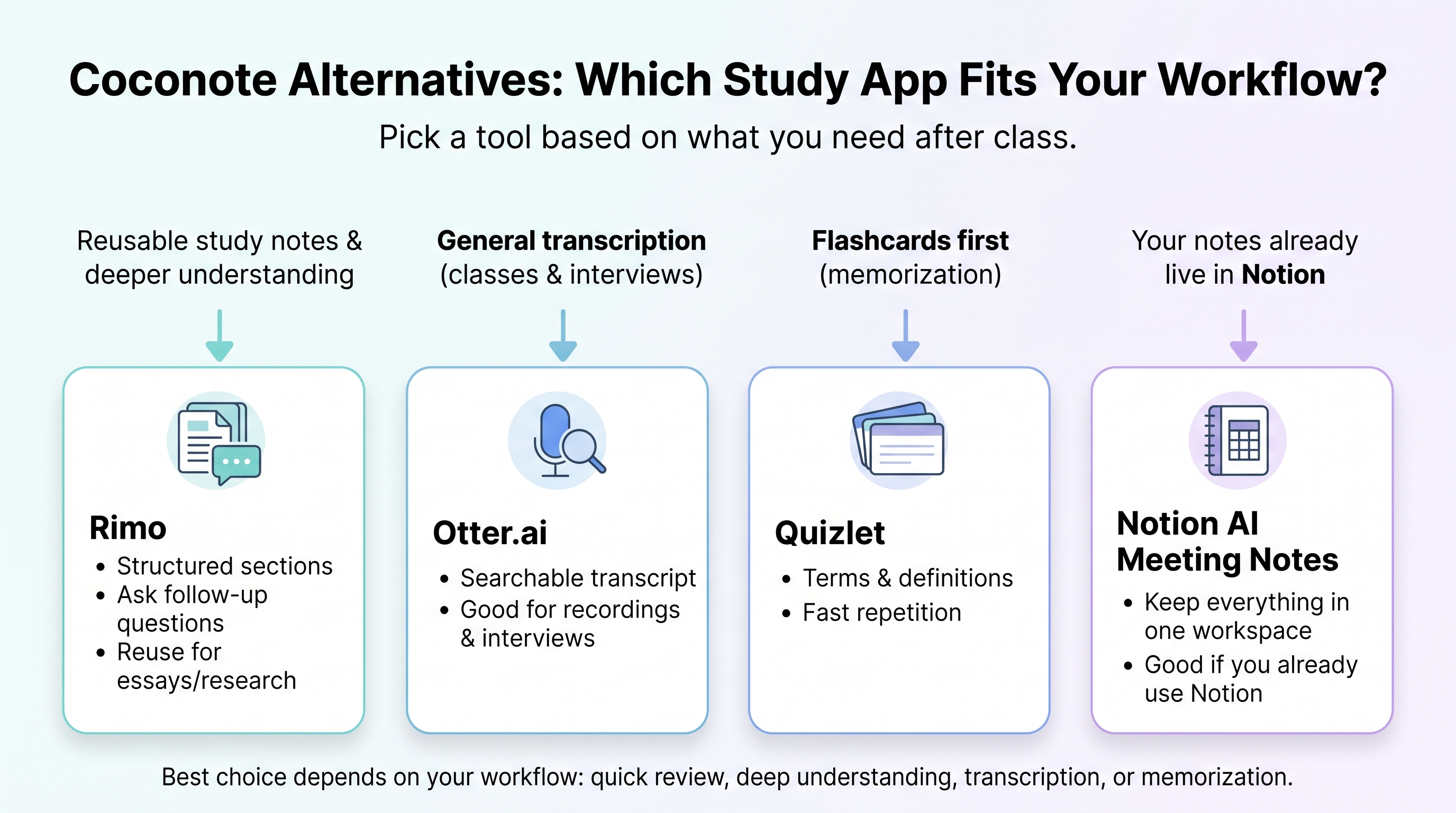
Coconote is not the only study app students may consider. The best choice depends on what you want to do after class.
If your main goal is to quickly review lecture content with notes, flashcards, and quizzes, Coconote may be a strong fit. If you want to ask questions about a recording, turn lecture content into an outline, or reuse it for a report or presentation, you may want to compare it with other tools.
Here are a few alternatives to consider.
If You Want to Turn Lectures into Reusable Study Notes: Rimo
Rimo may be a better fit if you want lecture recordings to become structured notes that you can reuse.
For example, after a sociology lecture, you may not only want a summary. You may want to ask what the key argument was, turn the lecture into a study guide, or create an essay outline from the professor’s explanation.
That is where Rimo is worth considering. Coconote is useful when you want quick review materials. Rimo is more useful when you want to work with the lecture after recording it.
If You Want General Transcription for Classes and Interviews: Otter.ai
Otter.ai is a better fit if your main goal is transcription.
Students may use Otter.ai to record a guest lecture, transcribe an interview for a research project, or search a group discussion later. It is useful when the main thing you need is a searchable record of what was said.
However, if you want flashcards, quizzes, and study materials created from lecture content, Coconote may feel more student-focused.
In short, Otter.ai may be a good option for students who mainly want to keep a searchable record of what was said in a class, interview, or discussion.
If You Want Flashcards First: Quizlet
Quizlet is a strong option if your main goal is memorization.
If you are studying vocabulary, medical terms, historical dates, formulas, or definitions, Quizlet may be the simpler choice. You can focus on flashcards first instead of starting with a lecture recording.
Coconote is different because it starts from class content. It is useful when you want to record or upload material and then create notes, flashcards, and quizzes from it. Quizlet is more direct when you already know exactly what you need to memorize.
If Your Notes Already Live in Notion: Notion AI Meeting Notes
Notion AI Meeting Notes may be useful if your study system already lives inside Notion.
For example, if you keep class pages, reading lists, assignment deadlines, and project notes in Notion, it can be convenient to keep your lecture notes there too. This works well for students who like building a full study workspace.
However, Notion is not always the simplest choice if you only want lecture recordings to become flashcards and quizzes. In that case, Coconote may feel faster and more focused.
Final Verdict: Is Coconote Worth It in 2026?
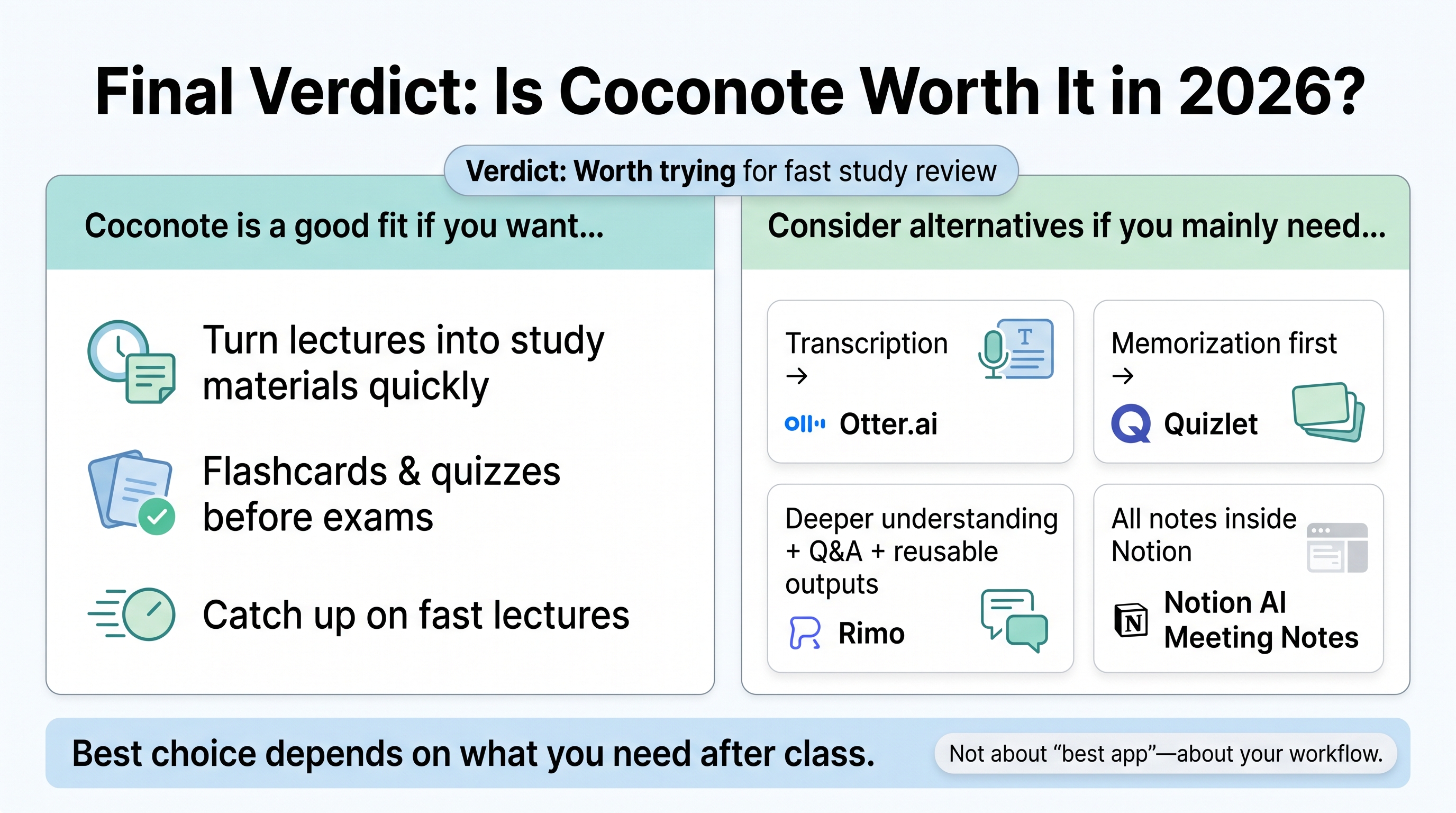
Coconote is worth trying if you want to turn lectures into study materials quickly.
It is especially useful for students who record classes, struggle to keep up with fast lectures, or want flashcards and quizzes before exams. If your main problem is that your lecture recordings never become review notes, Coconote may help.
However, Coconote is not the only option. If you mainly want transcription, Otter.ai may be enough. If you want memorization first, Quizlet may be simpler. If you want to turn lecture content into structured notes, questions, study guides, or essay outlines, Rimo may be a better fit.
The best choice depends on what you need after class.
If you mainly want to review lectures faster, Coconote may be a good fit.
If you want to ask questions about lectures, organize the content, or turn recordings into study guides or other materials, Rimo may also be worth considering.
If your main focus is memorization, Quizlet may be a better fit.
If you mainly need transcription, Otter.ai may be enough.
If your notes, assignments, and reading lists already live in Notion, Notion AI Meeting Notes may also be useful.
FAQ About Coconote
Below are short answers to common questions about Coconote.
What is Coconote?
Coconote is an AI study app that turns lecture recordings, PDFs, and study materials into notes, flashcards, quizzes, and review content. It is designed mainly for students who want to review class content more easily after a lecture.
How to use Coconote?
Coconote works by recording or uploading class content, then using AI to generate notes and study materials. A typical workflow is: record or upload, generate AI notes, review key points, then study with flashcards or quizzes.
Is Coconote free, how much is Coconote?
Coconote can be started for free, but it also includes in-app purchases. The exact price and limits may change, so students should check the latest pricing in the app or official listing before subscribing.
At the time of writing, Coconote is free to download, but some features and higher usage limits may require a paid plan. Public listings show in-app purchases ranging from around $9.99 to $189.99, depending on the plan and billing period.
In our test, lecture recording and basic review features were easier to try first. However, PDF and document upload required a paid plan. Students who only want to test Coconote with lecture recordings may be able to start for free, while students who want to upload PDFs, slides, or handouts should check whether an upgrade is needed.
Can Coconote Turn PDFs into Brainrot-Style Study Content?
In a broad sense, yes. Coconote can help turn lecture recordings, PDFs, and study materials into more interactive review content, such as flashcards and quizzes.
This is close to what some students may mean by “brainrot-style” study content: taking a boring or difficult material and turning it into something easier to start reviewing.
For example, instead of reading a PDF from the beginning, students can use Coconote to generate notes, quiz questions, or flashcards from the material. This can lower the barrier to studying, especially when the original document feels too long or hard to approach.
However, students should be careful. Brainrot-style study content can be useful as a first step, but it should not replace the original PDF, lecture material, or textbook. For exam preparation, essays, or research assignments, students still need to check the source material and make sure they understand the topic accurately.
In short, Coconote can make boring study materials easier to enter, but it may not replace deeper reading or serious study.
How to cancel Coconote subscription?
The cancellation process depends on where you subscribed. If you subscribed through the App Store, manage the subscription from your Apple account. If you subscribed through Google Play, manage it from your Google Play subscriptions. If you subscribed on the web, check the billing or account settings inside Coconote.
Deleting the app usually does not cancel a subscription.
Is Coconote app safe?
Coconote can be useful, but safety depends on both the app and how you use it. Lecture recordings may include a professor’s voice, other students’ comments, class materials, or personal information.
Before recording, check your school’s rules and ask for permission when needed. You should also review Coconote’s privacy policy and data settings, especially if you upload sensitive class materials.
What are apps like Coconote?
Apps like Coconote include Rimo, Otter.ai, Quizlet, and Notion AI Meeting Notes.
Rimo may be worth considering if you want to turn lecture recordings into structured notes or reusable study outputs. Otter.ai may be a good fit if your main need is transcription. Quizlet may work better if flashcards and memorization are your priority. Notion AI Meeting Notes may be useful if your study system already lives in Notion.
The best option depends on what you want to do after class, so students should compare these tools based on their own lecture style, review habits, and budget.
Related articles
Return to List